Miscellaneous Documentation




Tactus environment variables
The following environment variables can be used to control various behaviour.
TACTUS_LOGLEVEL sets the logger log level. Select e.g. between info and debug. For more options see the loguru documentation.
TACTUS_HOST allows to override the automatic detection of host. The host is used to pick up specific configuration settings. See e.g.
tactus show hostTACTUS_CONFIG_DATA_DIR sets additional search paths for config files. This is useful when using tactus as a package. To see paths in use run
tactus show paths.
Local installations
In the following we have gathered instructions for all known platforms. If a platform is missing please add instructions.
Adding a new host
In the following we have gathered instructions for all known platforms. In the standard case a host/platform can be recognized either through the host name or by identifying a specific environment variable. This is configured in tactus/data/config_files/known_hosts.yml. In the example below we see how atos_bologna and lumi are regonized via a hostname regular expression whereas freja is recognized from a specific environment variable. A hostname can also be forced by setting the TACTUS_HOST environment variable which overrides all settings in the known_hosts.yml file.
atos_bologna :
  hostname : "ac\\d-\\d\\d\\d"
lumi :
  hostname : "uan\\d\\d"
freja:
  env:
   SNIC_RESOURCE: "freja"
Any new host should be added in the same way and the names for the configuration files for platform, scheduler and submission should be named using the given hostname.
Setup ecflow
The ecflow server setup is defined in tactus/data/config_files/include/scheduler/ecflow_@HOST@.toml. For your local installation you might add the proper configurations, e.g. ecflow_freja.toml:
[scheduler.ecfvars]
  ecf_files = "/nobackup/smhid20/users/@USER@/tactus_ecflow/ecf_files"
  ecf_files_remotely = "/nobackup/smhid20/users/@USER@/tactus_ecflow/ecf_files"
  ecf_home = "/nobackup/smhid20/users/@USER@/tactus_ecflow/jobout"
  ecf_host = "le1"
  ecf_jobout = "/nobackup/smhid20/users/@USER@/tactus_ecflow/jobout"
  ecf_out = "/nobackup/smhid20/users/@USER@/tactus_ecflow/jobout"
  ecf_port = "_set_port_from_user(10000)"
  ecf_ssl = "0"
  hpc = "freja"
Note there are two functions available for the detection of ecf_port and ecf_host that might help to detect correct values for these two variables. _set_port_from_user() sets a user-id related ecf_port while _select_host_from_list() finds the active ecf_host from a list of possible hostnames (used in ecflow_atos_bologna.toml). Both functions are defined in tactus/scheduler.py
linda
Linda is the SMHI RedHat linux environment. In the following it’s described how to install tactus to run the simple test suite with ecflow.
Fetch and install the micromamba environment, and tactus
"${SHELL}" <(curl -L micro.mamba.pm/install.sh)
micromamba self-update
micromamba create -n tactus_3.10 python=3.10 ecflow poetry
micromamba activate tactus_3.10
git clone git@github.com:ACCORD-NWP/tactus.git
cd tactus
poetry install
Platform dependent config files
Rules for archiving: tactus/data/config_files/include/archiving/linda.toml
Platform dependent paths: tactus/data/config_files/include/platform_paths/linda.toml
Ecflow settings: tactus/data/config_files/include/scheduler/ecflow_linda.toml
Job submission rules: tactus/data/config_files/include/submission/linda.toml. Here all jobs are running in the background.
We also have to make sure the host is recognized by adding a rule in tactus/config/known_host.yaml
freja
Freja is the SMHI research cluster operated by NSC. For more details see https://nsc.liu.se/systems/freja
Installing under mamba
Get the code
git clone git@github.com:ACCORD-NWP/tactus.git
cd tactus
Create a conda environment and install ecflow, gdal and poetry.
$ module purge
$ module load Mambaforge/23.3.1-1-hpc1
$ mamba create -p .conda ecflow gdal=3.5.0 poetry python=3.10.4
...
$ mamba activate .conda/
Install tactus and all it’s dependencies
(tactus-py3.10) $ poetry install
Now we’re ready to go!
tactus-py3.10) $ tactus --version
2024-05-20 13:00:19 | INFO     | Start tactus v0.5.0 --> "tactus --version"
tactus v0.5.0
mamba deactivate
To load your new environment do
$ cd tactus
$ mamba activate .conda/
Note that for the time being ( until the mamba/poetry usage is better understood ) it’s recommended to make this procedure, with a new mamba name, for each new tactus clone.
Belenos
Belenos is the Météo-France computing cluster for research. On this platform, the tactus can be installed using Micromamba.
Installing under micromamba
Get the code
git clone git@github.com:ACCORD-NWP/tactus.git
cd tactus
Create a micromamba environment and install python, ecflow and gdal.
"${SHELL}" <(curl -L micro.mamba.pm/install.sh)
source ~/.bashrc
micromamba self-update
micromamba create -y -p ${HOME}/micromamba-wf conda python=3.10.* gdal=3.6.2 ecflow
Install tactus and all its dependencies.
cd tactus/tactus/
source $HOME/micromamba-wf/bin/activate
pip install -e . --no-cache --prefer-binary
Then we have a setup:
(base) [coutandn@belenoslogin1 ~]$ tactus --version
2026-03-03 14:15:47 | INFO     | Start tactus v0.24.0 --> "tactus --version"
tactus v0.24.0
Ecflow server
The ecflow server can run on any login node belenosloginN, where N ranges from 0 to 3. The port number is computed by _set_port_from_user, which adds the user’s UID to an offset (default=0).
Edit the configuration file : tactus/data/config_files/include/scheduler/ecflow_belenos.toml and set ecf_host to the name of your server.
[scheduler]

[scheduler.ecfvars]
  case_prefix = ""
  ecf_tactus_home = "@TACTUS_HOME@"
  ecf_files = "@HOME@/tactus_ecflow/ecf_files"
  ecf_files_remotely = "@HOME@/tactus_ecflow/ecf_files"
  ecf_home = "@HOME@/tactus_ecflow/jobout"
  ecf_host = "belenoslogin0.belenoshpc.meteo.fr"
  ecf_jobout = "@HOME@/tactus_ecflow/jobout"
  ecf_out = "@HOME@/tactus_ecflow/jobout"
  ecf_port = "_set_port_from_user('0',)"
  ecf_ssl = "0"

[scheduler.ecfvars.troika]
  config_file = "@ECF_TACTUS_HOME@/data/config_files/troika.yml"
Running a Compilation
Tactus exposes a dedicated compile subcommand that builds a configuration aimed at compiling IAL and starts (optionally) the compilation suite.
Quick start
tactus compile --ial-tag develop
This will:
Build a config from
config.toml+ host-specific overrides +compile_suite.tomlSet the compile task’s IAL git version to
developGenerate a compilation case (named from
submission.ial_version, see callout below)Start the compilation suite (
CompilationSuiteDefinition) because-d(equivalent to--dry-run) is not passed as an argument
To run the compilation as a part of a run amend the compile_@HOST@.toml to your case command. E.g. on ECMWF ATOS it may look like
tactus case ?tactus/data/config_files/configurations/cy50t2_arome tactus/data/config_files/configurations/modifications/compile_atos_bologna.toml [...]
What the command does
The compile subcommand is a specialization of tactus case. It:
Sets
ial.compile.ial_git_versionfrom--ial-tag(default:develop)Sets
ial.compile.ial_git_repofrom--ial-repo, when providedAlways merges the following modification files on top of the user-supplied config:
tactus/data/config_files/modifications/@HOST@.tomltactus/data/config_files/modifications/compile_suite.toml
Forwards everything else (output path, start-suite flag, keep-def-file, expand-config) to
tactus case
Required configuration
For the compilation suite to run end-to-end, the following keys are read by the task classes documented below:
Key |
Used by |
Notes |
|---|---|---|
|
|
Required if cloning IAL |
|
|
Branch/tag/commit hash to check out; intended to be set via |
|
|
Optional; enables HTTPS token auth |
|
|
Local IAL checkout path |
|
|
Passed to |
|
|
ECBundle YAML |
|
|
Bundle working directory |
|
|
Whether to install into the shared |
|
|
Names the shared install location — see callout under |
|
|
Build architecture |
|
|
Compiler used to build IAL ( |
See the sections below for the full configuration surface of each task.
Bundle Compilation Tasks
This module provides three compilation-related task classes:
IALClone— clones the IAL (IFS/Arpege Library) Git repositoryTactusBundleCreate— creates or updates an ECBundle source bundleTactusBundleBuild— builds the bundle and optionally installs it into a shared, versioned location
These tasks are designed to work within the Tactus framework and use ecbundle for source management and compilation orchestration.
Overview
The workflow is typically:
Clone IAL repository (optional)
Fetch IAL sources from a Git repository onto a local directory
Check out the configured git version/branch/commit
Create/update the bundle
Clone/update repositories defined in a bundle YAML
Optionally merge in local bundle overrides
Build the bundle
Configure and compile all sources
Install binaries either locally (per-experiment) or into a shared, versioned install tree
Tasks
IALClone
Clones the IAL Git repository into a local directory and checks out the configured version.
Purpose
Clones the IAL source repository
Checks out the configured version/branch/commit
Skips cloning if the target directory already exists
Configuration Keys
Key |
Description |
|---|---|
|
URL of the IAL Git repository (supports |
|
Branch/tag/commit checked out after cloning |
|
Git token substituted into |
|
Local destination directory for the IAL clone |
Token Substitution
If the repository URL contains the placeholder [TOKEN], it is replaced with the value of compile.git_token before cloning. This allows the token to be embedded into HTTPS Git URLs, e.g.:
https://[TOKEN]@github.com/ecmwf/ial.git
becomes:
https://<actual-token>@github.com/ecmwf/ial.git
Behavior
If
compile.ial_diralready exists: the clone step is skipped and an info message is logged.Otherwise the task clones the repository:
git clone <ial_git_repo> <ial_dir>
In either case, the task then always runs a checkout of the configured version:
cd <ial_dir>; git checkout <ial_git_version>
The checkout runs unconditionally, even when the directory already existed from a previous run, so it also serves to move an existing checkout onto a newly requested
compile.ial_git_version.
TactusBundleCreate
Creates or updates an ECBundle source tree.
Purpose
Reads the configured bundle YAML
Optionally merges in an update bundle YAML (for local IAL overrides or other customizations)
Executes:
ecbundle create
Configuration Keys
Key |
Description |
|---|---|
|
Directory where bundle sources are created (defaults to |
|
Directory where arch files can be found; passed to |
|
Optional GitHub token |
|
ECBundle YAML file (defaults to |
|
If |
|
YAML file used to override/extend the base bundle when |
|
Optional local IAL source override (exported as |
Bundle Update Mechanism
When compile.bundle_update is enabled, the task:
Loads the original bundle YAML
Loads the update bundle YAML
Merges them via
merge_dicts(..., overwrite=True, remove_none=True):overwrite=True— values in the update file override values in the originalremove_none=True— keys explicitly set toNonein the update file are removed from the merged result
Writes the merged result to:
@CASEDIR@/bundle-local-ial.yaml
YAML formatting is preserved using ruamel.yaml with:
preserve_quotes = Trueindentation: mapping=4, sequence=4, offset=2
line width: 4096
Example transformation:
Before (original)
ial-source:
  git: github.com/ecmwf/ial.git
  version: 1.2.0
Update YAML
ial-source:
  git: ~
  version: ~
  dir: /path/to/local/ial
After (merged)
ial-source:
  dir: /path/to/local/ial
IAL_DIR Environment Variable
Before invoking ecbundle, the task exports:
IAL_DIR=<substituted compile.ial_dir>
This allows the bundle YAML to reference ${IAL_DIR} for local IAL source overrides.
Git Authentication
SSH Mode (default)
If no Git token is provided:
os.environ["GITHUB"] = "git@github.com:"
Repositories are cloned using SSH access.
Token Mode
If compile.git_token is set:
--github-token <TOKEN>
is passed to ecbundle.
[!WARNING] Updating the remote repository while keeping the same branch/version may fail if the local branch is already tracking a different remote.
Example error:
+ git remote add eeec494cba20d4c7ae560cc38b7a8b14 git@github.com:/uandrae/IAL
ERROR: Branch feature/toolchain-flags was already tracking origin/feature/toolchain-flags. Manual intervention needed.
ERROR: Could not download or update ial-source ...
This happens because Git refuses to change the upstream tracking configuration automatically when the branch already tracks another remote.
In this case, remove the existing source directory or manually reconfigure the branch tracking before rerunning the bundle creation step.
Generated Command
cd <compile_dir>; ecbundle create [--github-token <TOKEN>] --bundle <bundle_file> --update --arch-dir <arch_dir>
TactusBundleBuild
Builds an ECBundle source tree, either as a local per-experiment install or into a shared, versioned install tree.
Purpose
Builds source repositories produced by
TactusBundleCreateSupports multiple architectures and compilers
Supports precision selection (
prec/R32)Supports Ninja builds
Supports clean rebuilds
Optionally installs into a shared
@INSTALL_DIR@tree with alatestpointer, instead of a purely local per-experiment installBacks up the resolved
bundle.ymlnext to the build output
Configuration Keys
Key |
Description |
|---|---|
|
Bundle source directory (output of |
|
Install into the shared |
|
Names the shared install location when |
|
Enable Ninja builds (defaults to |
|
Skip build if install already exists (defaults to |
|
Clean build directory before compiling (defaults to |
|
Build architecture configuration (defaults to |
|
Compiler used to build IAL: |
|
Precision selector: |
Precision Modes
Precision |
Effect |
|---|---|
|
Default double-precision build |
|
Adds |
Install Modes
TactusBundleBuild supports two install layouts, controlled by compile.install:
Local install (
compile.install = false, the default): binaries are built straight into@CASEDIR@/install/<precision>. Nothing outside the case directory is touched.Shared install (
compile.install = true): binaries are installed into a shared, version-named tree under@INSTALL_DIR@, and the local@CASEDIR@/install/<precision>becomes a symlink pointing at that shared location. This lets multiple experiments/cases reuse the same compiled binaries for a given install version (see the callout above regarding which key actually supplies that version name).
Install Subpath
get_install_subpath() computes an additional path segment appended to the shared install root, so that different architecture/compiler combinations under the same bundle don’t collide:
It resolves
<compile.dir>/source/arch/<submission.arch>— following it as a symlink if it is one.It looks for
submission.compileramong the components of the resolved path.If found, everything after that component is returned as the subpath.
If
submission.compilerdoes not appear anywhere in the resolved arch path, the method returnsNone— which will produce an invalid install path, sosubmission.compilermust correspond to an actual segment of the resolvedsubmission.archpath (e.g.submission.archdefaults to@COMPILER@/default, which already embeds the compiler name).
Build Directories
The builder creates:
build/<precision>
under @CASEDIR@, regardless of install mode. The install directory (exp_bindir) depends on compile.install:
@CASEDIR@/install/<precision>                                                       # local install
@INSTALL_DIR@/<compile.ial_version>/<precision>/<compiler>/<install_subpath>        # shared install
Bundle Backup
Before building, the task attempts to copy:
<bundle_dir>/source/bundle.yml
to @CASEDIR@/bundle.yml. This preserves a snapshot of what was actually built. If the source file is missing, the failure is logged and execution continues.
Pre-build Cleanup
If the build is not being skipped, any existing content at @CASEDIR@/install/<precision> is removed before building: it is unlinked if it’s a symlink, or fully removed with shutil.rmtree if it’s a real directory. This runs regardless of install mode, and prevents a fresh build from silently mixing with a stale local install or a stale symlink from a previous run.
Build Command
The build now actually runs (the invocation is no longer commented out). The command assembled and executed is:
cd <bundle_dir>; ecbundle build \
  --arch <arch> \
  [--ninja] \
  --forecast-only \
  [--clean] \
  [--without-double-precision] \
  --install-dir=<install_dir> \
  --install \
  --build-dir=<build_dir>
Optional flags:
Option |
Trigger |
|---|---|
|
|
|
|
|
|
Skip Build Logic
If:
compile.skip_build == True
and:
<install_dir>/bin/MASTERODB
exists, the build step is skipped. The shared-install symlink bookkeeping (when compile.install is enabled) still runs regardless of skip_build, so the local install path is kept pointing at the right shared location.
Notes
This build path targets
ecbundle==2.5.0(pinned inpyproject.toml)All compilation-related configuration lives under the flat
[compile]section again — the nested[ial]/[ial.compile]schema explored at one point has been reverted; update any config files or macro references usingial.*keys back tocompile.*@COMPILER@is sourced fromsubmission.compiler, and@ARCH@fromsubmission.arch— architecture/compiler selection now lives entirely undersubmission.*, separate from thecompile.*git/build-process settings@IAL_GIT_TAG@(macro, sourced fromcompile.ial_git_version) is the git branch/tag/commit being compiled;@IAL_VERSION@(sourced fromsubmission.ial_version) is the installed-binaries version name used elsewhere (e.g. in submissionbindirdefaults) — these are intentionally allowed to differ, sincesubmission.ial_versioncan be"latest"with no corresponding git ref; see the known issues above for where this separation isn’t fully connected yetHost-specific overrides (e.g.
modifications/compile_atos_bologna.toml) can setsubmission.bindir, a task-specificMASTERODBbindir override, andcompile.arch_dirfor a given platformThe
ecbundlebinary is resolved as<python-bin-dir>/ecbundle, i.e. it must be installed in the same environment as TactusIAL_DIRis always exported fromcompile.ial_dir, regardless of whetherbundle_updateis enabled, so bundle YAMLs can rely on it being set
Handling of binaries
Describes the handling of binaries in tactus.
Compilation and external sources
Binaries can be compiled in tactus using CMake.
How to specify binaries
There are several ways to specify which binary to be used. The standard way is to set bindir in the system config section. This assumes all required binaries are in the given directory and with the names used in the task. If, for whatever reason, a specific task should pick binaries from another directory, or with another name we can define location and/or name on task level by introducing a new section in the config file like:
[submission.task_exceptions.Forecast]
 bindir = "SOME_NEW_PATH"
 binary = "SOME_NEW_NAME"
If a specific task should pick more then one binary from different directories, we can define it like this:
[submission.task_exceptions.TASK_NAME.binaries]
 NAME_OF_BINARY = { "binary" = "somename" , "bindir" = "somewhere" }
 NAME_OF_BINARY1= { "binary" = "somename" , "bindir" = "somewhere" }
where NAME_OF_BINARY is the argument of the function get_binary() used in the code. For e.g. the mars client it’s sometimes advisable to run with -n ( as in next version ). This then achieved by ( example from lumi )
[submission.task_exceptions.Marsprep.binaries]
 mars = { "binary" = "mars -n" , "bindir" = "/appl/local/destine/bin" }
Computational parameters in config file
The default config.toml file, parameters in the submission groups refer to a coarse-resolution run in a small domain and a short lead time.
When running at higher resolution on real-sized domains, it is suggested to take care of and adjust the following parameters:
WALLTIME: maximum wallclock time allowed by task. It can be raised in
[submission.task_exceptions.{e927,Forecast,Pgd,Prep}.BATCH]. Raising it is suggested especially during climate generation, e.g., in[submission.task_exceptions.Pgd.BATCH].NPROC: number of compute processes (can be also adjusted within
[submission.task_exceptions.{e927,Forecast,Pgd,Prep}]).NPROC_IO: number of compute processes used for the IO server (forecast runs only).
NODES: number of compute nodes.
NTASKS: number of MPI tasks. The total number of tasks defined for the forecast should be equal to NPROC + NPROC_IO.
Submission files for large domains can be found under include/submission folder and can be used directly or give guidance.
The parameter values encoding instructions in the BATCH groups are specific to the SLURM scheduler.
Available tasks
Preparations
tactus.tasks.cleaning_tasks.PrepRunprepares the run by storing the used (and expanded) config file and by removing old ecflow output and job files.
Preparation of static files
This section contains tasks that are done only once during a model run. In case the static files already exists the tasks can be deactivated in the suite setting config.suite_control.create_static_data to False. The location of the background input data used is defined in config.platform and the resulting output files are stored in a directory defined by config.system.climdir.
Surfex
tactus.tasks.toposoil.Topographyprepares topograhpic data from input data.tactus.tasks.toposoil.Soilprepares soil data input for PGD using SOILGRID.tactus.tasks.sfx.Pgdruns PGD using ECOCLIMAP SG for either a single 10 day period or the full year. Checkconfig.pgdfor PGD configuration options and usetactus show namelist [--config-file your_config.toml] -t surfex -n pgdto print the used namelist.tactus.tasks.e923.PgdUpdateupdates the topography in the Const.Clim.sfx file with the one filtered/truncated in E923Constant.tactus.tasks.creategrib.CreateGribStaticconverts static FA files to GRIB files.
E923
These task handles the generation of the non-SURFEX related static data required by the model. Type tactus show namelist -t master -n show to show the available namelists used in e923.
tactus.tasks.e923.E923Constantgenerates the constant part of the e923 files.tactus.tasks.e923.E923Monthlygenerates the monthly part of the e923 files.tactus.tasks.e923_update.E923Update: In case of CSC=ALARO selected physiography fields are taken from the initial surfex files and written back to the e923 used. This is only performed once. Read more about the task here.
Input data
tactus.tasks.marsprep.Marsprepextracts IFS data from MARS if the expected data is not found on disk. The location of the data on disk is by default outside of a specific case so the input data can easily be reused for several runs. Implemented data sources are described in config.marstactus.tasks.sfx.Prepcreates the initial state file for SURFEX using PREP. Input data can be either IFS or AROME/HARMONIE-AROME data. The namelist used for Prep can be generated bytactus show namelist [--config-file your_config.toml] -t surfex -n preptactus.tasks.c903.C903creates an initial atmospheric state and boundary files from a global ECMWF file. Usetactus show namelist [--config-file your_config.toml] -t master -n c903_[main|domain]to see the two namelists required.tactus.tasks.e927.E927creates an initial atmospheric state and boundary files from a AROME/HARMONIE-AROME file. Usetactus show namelist [--config-file your_config.toml] -t master -n e927to see the namelist used.tactus.tasks.interpolsstsic.InterpolSstSicinterpolate SST/SIC from the host model to the model geometry with gl.
Forecasting
tactus.tasks.forecast.Forecastruns the forecast for any of the three CSCs. Namelists can be extracted withtactus show namelist [--config-file your_config.yoml] -t master -n forecastfor the upper air namelist and with-t surfex -n forecastfor the surfex part.
Postprocessing
tactus.tasks.creategrib.CreateGribconverts FA files to GRIB files.tactus.tasks.sqlite.ExtractSQLiteextracts data for point verification with harp. Options defined in config.extractsqlite and in the parameter lists undertactus/data/sqlitetactus.tasks.sqlite.MergeSQLitesMerge multiple sqlite files into a single sqlite file in the cases of an ensemble. Options defined in config.extractsqlite. The task is only active in case of more than 1 ensemble member and if the suite control settingconfig.suite_control.do_mergesqliteisTrue.
Archiving
All non temporary files produced by the tactus are stored in a directory defined by config.system.archive usually defined as SOME_PATH/YOUR_EXP/archive/YYYY/MM/DD/HH. Depending on your system these file may be left there for further usage or sent to a more permanent storage. Currently support is implemented or on the way to be implemented for the following
ecfs: Archiving on ECMWF ECFS tape system, either under
ecorectmp.fdb: Archiving in FDB for further internal usage or for propagation to the data bridge (in case of operataions). This is still under development.
scp: Send files to an arbitrary remote host using scp. The location and access details are configured under
config.archiving.scp.
For archiving we have the following two tasks
tactus.tasks.archive.ArchiveStaticarchives the output from the Pgd and E923 tasks. Configured underconfig.archiving.ecfs.static.tactus.tasks.archive.ArchiveHourarchives output from each cycle. Configured underconfig.archiving.ecfs.tactus.tasks.archive.ArchiveMergedSQLitesarchives merged sqlite files. Configured underconfig.archiving.merged_sqlite.ecfs. The task is only active in case of more than 1 ensemble member and if the suite control settingconfig.suite_control.do_mergesqliteisTrue.
Cleaning
These tasks takes care of temporary files and directories or files that has been archived as described above. The rules for the cleaning tasks described below are defined in config.cleaning.TASK. Read more about the cleaning here.
tactus.tasks.cleaning_tasks.CycleCleaningruns after each cycle and removes old directories and files with some delay as defined in the configuration.tactus.tasks.cleaning_tasks.PostMortemruns at the very end of the suite and could potentially remove all obsolete ecflow output files.
Configure cases
The case setup
Tactus is designed to be highly configurable and driven from a single config file. The tactus case functionality offers a way to reduce the number of lengthy config files by building the final config file from smaller sections of configuration settings. A number of pre-defined configurations are available under tactus/data/config_files/configurations
Example usage would be:
tactus case ?tactus/data/config_files/configurations/cy49t2_alaro -o test.toml
where ? is a file includer operator where all the arguments are defined line by line. I.e. tactus/data/config_files/configurations/cy49t2_alaro contains a list of arguments to be evaluated. In this case we have
--config-file
tactus/data/config_files/config.toml
tactus/data/config_files/modifications/csc/alaro.toml
tactus/data/config_files/include/vertical_levels/MF_87.toml
tactus/data/config_files/modifications/cycle/CY49t2.toml
tactus/data/config_files/modifications/@HOST@.toml
When the first config file, config.toml, has been read the appropriate files for the current host is included for scheduler platformand submission.
The following configuration files will be read and added in order of appearence. If we check the various files we find that e.g. alaro.toml only contains the bare minimum changes on top of the default configuration file required to run the ALARO CSC.
The processed configuration output file, here test.toml, is self contained from a config point of view. All configuration settings (also defaults from json schema) are in the generated configuration file.
The produced config file, test.toml is now used to start a run the usual way.
tactus start suite --config-file test.toml
We can also do everything in one by adding the --start-suite flag
tactus case ?tactus/data/config_files/configurations/cy49t2_alaro -o test.toml --start-suite
To see all commands available for the case functionality run tactus case --help.
Time handling
A typical use case is to run the same configuration for a number of dates or a longer period. The example above could easily be modified to run for any arbitrary date by running
tactus case ?tactus/data/config_files/configurations/cy49t2_alaro time.toml -o test.toml
where time.toml contains
[general.times]
  end = "YYYY-MM-DD:HH:mm:ssZ"
  start = "YYYY-MM-DD:HH:mm:ssZ"
or any additional extra information.
Compiling IAL via the compile command
In addition to tactus case and tactus start suite, Tactus provides a dedicated tactus compile command that builds a configuration tailored for compiling the IAL (IFS/Arpege Library) sources. It is a thin wrapper around tactus case that:
forces inclusion of the host-specific modifications (
@HOST@.toml)forces inclusion of the compilation suite modifications (
compile_suite.toml)injects the requested IAL Git tag/branch into
compile.ial_git_branchuses the
CompilationSuiteDefinitionsuite
Basic usage
tactus compile --ial-tag develop
produces and launches case named IAL_develop_compile.
compile_suite.toml defines the case name as:
[general]
  case = "IAL_@IAL_TAG@_compile"
The @IAL_TAG@ macro is resolved from compile.ial_git_branch (see tactus/data/config_files/include/macros.toml), which is set from the --ial-tag argument.
EPS Configuration by design
Tactus treats every run as an ensemble run. A deterministic run is thus just a special case of an ensemble with only one member. Furthermore, an ensemble in tactus is not limited to consist of a control member and a number of perturbed members. Instead, think of it as an ensemble of configurations, where each member “perturb” the default configuration. One can e.g. think of running an ensemble of
a set of different model configurations (e.g. different physics options, different initial conditions, different boundary conditions, etc.)
a set of different CSCs
a set of different domains
a set of different domain resolutions and extends
a set of different time settings
etc.
Basically any configuration setting can be “perturbed”, i.e. configured differently for each member, so it’s up to your imagination how to use the ensemble design to your needs.
Running a minimal ensemble
To get hands-on running an ensemble, tactus ships with a bunch of example eps include files. To enable one of them, one has to include the file in the configuration or on the commandline. The example eps include files are available in the
tactus/data/config_files/include/eps/ directory.
E.g. to run a 1 control + 2 perturbed members (using IFSENS boundary data) ensemble, one can use the tactus/data/config_files/include/eps/eps_3members_IFSENS_common_mars_prep and do
tactus case --config-file tactus/data/config_files/config.toml tactus/data/config_files/include/eps/eps_3members_IFSENS_common_mars_prep.toml --start-suite
or include the following in the configuration file
--config-file
tactus/data/config_files/config.toml
tactus/data/config_files/include/eps/eps_3members_IFSENS_common_mars_prep.toml
and do
tactus case --config-file <path_to_config_file> --start-suite
The eps_3members_IFSENS_common_mars_prep.toml file contains the following settings:
[general.times]
  start = "-P1D"

[boundaries.ifs]
  selection = "IFSENS"

[eps.general]
  members = "0:3"

[eps.member_settings.boundaries.ifs]
  bdmember = [0, 1, 2]
Translated into words, including this file in the main config file will make the tactus case command produce a config file with three members:
[general.times]
  start = "-P1D"

[eps.general]
  members = [0, 1, 2]

[eps.member_settings.system]
  # This section comes from the default eps include file tactus/data/config_files/include/eps/eps_default.toml
  wrk = "@CASEDIR@/@YYYY@@MM@@DD@_@HH@@mm@/@MEMBER_STR@"

[eps.member_settings.boundaries.ifs]
  bdmember = [0, 1, 2]

[eps.members]

[eps.members.0.boundaries.ifs]
  bdmember = 0

[eps.members.1.boundaries.ifs]
  bdmember = 1

[eps.members.2.boundaries.ifs]
  bdmember = 2
NOTE:: The general.times.start setting is set to “-P1D” by default, to make the example able to run out-of-the-box, since IFSENS data is only available in mars for the past two weeks.
The three members (0, 1, and 2) will use the lateral boundary data from corresponding IFSENS member. Note, that member 0 of the IFSENS is the control member, so the EPS member 0 will use the control member data. This is a quite bare bones example, since they only differs in what boundary data they use.
Adjusting which member uses which IFSENS member data
Let’s instead say, that you wanted the member 2 to use the IFSENS member 0 boundary data, i.e. the control member data, and member 0 and 1 to use the IFSENS member 1 and 2 boundary cata, respectively. You can do this by setting eps.member_settings.boundaries.ifs = [1, 2, 0], e.g.
[general.times]
  start = "-P1D"

[boundaries.ifs]
  selection = "IFSENS"

[eps.general]
  members = "0:3"

[eps.member_settings.boundaries.ifs]
  bdmember = [1, 2, 0]
Running the tactus case command will result in a config file with the following [eps] section:
[general.times]
  start = "-P1D"

[eps.general]
  members = [0, 1, 2]

[eps.member_settings.system]
  # This section comes from the default eps include file tactus/data/config_files/include/eps/eps_default.toml
  wrk = "@CASEDIR@/@YYYY@@MM@@DD@_@HH@@mm@/@MEMBER_STR@"

[eps.member_settings.boundaries.ifs]
  bdmember = [1, 2, 0]

[eps.members]

[eps.members.0]
  bdmember = 1

[eps.members.1]
  bdmember = 2

[eps.members.2]
  bdmember = 0
NOTE:: The general.times.start setting is set to “-P1D” by default, to make the example able to run out-of-the-box, since IFSENS data is only available in mars for the past two weeks.
Common or member specific mars data retrieval
By default, mars data is retrieved for all members simultaneously to optimize the mars requests. This is controlled by the suite_control.member_specific_mars_prep = false setting. As shown in above example, all what one has to do, to retrieve the correct members, is to set the bdmember settings:
[general.times]
  start = "-P1D"

[boundaries.ifs]
  selection = "IFSENS"

[eps.general]
  members = "0:3"

[eps.member_settings.boundaries.ifs]
  bdmember = [0, 1, 2]
NOTE:: The general.times.start setting is set to “-P1D” by default, to make the example able to run out-of-the-box, since IFSENS data is only available in mars for the past two weeks.
To instead retrieve mars data individually for each member, one just has to set the member_specific_mars_prep setting to true in the [suite_control] section.
i.e.
[suite_control]
  member_specific_mars_prep = true

[boundaries.ifs]
  bdmember = "@MEMBER@"
  selection = "IFSENS"

[eps.general]
  members = "0:3"
or
[suite_control]
  member_specific_mars_prep = true

[boundaries.ifs]
  selection = "IFSENS"

[eps.general]
  members = "0:3"

[eps.member_settings.boundaries.ifs]
  bdmember = [0, 1, 2]   # or bdmember = "@MEMBER@"
Member specific static data
By default, the static data is generated one time for all members. To generate static data for each member individually, one has to set the member_specific_static_data setting to true in the [suite_control] section, and adjust the climdir to have a “@MEMBER_STR@” directory.
i.e.
[suite_control]
  member_specific_static_data = true
[system]
  climdir = "@CASEDIR@/climate/@DOMAIN@/@MEMBER_STR@"
Construct ensemble from modification files
Sometimes, one wants to create an ensemble with a lot of specific settings for each member. As an example, one could think of an ensemble of CSCs. Every CSC comes with its own specific configurations, and to type them all into e.g. a eps_3csc_members.toml file is tedious. Instead, one can use predefined toml modification files and reference them in a [eps.member_settings.modifications] section. Let’s take a simple example first.
Let’s imagine we have tree different modification toml files:
modifications/mod1.toml:
[general.output_settings]
  fullpos = "PT1H"
modifications/mod2.toml
[general.output_settings]
  fullpos = "PT2H"
modifications/mod3.toml
[general.output_settings]
  fullpos = "PT3H"
If we add a section [eps.member_settings.modifications] to e.g. the eps_3members_IFSENS.toml file from Running a minimal ensemble, and at the same time imagine that we have defined a general member setting for the fullpos setting:
[general.times]
  start = "-P1D"

[boundaries.ifs]
  selection = "IFSENS"

[eps.general]
  members = "0:3"

[eps.member_settings.general.output_settings]
  fullpos = "PT6H"

[eps.member_settings.boundaries.ifs]
  bdmember = [0, 1, 2]

[eps.member_settings.modifications]
  example_mod = ["modifications/mod1.toml", "modifications/mod2.toml", "modifications/mod3.toml"]
then the three modification files will be merged into the resulting config file for the respective members and overwrite any existing setting. E.g. the resulting eps section for member 0 will include settings from "modifications/mod1.toml", for member 1 from "modifications/mod2.toml" and for member 2 from "modifications/mod3.toml". The resulting config file will look like this:
[general.times]
  start = "-P1D"

[eps.general]
  members = [0, 1, 2]

[eps.member_settings.system]
  # This section comes from the default eps include file tactus/data/config_files/include/eps/eps_default.toml
  wrk = "@CASEDIR@/@YYYY@@MM@@DD@_@HH@@mm@/@MEMBER_STR@"

[eps.member_settings.boundaries.ifs]
  bdmember = [0, 1, 2]

[eps.member_settings.general.output_settings]
  fullpos = "PT6H"

[eps.member_settings.modifications]
  example_mod = ["modifications/mod1.toml", "modifications/mod2.toml", "modifications/mod3.toml"]

[eps.members]

[eps.members.0.general.output_settings]
  fullpos = "PT1H"

[eps.members.0.boundaries.ifs]
  bdmember = 0

[eps.members.1.general.output_settings]
  fullpos = "PT2H"

[eps.members.1.boundaries.ifs]
  bdmember = 1

[eps.members.2.general.output_settings]
  fullpos = "PT3H"

[eps.members.2.boundaries.ifs]
  bdmember = 2
NOTE::
It’s not important what the keys in the modification section are called. They are just used to label the different modification files.
The settings in the modification files will overwrite any existing value for that setting.
The general.times.start setting is set to “-P1D” by default, to make the example able to run out-of-the-box, since IFSENS data is only available in mars for the past two weeks.
Now to the 3 CSC ensemble example. To set this up, one needs to have the following in the eps config file (NOTE: the exact modification file paths may change with the tactus version):
[suite_control]
  member_specific_static_data = true

[eps.general]
  members = "0:3"

[eps.member_settings.modifications]
  csc_modification = ["modifications/arome.toml", "modifications/harmonie_arome.toml", "modifications/alaro.toml"]
  cycle_modification = ["modifications/CY48t3.toml", "modifications/CY46h1.toml", "modifications/CY48t3.toml"]
  submission_modification = ["modifications/submission/@HOST@_CY48t3.toml", "modifications/submission/@HOST@_CY46h1.toml", "modifications/submission/@HOST@_CY48t3_alaro.toml"]
  vertical_levels_modification = {2 = "include/vertical_levels/MF_87.toml"}
The member_specific_static_data = true setting is needed since the static data is generated differently for each CSC. Running the tactus case command with this eps config file will result in a config file with all the modifications merged into the member specific sections.
Configuring EPS in general terms
This section describes how to configure an ensemble in tactus in general terms. All configuration described below should be applied to a .toml file, that is included when running the tactus case command, as described in Running a minimal ensemble.
In the [eps.general] section, one can set the members that should be part of the ensemble. The members setting can either be
an integer,
a list of integers or
a string sequence of integers or slices separated by commas
E.g. members = [1, 3, 5] will include members 1, 3, and 5 in the ensemble,
whereas members = "0, 1, 2, 4:10:2" will include members 0, 1, 2, 4, 6, and 8. Setting members = 1 will include only member 1.
The format of the string slices follows the Python slice notation, i.e. start:stop:step.
The default value for step is 1, so start:stop is equivalent to start:stop:1.
The above rules also apply for the bdmember setting.
To adjust the default member settings to ones needs, one can set member specific settings
for basically any existing settings of the tactus config file. There are various
ways to do this, but in any case the settings shall be placed under the
[eps.member_settings] section in the eps include file with the full original
config section string appended to “eps.member_settings”. E.g. to adjust the
[general.output_settings] section member specifically, one would add the section
[eps.member_settings.general.output_settings]
fullpos = "..."
to the eps include file.
NOTE::
Only deviating settings relative to the
[eps.member_settings]section are saved to the resulting config file.No validation of the [eps.member_settings.*] sections is done at this point.
The original
[eps.member_settings]section is included in the resulting config file for reference.
The various ways of setting member specific settings are:
1. Single value -> all members get the same setting
[eps.member_settings]
parameter = "value"
Result:
[eps.members.0]
  parameter = "value"
[eps.members.1]
  parameter = "value"
...
2. List of values -> first member gets first item, second member gets second item, etc. (with “circular boundary condition”)
[eps.member_settings]
parameter = ["value1", "value2", "value3", "..."]
Result:
[eps.members.0]
  parameter = "value1"
[eps.members.1]
  parameter = "value2"
...
[eps.members.N]
  parameter = "valueN"
[eps.members.N+1]
  parameter = "value1"
...
3. Dict of mbr/value pairs -> a given member get the value of the mbr key
[eps.member_settings]
parameter = {0 = "value1", 1 = "value2", "2:5:2" = "value3", ...}
Result:
[eps.members.0]
  parameter = "value1"
[eps.members.1]
  parameter = "value2"
[eps.members.2]
  parameter = "value3"
[eps.members.4]
  parameter = "value3"
NOTE:
“m:n:s” keys are interpreted as slices like for the general members setting, that is
{"2:10:2" = "value3"}assigns"value3"to members 2, 4, 6, and 8.The
[eps.general.members]setting limits parameter slices. E.g. if[eps.general.members] = "0:10",[eps.member_settings] parameter = {"6:16" = "value1"}will set
parameter = "value1"only for members 6, 7, 8, and 9.For members with no mbr/value pair, the default is used. I.e. in the above example, members 0-5 will get the default value.
In cases, where a mbr key is duplicated in the dictionary (including string slices), the last value is used. E.g. in
  [eps.member_settings]
  parameter = {"2:4" = "value1", 3 = "value2"}
parameterwill be set to"value2"for member 3.
4. Python subclass of tactus.eps.custom_generators.BaseGenerator. Generates member settings based on list of members.
E.g. to generate random boolean values for each member, one could define a generator class like
@pydantic_dataclass
class BoolGenerator(BaseGenerator[bool]):
    """Example generator class to generate random boolean values."""

    def __iter__(self):
        for _ in self.members:
            yield random.choice([True, False])
and set the parameter to a string that points to the given class object like
[eps.member_settings]
parameter = "tactus.eps.custom_generators.BoolGenerator"
Result:
[eps.members.0]
  parameter = true
[eps.members.1]
  parameter = false
[eps.members.2]
  parameter = false
...
Domain configuration
Define new domains
The domain you use for your run needs to be defined in a toml file and placed in include/domains folder and few test domains are provided.
We recommend you use tools like domain_maker.py (EpyGraM) or Domain Creation Tool (follow the link) to define your domain.
The parameters you can put into your domain configuration can be found in the config/domain section.
Some of the parameters are optional and derived automatically if not provided:
ilone / ilate: If not provided will default to 11 gridpoints.
nbzonl / nbzong: If not provided will be derived automatically from resolution (xdx/xdy) but if domain very small, i.e. less than 250 gridpoints in either direction, then the parameter defaults to 8 gridpoints.
Finally you’ll need to update domain under section [include] in your main config file and point it to your new domain toml file.
Namelist handling in tactus
Describes the namelist handling in the tactus.
Internal usage
The tactus namelists are stored as yml files in tactus/data/namelist_generation_input/CYCLE and assembled following a set of rules. The upper air and surfex namelists are stored in master_namelists.yml and surfex_namelists.yml respectively. In these config files the namelists are grouped depending on function and application. E.g. the namelist for generation of climate files (configuration E923) are separated in a base block, e923_base and one additional block for each step, e.g. e923_0. In assemble_master.yml the rules for how these blocks are combinged is defined. For the initial part, e923_part_0 is defined as
e923_part_0:
  - common_e923
  - e923_0
where common_e923 is another group in the assemble rules and e923_0 is a group in the namelist file. This will be expanded to the three namelist groups
  - empty
  - e923_base
  - e923_0
In addition the defined macros (see tactus/data/config_files/include/macros.toml) are use in the namelist for config driven selections. For e.g. the forecast the settings are dependent on the CSC used as well as the forcing model and the config keys general.csc and boundaries.bdmodel are used accordingly like:
forecast:
  - master_common
  - f4_@CSC@
  - namgfl_@BDMODEL@
where e.g. @BDMODEL@ is substituted runtime to e.g. AROME or IFS which allows to pick of the corresponding section in master_namelists.yml.
Get a specific namelist from command line
For a given configuration file any namelist generated by the system can be extracted from command line using e.g. for the forecast
tactus show namelist -t master -n forecast
If you are uncertain about the name of the namelist you’re searching for just type any name to get a list
tactus show namelist -t master -n showme
By default none of the namelist values are substituted with config settings, like e.g. output frequency. If you’d like have the namelist with the substituted values from the config file add a -s to the command. For more information about namelist extraction use the help command.
tactus show namelist -h
Add your own namelist
The simplest and recommended way to change a namelist is to extract it as described above using the -b option, make your modifications and add the namelist to the directory specified by system.namelists in the config file. The name of the namelist should be the same as when extracted above. Before the system will pick up your namelist you have to set general.accept_static_namelists = true in the config file. Note that for the main forecast namelist any existing fullpos select files following the name convention “xxt*” will be picked up as well if they exists. If not they will be generated.
Modify a namelist from config
There are several ways to modify namelists. We can either use the ${} syntax in the yaml files to substitute values. See e.g. how it’s done for nproma or lfftw defined in the submission sections. Another way is to introduce a namelist_update section like
  [namelist_update.master.all_targets]
    namdim = { nproma = -99 }
  [namelist_update.master.forecast]
    namrip =  {  ravgtime = 99.0 }
where the first section updates all used namelists and the latter updates the forecast namelist only. This allows us to introduce namelist changes for a specific configuration without having to edit the yaml files or a static namelist.
Configure selection of timings in output settings
Describes examples of timings in output settings for [general.output_settings] in the config file, see output settings.
Output timings must be specified as follows:
to switch off output for a certain type remove the key fullpos/history/surfex or set it to an empty string
""to configure output at t=0 only set e.g. “PT0H”
to configure a single output interval across the entire forecast length (e.g. outputs every hour, every 30 minutes and so on): a single string with format
"PTnC", wherenis a positive integer number andCcan be hours,H, or minutes,M.to configure different output intervals across the forecast length: a list of strings. Each string must be of the format
"starttime:endtime:interval", where each ofstarttime,endtime,intervalhave the formatPTnCas described above. More explicitly, the stringstarttime:endtime:intervalinstructs to generate forecast outputs with frequencyinterval(hour or minute) from the forecast stepstarttimeto the forecast stependtime.
Example
Here we explain output intervals through an example:
  fullpos = ["PT0H:PT6H:PT15M", "PT6H:PT9H:PT30M", "PT9H:PT24H:PT1H"]
  history = "PT1H"
  surfex = ["PT0H:PT9H:PT10M", "PT9H:PT24H:PT3H"]
With the above settings:
fullposoutput will be created with a 15 minutes interval from the start until six hours, then with a 30 minutes interval until nine hours, then with a 1 hour interval onwards.historyoutput will be created with a 1 hour interval.surfexoutput will be created with a 10 minutes interval from the start until nine hours, then with a 3 hour interval until 24 hours.
Configure selection of fields from fullpos
Describes how to select fields and output settings for fullpos. The scripting allows to select fields and levels without having to worry about how the namelist should be constructed, this is done by the system.
Overview
The fullpos output is controlled by the following settings
Output interval, see output settings
Field selection and settings for different output times is done in the fullpos main selection,
tactus/namelist_generation/CYCLE/master_selection.yml
Currently it’s only implemented support for a single domain using the native geometry of the domain used for the model run.
The fullpos config files
There are a number of fullpos config file types under tactus/namelist_generation/fullpos/CYCLE/
rules.yml sets
LEVEL_MAPandPARAM_MAPand tells how settings in the selection part should be translated to settings inNAMFPC. Normally this does not have to be changed.namfpc_header.yml where we specify the non-field related settings in NAMFPC
master_selection.yml where all fields and levels are specified per output type as defined by fullpos. This config file is for hourly output
master_subhour_selection.yml defines similar as above but for subhourly output. The separation here allows a more fine grained control of the subhourly output streams.
A number of impact model selections defined for all output steps.
The settings done in the selection part will be used to fill NAMFPC and the correct level numbers will be filled in the final namelist.
NAMFPC settings
In the section we can add general fullpos settings as in the example below.
NAMFPC:
    NFPGRIB: 141
    CFPDOM: "${domain.name}"
    LFPCAPEX: True
    LFPMOIS: False
    L_READ_MODEL_DATE: True
    NFPCAPE: 5
Selection
In the selection section we specify all fields to be produced by fullpos. Following the time selection logics we define the subsection as an arbitrary number of xxtddddhhmm choices. The default setup contains a general selection and on for t=0, i.e. xxt00000000.
The logics follows the namelists used by fullpos. For 2D fields we specify the field names in the appropriate sections. For 3D fields there are two ways. We can specify the fields directly as in here:
  NAMFPDYH:
   CL3DF:
     - 'CLOUD_FRACTI'
     - 'GRAUPEL'
   RFP3H:
     - 20.0
     - 50.0
If there is a wish for different levels for different fields we can specify this as
  NAMFPDYP:
   VOR:
    CL3DF:
     - 'ABS_VORTICITY'
    RFP3P:
     - 5000.0
     - 10000.0
   DIV:
    CL3DF:
     - 'DIVERGENCE'
    RFP3P:
     - 70000.0
     - 80000.0
Where VOR and DIV in the example above are just arbitrary names used to separate the different choices. Note that it’s not possible to combine grouped and none grouped settings.
Combine selection files
A number of selection files can be combined by adding keys to fullpos.selection in the fullpos part of the config file
[fullpos.selection]
 AROME = ["master_selection" ,"aq_selection"]
The name AROME here is just a label. This allows to define different combination of output depending on other configuration choices.
Example
The fullpos namelists can be generated from command line using
tactus --config-file tactus/data/config_files/config.toml show namelist -t master -n forecast_bdmodel_ifs
This will produce the namelist for the forecast and as many xxt* files as has been defined in the fullpos yaml file.
Master Selection Overview as of version 1.4.0
Cycle: CY49t2, CSC: AROME
Single levels
paramId |
shortName |
longName |
unit |
faField |
|---|---|---|---|---|
sp |
Surface pressure |
Pa |
SURFPRESSION |
|
msl |
Mean sea level pressure |
Pa |
MSLPRESSURE |
|
h1thg |
Geometric height of 1 degree C theta level above ground |
m |
SURFISOTPW1.MALT |
|
mucape |
Most-unstable CAPE |
J kg**-1 |
SURFCAPE.POS.F00 |
|
mucin |
Most-unstable CIN |
J kg**-1 |
SURFCIEN.POS.F00 |
|
hacg |
Geometric height of adiabatic condensation level above ground |
m |
SURFLIFTCONDLEV |
|
hfcg |
Geometric height of free convection level above ground |
m |
SURFFREECONVLEV |
|
hnbg |
Geometric height of neutral buoyancy level above ground |
m |
SURFEQUILIBRLEV |
|
unknown |
unknown |
unknown |
SURFREFLECT.MAX |
|
unknown |
unknown |
unknown |
REFLECT_DBZ.MAX |
|
pcdc |
Pressure at cloud ceiling |
Pa |
ATMOCLD.CEIL.P |
|
ceil |
Ceiling |
m |
ATMOCLD.CEIL.H |
|
pcdb |
Pressure at cloud base |
Pa |
ATMOCLD.BASE.P |
|
cbh |
Cloud base height |
m |
ATMOCLD.BASE.H |
|
deg0l |
Geometric height of 0 degrees C atmospheric isothermal level above ground |
m |
ISOT_ALTIT |
|
deg3l |
Geometric height of 3 degrees C atmospheric isothermal level above ground |
m |
ISOT_ALTIT |
|
tsr |
Top net short-wave (solar) radiation |
J m**-2 |
SOMMFLU.RAY.SOLA |
|
ssr |
Surface net short-wave (solar) radiation |
J m**-2 |
SURFFLU.RAY.SOLA |
|
ttr |
Top net long-wave (thermal) radiation |
J m**-2 |
SOMMFLU.RAY.THER |
|
str |
Surface net long-wave (thermal) radiation |
J m**-2 |
SURFFLU.RAY.THER |
|
tislhef |
Time integral of surface latent heat evaporation flux |
J m**-2 |
SURFFLU.LAT.MEVA |
|
eva |
Evaporation |
kg m**-2 |
SURFFLU.MEVAP.EA |
|
sshf |
Time-integrated surface sensible heat net flux |
J m**-2 |
SURFFLU.CHA.SENS |
|
ssrd |
Surface short-wave (solar) radiation downwards |
J m**-2 |
SURFRAYT_SOLA_DE |
|
strd |
Surface long-wave (thermal) radiation downwards |
J m**-2 |
SURFRAYT_THER_DE |
|
tirf |
Time integral of rain flux |
kg m**-2 |
SURFACCPLUIE |
|
tsnowp |
Total snow precipitation |
kg m**-2 |
SURFACCNEIGE |
|
tgrp |
Graupel (snow pellets) precipitation |
kg m**-2 |
SURFACCGRAUPEL |
|
litotint |
Time-integrated total lightning flash density |
km**-2 |
SURFDIAG.FLASH |
|
tp |
Total Precipitation |
kg m**-2 |
TOTAL.PRECIP. |
|
t |
Temperature |
K |
SURFTEMPERATURE |
|
sd |
Snow depth water equivalent |
kg m**-2 |
SURFRESERV.NEIGE |
|
max_tcolg |
Time-maximum total column vertically-integrated graupel (snow pellets) |
kg m**-2 |
SURFDIAGHAIL |
|
rprate |
Rain precipitation rate |
kg m**-2 s**-1 |
SURFINSPLUIE |
|
2t |
2 metre temperature |
K |
CLSTEMPERATURE |
|
2r |
2 metre relative humidity |
% |
CLSHUMI.RELATIVE |
|
2sh |
2 metre specific humidity |
kg kg**-1 |
CLSHUMI.SPECIFIQ |
|
10u |
10 metre U wind component |
m s**-1 |
CLSVENT.ZONAL |
|
10v |
10 metre V wind component |
m s**-1 |
CLSVENT.MERIDIEN |
|
10efg |
10 metre eastward wind gust since previous post-processing |
m s**-1 |
CLSU.RAF60M.XFU |
|
10nfg |
10 metre northward wind gust since previous post-processing |
m s**-1 |
CLSV.RAF60M.XFU |
|
mx2t |
Maximum temperature at 2 metres since previous post-processing |
K |
CLSMAXI.TEMPERAT |
|
mn2t |
Minimum temperature at 2 metres since previous post-processing |
K |
CLSMINI.TEMPERAT |
|
hcc |
High cloud cover |
% |
SURFNEBUL.HAUTE |
|
mcc |
Medium cloud cover |
% |
SURFNEBUL.MOYENN |
|
lcc |
Low cloud cover |
% |
SURFNEBUL.BASSE |
|
tcc |
Total Cloud Cover |
% |
SURFNEBUL.TOTALE |
|
blh |
Boundary layer height |
m |
CLPMHAUT.MOD.XFU |
|
min_vis |
Time-minimum visibility |
m |
CLSVISIN_60 |
|
min_visp |
Time-minimum visibility through precipitation |
m |
CLSVISIHYDN60 |
|
ptype_freq1h |
Precipitation type (most frequent) in the last 1 hour |
(Code table 4.201) |
CLSPTYPE_60M |
|
ptype_sev1h |
Precipitation type (most severe) in the last 1 hour |
(Code table 4.201) |
CLSPTYPESEV_60M |
|
mrt |
Mean radiant temperature |
K |
CLSMEAN.RAD.TEMP |
Height levels
paramId |
shortName |
longName |
unit |
faField |
|---|---|---|---|---|
wz |
Geometric vertical velocity |
m s**-1 |
VERT.VELOCIT |
|
cc |
Fraction of cloud cover |
(0 - 1) |
CLOUD_FRACTI |
|
r |
Relative humidity |
% |
HUMI_RELATI |
|
q |
Specific humidity |
kg kg**-1 |
HUMI.SPECIFI |
|
t |
Temperature |
K |
TEMPERATURE |
|
u |
U component of wind |
m s**-1 |
WIND.U.PHYS |
|
v |
V component of wind |
m s**-1 |
WIND.V.PHYS |
|
ciwc |
Specific cloud ice water content |
kg kg**-1 |
ICE_CRYSTAL |
|
clwc |
Specific cloud liquid water content |
kg kg**-1 |
CLOUD_WATER |
|
grle |
Graupel (snow pellets) |
kg kg**-1 |
GRAUPEL |
|
crwc |
Specific rain water content |
kg kg**-1 |
RAIN |
|
cswc |
Specific snow water content |
kg kg**-1 |
SNOW |
|
tke |
Turbulent kinetic energy |
J kg**-1 |
TKE |
Pressure levels
paramId |
shortName |
longName |
unit |
faField |
|---|---|---|---|---|
cc |
Fraction of cloud cover |
(0 - 1) |
CLOUD_FRACTI |
|
grle |
Graupel (snow pellets) |
kg kg**-1 |
GRAUPEL |
|
r |
Relative humidity |
% |
HUMI_RELATI |
|
sp |
Surface pressure |
Pa |
PRESSURE |
|
crwc |
Specific rain water content |
kg kg**-1 |
RAIN |
|
cswc |
Specific snow water content |
kg kg**-1 |
SNOW |
|
t |
Temperature |
K |
TEMPERATURE |
|
z |
Geopotential |
m2 s-2 |
GEOPOTENTIEL |
|
q |
Specific humidity |
kg kg**-1 |
HUMI.SPECIFI |
|
u |
U component of wind |
m s**-1 |
WIND.U.PHYS |
|
v |
V component of wind |
m s**-1 |
WIND.V.PHYS |
|
wz |
Geometric vertical velocity |
m s**-1 |
VERT.VELOCIT |
|
t |
Temperature |
K |
VITESSE_VERT |
|
ciwc |
Specific cloud ice water content |
kg kg**-1 |
ICE_CRYSTAL |
|
clwc |
Specific cloud liquid water content |
kg kg**-1 |
CLOUD_WATER |
|
tke |
Turbulent kinetic energy |
J kg**-1 |
TKE |
Cycle: CY49t2, CSC: ALARO
Single levels
paramId |
shortName |
longName |
unit |
faField |
|---|---|---|---|---|
sp |
Surface pressure |
Pa |
SURFPRESSION |
|
msl |
Mean sea level pressure |
Pa |
MSLPRESSURE |
|
h1thg |
Geometric height of 1 degree C theta level above ground |
m |
SURFISOTPW1.MALT |
|
mucape |
Most-unstable CAPE |
J kg**-1 |
SURFCAPE.POS.F00 |
|
mucin |
Most-unstable CIN |
J kg**-1 |
SURFCIEN.POS.F00 |
|
hacg |
Geometric height of adiabatic condensation level above ground |
m |
SURFLIFTCONDLEV |
|
hfcg |
Geometric height of free convection level above ground |
m |
SURFFREECONVLEV |
|
hnbg |
Geometric height of neutral buoyancy level above ground |
m |
SURFEQUILIBRLEV |
|
unknown |
unknown |
unknown |
SURFREFLECT.MAX |
|
unknown |
unknown |
unknown |
REFLECT_DBZ.MAX |
|
pcdc |
Pressure at cloud ceiling |
Pa |
ATMOCLD.CEIL.P |
|
ceil |
Ceiling |
m |
ATMOCLD.CEIL.H |
|
pcdb |
Pressure at cloud base |
Pa |
ATMOCLD.BASE.P |
|
cbh |
Cloud base height |
m |
ATMOCLD.BASE.H |
|
deg0l |
Geometric height of 0 degrees C atmospheric isothermal level above ground |
m |
ISOT_ALTIT |
|
deg3l |
Geometric height of 3 degrees C atmospheric isothermal level above ground |
m |
ISOT_ALTIT |
|
tsr |
Top net short-wave (solar) radiation |
J m**-2 |
SOMMFLU.RAY.SOLA |
|
ssr |
Surface net short-wave (solar) radiation |
J m**-2 |
SURFFLU.RAY.SOLA |
|
ttr |
Top net long-wave (thermal) radiation |
J m**-2 |
SOMMFLU.RAY.THER |
|
str |
Surface net long-wave (thermal) radiation |
J m**-2 |
SURFFLU.RAY.THER |
|
tislhef |
Time integral of surface latent heat evaporation flux |
J m**-2 |
SURFFLU.LAT.MEVA |
|
eva |
Evaporation |
kg m**-2 |
SURFFLU.MEVAP.EA |
|
sshf |
Time-integrated surface sensible heat net flux |
J m**-2 |
SURFFLU.CHA.SENS |
|
ssrd |
Surface short-wave (solar) radiation downwards |
J m**-2 |
SURFRAYT_SOLA_DE |
|
strd |
Surface long-wave (thermal) radiation downwards |
J m**-2 |
SURFRAYT_THER_DE |
|
litotint |
Time-integrated total lightning flash density |
km**-2 |
SURFDIAG.FLASH |
|
lsrr |
Large scale rain rate |
kg m**-2 s**-1 |
SURFPREC.EAU.GEC |
|
crr |
Convective rain rate |
kg m**-2 s**-1 |
SURFPREC.EAU.CON |
|
lsfwe |
Large-scale snowfall water equivalent |
kg m**-2 |
SURFPREC.NEI.GEC |
|
csfwe |
Convective snowfall water equivalent |
kg m**-2 |
SURFPREC.NEI.CON |
|
tgrp |
Graupel (snow pellets) precipitation |
kg m**-2 |
SURFPREC.GRA.GEC |
|
tp |
Total Precipitation |
kg m**-2 |
TOTAL.PRECIP. |
|
t |
Temperature |
K |
SURFTEMPERATURE |
|
sd |
Snow depth water equivalent |
kg m**-2 |
SURFRESERV.NEIGE |
|
max_tcolg |
Time-maximum total column vertically-integrated graupel (snow pellets) |
kg m**-2 |
SURFDIAGHAIL |
|
2t |
2 metre temperature |
K |
CLSTEMPERATURE |
|
2r |
2 metre relative humidity |
% |
CLSHUMI.RELATIVE |
|
2sh |
2 metre specific humidity |
kg kg**-1 |
CLSHUMI.SPECIFIQ |
|
10u |
10 metre U wind component |
m s**-1 |
CLSVENT.ZONAL |
|
10v |
10 metre V wind component |
m s**-1 |
CLSVENT.MERIDIEN |
|
10efg |
10 metre eastward wind gust since previous post-processing |
m s**-1 |
CLSU.RAF60M.XFU |
|
10nfg |
10 metre northward wind gust since previous post-processing |
m s**-1 |
CLSV.RAF60M.XFU |
|
mx2t |
Maximum temperature at 2 metres since previous post-processing |
K |
CLSMAXI.TEMPERAT |
|
mn2t |
Minimum temperature at 2 metres since previous post-processing |
K |
CLSMINI.TEMPERAT |
|
hcc |
High cloud cover |
% |
SURFNEBUL.HAUTE |
|
mcc |
Medium cloud cover |
% |
SURFNEBUL.MOYENN |
|
lcc |
Low cloud cover |
% |
SURFNEBUL.BASSE |
|
tcc |
Total Cloud Cover |
% |
SURFNEBUL.TOTALE |
|
blh |
Boundary layer height |
m |
CLPMHAUT.MOD.XFU |
|
min_vis |
Time-minimum visibility |
m |
CLSVISIN_60 |
|
min_visp |
Time-minimum visibility through precipitation |
m |
CLSVISIHYDN60 |
|
ptype_freq1h |
Precipitation type (most frequent) in the last 1 hour |
(Code table 4.201) |
CLSPTYPE_60M |
|
ptype_sev1h |
Precipitation type (most severe) in the last 1 hour |
(Code table 4.201) |
CLSPTYPESEV_60M |
|
mrt |
Mean radiant temperature |
K |
CLSMEAN.RAD.TEMP |
Height levels
paramId |
shortName |
longName |
unit |
faField |
|---|---|---|---|---|
wz |
Geometric vertical velocity |
m s**-1 |
VERT.VELOCIT |
|
cc |
Fraction of cloud cover |
(0 - 1) |
CLOUD_FRACTI |
|
r |
Relative humidity |
% |
HUMI_RELATI |
|
q |
Specific humidity |
kg kg**-1 |
HUMI.SPECIFI |
|
t |
Temperature |
K |
TEMPERATURE |
|
u |
U component of wind |
m s**-1 |
WIND.U.PHYS |
|
v |
V component of wind |
m s**-1 |
WIND.V.PHYS |
|
ciwc |
Specific cloud ice water content |
kg kg**-1 |
ICE_CRYSTAL |
|
clwc |
Specific cloud liquid water content |
kg kg**-1 |
CLOUD_WATER |
|
grle |
Graupel (snow pellets) |
kg kg**-1 |
GRAUPEL |
|
crwc |
Specific rain water content |
kg kg**-1 |
RAIN |
|
cswc |
Specific snow water content |
kg kg**-1 |
SNOW |
|
tke |
Turbulent kinetic energy |
J kg**-1 |
TKE |
Pressure levels
paramId |
shortName |
longName |
unit |
faField |
|---|---|---|---|---|
cc |
Fraction of cloud cover |
(0 - 1) |
CLOUD_FRACTI |
|
grle |
Graupel (snow pellets) |
kg kg**-1 |
GRAUPEL |
|
r |
Relative humidity |
% |
HUMI_RELATI |
|
sp |
Surface pressure |
Pa |
PRESSURE |
|
crwc |
Specific rain water content |
kg kg**-1 |
RAIN |
|
cswc |
Specific snow water content |
kg kg**-1 |
SNOW |
|
t |
Temperature |
K |
TEMPERATURE |
|
z |
Geopotential |
m2 s-2 |
GEOPOTENTIEL |
|
q |
Specific humidity |
kg kg**-1 |
HUMI.SPECIFI |
|
u |
U component of wind |
m s**-1 |
WIND.U.PHYS |
|
v |
V component of wind |
m s**-1 |
WIND.V.PHYS |
|
wz |
Geometric vertical velocity |
m s**-1 |
VERT.VELOCIT |
|
t |
Temperature |
K |
VITESSE_VERT |
|
ciwc |
Specific cloud ice water content |
kg kg**-1 |
ICE_CRYSTAL |
|
clwc |
Specific cloud liquid water content |
kg kg**-1 |
CLOUD_WATER |
|
tke |
Turbulent kinetic energy |
J kg**-1 |
TKE |
Cycle: CY49t2, CSC: HARMONIE_AROME
Single levels
paramId |
shortName |
longName |
unit |
faField |
|---|---|---|---|---|
sp |
Surface pressure |
Pa |
SURFPRESSION |
|
msl |
Mean sea level pressure |
Pa |
MSLPRESSURE |
|
h1thg |
Geometric height of 1 degree C theta level above ground |
m |
SURFISOTPW1.MALT |
|
mucape |
Most-unstable CAPE |
J kg**-1 |
SURFCAPE.POS.F00 |
|
mucin |
Most-unstable CIN |
J kg**-1 |
SURFCIEN.POS.F00 |
|
hacg |
Geometric height of adiabatic condensation level above ground |
m |
SURFLIFTCONDLEV |
|
hfcg |
Geometric height of free convection level above ground |
m |
SURFFREECONVLEV |
|
hnbg |
Geometric height of neutral buoyancy level above ground |
m |
SURFEQUILIBRLEV |
|
unknown |
unknown |
unknown |
SURFREFLECT.MAX |
|
unknown |
unknown |
unknown |
REFLECT_DBZ.MAX |
|
pcdc |
Pressure at cloud ceiling |
Pa |
ATMOCLD.CEIL.P |
|
ceil |
Ceiling |
m |
ATMOCLD.CEIL.H |
|
pcdb |
Pressure at cloud base |
Pa |
ATMOCLD.BASE.P |
|
cbh |
Cloud base height |
m |
ATMOCLD.BASE.H |
|
deg0l |
Geometric height of 0 degrees C atmospheric isothermal level above ground |
m |
ISOT_ALTIT |
|
deg3l |
Geometric height of 3 degrees C atmospheric isothermal level above ground |
m |
ISOT_ALTIT |
|
tsr |
Top net short-wave (solar) radiation |
J m**-2 |
SOMMFLU.RAY.SOLA |
|
ssr |
Surface net short-wave (solar) radiation |
J m**-2 |
SURFFLU.RAY.SOLA |
|
ttr |
Top net long-wave (thermal) radiation |
J m**-2 |
SOMMFLU.RAY.THER |
|
str |
Surface net long-wave (thermal) radiation |
J m**-2 |
SURFFLU.RAY.THER |
|
tislhef |
Time integral of surface latent heat evaporation flux |
J m**-2 |
SURFFLU.LAT.MEVA |
|
eva |
Evaporation |
kg m**-2 |
SURFFLU.MEVAP.EA |
|
sshf |
Time-integrated surface sensible heat net flux |
J m**-2 |
SURFFLU.CHA.SENS |
|
ssrd |
Surface short-wave (solar) radiation downwards |
J m**-2 |
SURFRAYT_SOLA_DE |
|
strd |
Surface long-wave (thermal) radiation downwards |
J m**-2 |
SURFRAYT_THER_DE |
|
tirf |
Time integral of rain flux |
kg m**-2 |
SURFACCPLUIE |
|
tsnowp |
Total snow precipitation |
kg m**-2 |
SURFACCNEIGE |
|
tgrp |
Graupel (snow pellets) precipitation |
kg m**-2 |
SURFACCGRAUPEL |
|
litotint |
Time-integrated total lightning flash density |
km**-2 |
SURFDIAG.FLASH |
|
tp |
Total Precipitation |
kg m**-2 |
TOTAL.PRECIP. |
|
t |
Temperature |
K |
SURFTEMPERATURE |
|
sd |
Snow depth water equivalent |
kg m**-2 |
SURFRESERV.NEIGE |
|
max_tcolg |
Time-maximum total column vertically-integrated graupel (snow pellets) |
kg m**-2 |
SURFDIAGHAIL |
|
rprate |
Rain precipitation rate |
kg m**-2 s**-1 |
SURFINSPLUIE |
|
2t |
2 metre temperature |
K |
CLSTEMPERATURE |
|
2r |
2 metre relative humidity |
% |
CLSHUMI.RELATIVE |
|
2sh |
2 metre specific humidity |
kg kg**-1 |
CLSHUMI.SPECIFIQ |
|
10u |
10 metre U wind component |
m s**-1 |
CLSVENT.ZONAL |
|
10v |
10 metre V wind component |
m s**-1 |
CLSVENT.MERIDIEN |
|
10efg |
10 metre eastward wind gust since previous post-processing |
m s**-1 |
CLSU.RAF60M.XFU |
|
10nfg |
10 metre northward wind gust since previous post-processing |
m s**-1 |
CLSV.RAF60M.XFU |
|
mx2t |
Maximum temperature at 2 metres since previous post-processing |
K |
CLSMAXI.TEMPERAT |
|
mn2t |
Minimum temperature at 2 metres since previous post-processing |
K |
CLSMINI.TEMPERAT |
|
hcc |
High cloud cover |
% |
SURFNEBUL.HAUTE |
|
mcc |
Medium cloud cover |
% |
SURFNEBUL.MOYENN |
|
lcc |
Low cloud cover |
% |
SURFNEBUL.BASSE |
|
tcc |
Total Cloud Cover |
% |
SURFNEBUL.TOTALE |
|
blh |
Boundary layer height |
m |
CLPMHAUT.MOD.XFU |
|
min_vis |
Time-minimum visibility |
m |
CLSVISIN_60 |
|
min_visp |
Time-minimum visibility through precipitation |
m |
CLSVISIHYDN60 |
|
ptype_freq1h |
Precipitation type (most frequent) in the last 1 hour |
(Code table 4.201) |
CLSPTYPE_60M |
|
ptype_sev1h |
Precipitation type (most severe) in the last 1 hour |
(Code table 4.201) |
CLSPTYPESEV_60M |
|
mrt |
Mean radiant temperature |
K |
CLSMEAN.RAD.TEMP |
Height levels
paramId |
shortName |
longName |
unit |
faField |
|---|---|---|---|---|
wz |
Geometric vertical velocity |
m s**-1 |
VERT.VELOCIT |
|
cc |
Fraction of cloud cover |
(0 - 1) |
CLOUD_FRACTI |
|
r |
Relative humidity |
% |
HUMI_RELATI |
|
q |
Specific humidity |
kg kg**-1 |
HUMI.SPECIFI |
|
t |
Temperature |
K |
TEMPERATURE |
|
u |
U component of wind |
m s**-1 |
WIND.U.PHYS |
|
v |
V component of wind |
m s**-1 |
WIND.V.PHYS |
|
ciwc |
Specific cloud ice water content |
kg kg**-1 |
ICE_CRYSTAL |
|
clwc |
Specific cloud liquid water content |
kg kg**-1 |
CLOUD_WATER |
|
grle |
Graupel (snow pellets) |
kg kg**-1 |
GRAUPEL |
|
crwc |
Specific rain water content |
kg kg**-1 |
RAIN |
|
cswc |
Specific snow water content |
kg kg**-1 |
SNOW |
|
tke |
Turbulent kinetic energy |
J kg**-1 |
TKE |
Pressure levels
paramId |
shortName |
longName |
unit |
faField |
|---|---|---|---|---|
cc |
Fraction of cloud cover |
(0 - 1) |
CLOUD_FRACTI |
|
grle |
Graupel (snow pellets) |
kg kg**-1 |
GRAUPEL |
|
r |
Relative humidity |
% |
HUMI_RELATI |
|
sp |
Surface pressure |
Pa |
PRESSURE |
|
crwc |
Specific rain water content |
kg kg**-1 |
RAIN |
|
cswc |
Specific snow water content |
kg kg**-1 |
SNOW |
|
t |
Temperature |
K |
TEMPERATURE |
|
z |
Geopotential |
m2 s-2 |
GEOPOTENTIEL |
|
q |
Specific humidity |
kg kg**-1 |
HUMI.SPECIFI |
|
u |
U component of wind |
m s**-1 |
WIND.U.PHYS |
|
v |
V component of wind |
m s**-1 |
WIND.V.PHYS |
|
wz |
Geometric vertical velocity |
m s**-1 |
VERT.VELOCIT |
|
t |
Temperature |
K |
VITESSE_VERT |
|
ciwc |
Specific cloud ice water content |
kg kg**-1 |
ICE_CRYSTAL |
|
clwc |
Specific cloud liquid water content |
kg kg**-1 |
CLOUD_WATER |
|
tke |
Turbulent kinetic energy |
J kg**-1 |
TKE |
e923 Update
This utility copies the roughness length fields from sfx files to FA climate file, written by Jan Mašek.
It is necessary for ALARO at high resolutions (<5 km). See Jan’s original instructions below. NB:
intially this tool was meant for ECOCLIMAPII first generation but can be used for ECOCLIMAPII SG as well.
Original instructions:
Utility e923_update serves for updating roughness fields in e923 clim files from SURFEX, i.e. using GMTED2010 or other topography and ECOCLIMAP physiography. As a preparatory step, climake for target domain must be run, delivering PGD file and preliminary clim files.
Update of subgrid-scale orographic characteristics (variance, anisotropy, orientation of the main axis) from PGD file is also possible, but it must be done on the level of climake, using modified e923 step and ALADIN executable with modified subroutine EINCLI1. It is not needed if you do not want to use parameterization of gravity wave drag (LGWD=F).
Adding a New Task
There are two ways to add a new tasks to the system. First we describe the standard case where a task name is directly mapped to a class name. In the second part we describe how to map a task to a more generic class.
Code requirements
In order to start adding a new task to tactus, a file containing your task needs to be created in the $TACTUS_HOME/tactus/tasks folder, where $TACTUS_HOME points to the full name to the folder in which tactus is installed.
In the tasks folder, the discover_task.py file looks for the task specified in the tactus run command. The task name should be the name of the class of your task, as it’s in the class names that discover_task.py gets the tasks available. For ease of use, the file name containing your class can also be named the same as the class.
A created task class usually inherits the Task class from the base.py file inside the tasks folder The new tasks inherit the Task class, one can define their own execute , prep , post and run functions and possibly define new ones.
Inside that [task.taskname] directive, the wrapper and command settings could be set to their appropriate values if they are used by the task. The wrapper setting sets a wrapper for the command needed to be run, most commonly commands time or srun. The wrapper setting comes from the BatchJob class included from batch.py inside base.py.
wrapper = self.get_task_setting("wrapper")
self.batch = BatchJob(os.environ, wrapper)

cmd = self.get_task_setting("command")
self.batch.run(cmd)
The run function of the BatchJob class unites these two settings before running them as one in our task.
cmd = self.wrapper + " " + cmd
Handling output
In order to copy files, inside the task.py file, the fmanager directive from the tactus/toolbox.py file needs to be used. To create the input for the task, the fmanager.input function needs to be called.
def input(
    self,
    target,
    destination,
    basetime=None,
    validtime=None, # noqa
    check_archive=False,
    provider_id="symlink",
)
The fmanager.input only has two non-optional arguments and providers for symlink, copy, move and ECFS.
The paths used with fmanager should be put into macros and not hardcoded.
To link for example MASTERODB, one needs to call the function the following way:
self.fmanager.input("@BINDIR@/MASTERODB", "MASTERODB")
To copy or move, one only needs to add a provider_id:
self.fmanager.input("@BINDIR@/MASTERODB", "MASTERODB", provider_id="copy")
To handle output data, the fmanager.output function needs to be called after the running of the code in a similar way as the input. Example:
self.fmanager.output("ICMSH@CNMEXP@+000?", "@OUTDIR@/ICMSH@CNMEXP@+000?"). The same providers are available for output as for input.
Submission rules for a task
In order to setup submission options, they need to be added to the config.toml file needs. One can either add to an already existing submit type, like the default serial, or create their own submission type. To add SLURM options, a name of the option along with the option itself needs to be added inside the submission.submissiontype.BATCH directive:
[submission.parallel.BATCH]
WALLTIME = "#SBATCH --time=00:11:00"
QOS = "#SBATCH --qos=np"
NTASKS = "#SBATCH --ntasks=128"
CORES = "#SBATCH --cpus-per-task=4"
MULTITHREAD = "#SBATCH --hint=nomultithread"
NODES = "#SBATCH -N 4"
NAME = "#SBATCH --job-name=fcast_task"
To add environment variables, set them in the submission.submissiontype.ENV directive, and they will be exported in the job file
[submission.parallel.ENV]
DR_HOOK = "1"
OMP_NUM_THREADS = "2"
Modules are loaded with a spefic category in submission.submissiontype.MODULES:
[submission.parallel.MODULES]
ECFLOW = ["load","ecflow"]
which will perform a module load of ecflow. other module options are also possible.
Environment files can also be sourced with the submission.submissiontype.ENV_FILE section:
[submission.parallel.ENV_FILE]
env_file_path = "/path/to/your/env/file"
One can also specify these in a task.exceptions directive:
[submission.task_exceptions.Newtask.BATCH]
WALLTIME = "#SBATCH --time=00:11:00"
QOS = "#SBATCH --qos=np"
NTASKS = "#SBATCH --ntasks=128"
CORES = "#SBATCH --cpus-per-task=4"
MULTITHREAD = "#SBATCH --hint=nomultithread"
NODES = "#SBATCH -N 4"
NAME = "#SBATCH --job-name=fcast_task"

[submission.task_exceptions.Newtask.ENV]
MODULE = "print('My beautiful module')"
OS = "import os"
After that is all done, the new task can be ran with:
tactus --config-file=/your/config.toml run --task yourtask --template $PWD/tactus/templates/stand_alone.py --job $PWD/yourtask.job --troika-config $PWD/config.yml -o $PWD/yourtask.log
If config_file is specified under [troika] in config.yml, one can skip the --troika-config argument.
Map a task name to a generic class
A class can be resued for several tasks with different names. This can be useful when we want to contstruct very similar tasks with minor differences. One example could be processing of different observation types. Another example is the cleaning task which we will use as an example in the following.
To run the task in stand alone mode we define the class mapping and extra arguments as
[general]
  tactus_task = "Cleaning"
[task.args]
  cleaning_type = "CycleCleaning"
where tactus_task defines the class we map to, Cleaning in this case. In ARGS we defined the class specific arguments that defines the behaviour for this task. In the corresponding class Cleaning we pick up this setting using
cleaning_type = config["task.args.cleaning_type"]
The same rules applies for controlling the submission of tasks as in the standard case.
When constructing the task in e.g. Ecflow we define the EcflowSuiteTask as
EcflowSuiteTask(
  "CycleCleaning",
  ...
  variables={ "TACTUS_TASK": "Cleaning",
              "ARGS": "cleaning_type=CycleCleaning",
            },
  ...
)
Note that here TACTUS_TASK has to be in upper case as it’s communicated as an environment variable.
Plug-ins
Tactus has the capability to add plug-ins. Internally tactus itself is also treated as a plug-in, which is always enabled.
Plugin capablilities
In tactus suites and tasks are handled as plugins. The namespaces suites and tasks are searched for possible suites and tasks.
Running your own suite
The configuration setting below allows you to use an alternative suite defintion.
[general.suite_control]
suite_definition = "MySuite"
This should pick up the suite definition MySuite if it’s implementing the SuiteDefinition class from tactus.
Enable your own plug-in
The config file has a plugin_registry key inside the general part. The loaded plug-ins are defined inside the plugins key in the registry. The loaded plugins are stored as a dictionary, which uses namespaces as keys and paths as values.
An example could be to add the plugin with namespace “example” in location /tmp would be to add:
[general.plugin_registry.plugins]
"example": "/tmp"
In this case it is expected that the namespace “example” is located in /tmp/example. Suites in /tmp/example/suites and tasks in /tmp/example/tasks will be picked up.
Tactus test-runner
The tactus test-runner runs a number of configurations as defined by a config file.
We currently have the following cycle specific config files under the directory tactus/data/test
atos_bologna_[CY49t2,CY50t2].toml : Complete set of tests for atos_bologna
case_definitions_[CY49t2,CY50t2].toml : Definition of all test cases
test_macros.toml : Some macro definitions
modifs_atos_bologna_[CY49t2,CY50t2].toml : Platform dependent config modifications
modifs_reference_[checker,generator].toml : Setting for the reference checker
The main difference between CY49t2 and CY50t2 tests is that the latter includes a compilation step whereas the former uses DEODE binaries on ATOS.
Check
To list available and activated cases do
tactus test -c tactus/data/tests/atos_bologna_CY50t2.toml -l
Create config files
tactus test -c tactus/data/tests/atos_bologna_CY50t2.toml -m
This will create a directory under ttr-configs according to the tag and create all config files in this directory.
Launch the suites
tactus test -c tactus/data/tests/atos_bologna_CY50t2.toml -r
Failures in suites can be treated like any failure. I.e. by changing the relevant code or config and replace/relaunch the suite in full or parts as appropriate. The config files can be regenerated while suites are running if required. The config file generation and launch can be combined by running with -m -r in one go.
Check the outcome of the reference checker
For each suite namelists, logs and results are checked for a number of selected tasks using the reference checker. The status and progress of this can be checked by running
tactus test -c tactus/data/tests/atos_bologna_CY50t2.toml
For more information per suite add a -v
Generate new reference files
To generate new reference files run the full test setup with and additional -g, i.e.
tactus test -c tactus/data/tests/atos_bologna_CY50t2.toml -m -r -g
This will create new reference files in the references_generation_folder directory, currently defined as @SCRATCH@/tactus_references/@TAG@_@SUBTAG@ in tactus/data/tests/modifs_reference_generate.toml. Ask the local tactus administrator to copy this to the correct location. Note that the checking performed with -g is against the newly generated references. I.e. it’s a technical test of the new data and does compare with the default reference.
Remove the tests from disk and ecflow
After successful runs and assessment the tested cases can be cleaned from disks and ecflow with the standard tactus remove functionality
tactus remove your_test_tag_configs/your_test_tag*.toml --execute-removal -f
where your_test_tag_configs is the directory with test config files created in your current directory. Read more about the remove command in the cleaning documentation section.
About the config files
The config file has a four main sections: general, case, modifs and ial. Here we explain the usage of each
General
The general section defines the selection of cases and possible compiler extensions. If tag is not set it’s taken from the used tactus branch or tag. In extra we can define extra config files to include.
[general]
  reference_date  = "-P1D"
  tag = "my_label_"
  extra = []
  selection = [
    "cy49t2_alaro",
    "cy49t2_alaro_target",
  ]
Leaving out the selection section will run all defined cases. Check with -l how it works.
To test different compilers we can add the compiler section. Here we define the section as active, configurations patterns to exclude and possible extra config files.
[general.compiler.gnu_]
  active = true
  exclude = ["cy48t2", "cy46h"]
  extra = ["tactus/data/config_files/modifications/submission/atos_bologna_gnu.toml"]
In the configuration step the generation of new files are done in parallel. The maximum number of threads can be controlled by setting e.g.
[general]
  max_workers = 1
Case
Here we define the config settings per case.
base gives the config to start from
host defines the ecflow mirror dependency
extra is extra config files to add for this specific case
case.X.modifs.Y allows to modify abitrary config settings for this case only
[cases.cy49t2_alaro_eps]
  host = "alaro"
  base = "cy49t2_alaro"
  extra = [
    "tactus/data/config_files/include/eps/eps_7members.toml",
    "tactus/data/config_files/include/eps/alaro.toml",
  ]

[cases.cy49t2_alaro_eps.modifs.eps.general]
  members = "0:3"
Modifs
Here we define global modifications to the default config files. Works the same way as for the config modifications mentioned above.
[modifs.archiving.FDB.fdb.fpgrib_files]
  active = false
Cleaning of experiment
The forecast suite produces a lot of files in the working and output folders. To avoid increased usage of file storage, it is needed to have a cleaning feature, which allows configurable options to delete files.
Each forecast experiment has a start and end dates and cycle length. These settings define the experiment timeline and used folders:

working folder - contains the workings folder of each suite task:
wrk="@CASEDIR@/@YYYY@@MM@@DD@_@HH@@mm@/"archive folder - contains the forecast result folders:
archive="@ARCHIVE_ROOT@/@ARCHIVE_TIMESTAMP@"="@ARCHIVE_ROOT@/@YYYY@/@MM@/@DD@/@HH@/"
These folder paths are parameterized by settings in the config file and its include setting files. Here for working folder the time parameters are from the experiment start date. For the archive folder the time parameters are specific for each cycle. Regular usage of suite forecast for different start dates produces a series of specific folders and files in the experiment working and archive folders.
Cleaning task to clean experiment files
It is added an option in the suite_control setting section of the config file, which allows to add or not an ecflow cleaning task.
[suite_control]
  do_cleaning = true
To use the cleanig task it is created a ecFlow task which is the last task in the forecast suite. It is triggered after successfully execution of the previous suite tasks.
Cleaning settings are grouped in the cleaning include file, which is referred as a setting in the include setting section of the config file.
cleaning = "include/cleaning.toml"
Cleaning settings are separeted to general default settings and folder specific settings:
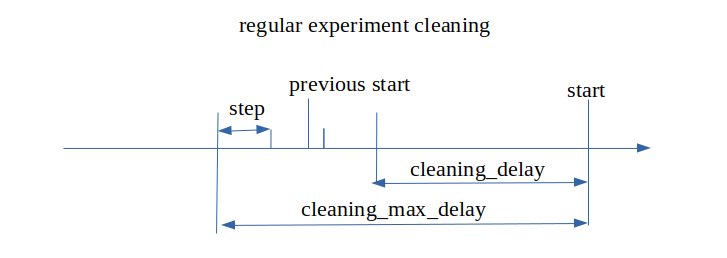
defaults
  active = true  - turn on or turn off the cleaning task
  dry_run = true  - testing mode - to see which files would be deleted without their actual deletion. This could be seen in the task log file.
  include  = "(.*)" - regular expression which specifies which files to delete. "(.*)" is regular expesion which matches all files
  exclude  = "(.*)" - regular expression which specifies which files not to delete. Leave empty to deactivate
  cleaning_delay = "P1D"
  cleaning_max_delay = "P2D"
  step = "PT6H"
  wipe = false - Removes everything under "path". Disables the meaning of include or exclude
  ecfs_prefix = None - Specifies path to ecfs if this is concerned
cleaning_delay and cleanig_max_delay are period settings which define the cleaning time interval according to the expiriment start date
step - defines the time moments in the cleaning interval when to clean files
All of the default settings are required. But these values could be changed in the specific folder settings.
Settings for the working folder
Required settings are active and path. path defines the working folder path - the root folder which contains all working files and folders.
Example value of the working path: /ec/res4/scratch/bgmt/tactus/CY48t3_AROME/20230916_0000/
[wrk]
  active = true
  dry_run = true
  include  = "ELS*"
  path = "@WRK@"
Settings for the archive folder
Required settings are active and path.
Example value of the archive folder path is /ec/res4/scratch/bgmt/tactus/CY48t3_AROME/archive/2023/09/16/00/
[archive]
  active = true
  dry_run = true
  include = "GRIBDEOD*"
  path = "@ARCHIVE@"
  cleaning_delay = "P1D"
  step = "PT6H"
The cleaning settings allow to define the cleaning time interval and step and which files to delete.
Removal of a complete case
All files produced by a run case be removed by
tactus remove [--config-file CONFIG_FILE_WITH_CLEANING_SETTINGS.toml] YOUR_CONFIG_FILE[S].toml [--execute-removal] [-f]
What to actually remove is defined in tactus/data/config_files/include/remove.toml. The settings are the same as for the cleaning config apart from remove_from_scheduler which removes the suite from the scheduler. With the default remove_not_completed_suites=True the removal is only executed if the suite is actually completed. This check can be overrided by using -f on command line. The latter also forces data to be removed even if a suite does not exist. Without including --execute-removal one only gets a list of what would have been removed.
The following section was automatically generated running
tactus doc config on 2026-10-13T12:02:08.
Config
Title: Config
Type |
|
Additional properties |

Description: Model for validation of tactus’s main config file.
Property |
Pattern |
Type |
Definition |
Title/Description |
|---|---|---|---|---|
+ general |
No |
object |
- |
General Section |
No |
object |
- |
Suite control |
|
- system |
No |
object |
- |
System |
- compile |
No |
object |
- |
IAL compilation configuration |
No |
object |
- |
Boundary Section |
|
No |
object |
- |
CollectLogs Section |
|
No |
object |
- |
Perturbation Section |
|
- pgd |
No |
object |
- |
Pgd Section |
- fullpos |
No |
object |
- |
Fullpos Section |
- troika |
No |
object |
- |
Troika |
- include |
No |
object |
- |
Include Section |
No |
object |
- |
Section for modify grib |
|
- genesis |
No |
object |
- |
Genesis information |
No |
object |
- |
Archiving Section, defined in include/archiving.toml |
|
- cleaning |
No |
object |
- |
CleaningSection |
No |
object |
- |
Creategrib Section, defined in include/creategrib.toml |
|
- da |
No |
object |
- |
Data assimilation section |
- domain |
No |
object |
- |
Domain Section, defined in files under include/domains |
- eps |
No |
object |
- |
EPS Members Configuration |
No |
object |
- |
Extract sqlite Section, defined in include/sqlite.toml |
|
- fdb |
No |
object |
- |
FDB Section, defined in include/fdb.toml |
No |
object |
- |
File Templates, defined in include/file_templates.toml |
|
- json2tab |
No |
object |
- |
json-2-tab Section, defined in include/json2tab.toml |
- macros |
No |
object |
- |
Macros Section, defined in include/macros.toml |
- mars |
No |
object |
- |
MARS settings, defined in include/mars_settings.toml |
- platform |
No |
object |
- |
Platform Section, defined in files under include/platform_paths |
No |
object |
- |
Reference Checker Configuration |
|
- remove |
No |
object |
- |
RemoveSection |
No |
object |
- |
Scheduler Section, defined in files under include/scheduler |
|
No |
object |
- |
Submission Section, defined in files under include/submission |
|
No |
object |
- |
Vertical Levels, defined in files under include/vertica_levels |
|
No |
object |
- |
Accelerator Device Section |
|
- cases |
No |
object |
- |
Test runner cases |
- modifs |
No |
object |
- |
Test runner modifications |
- default |
No |
object |
- |
- |
No |
object |
- |
Test runner modifications for generation of references |
|
No |
object |
- |
Gribmodify rules Section, defined in tactus/data/gribmodify/gribmodify_rules.json |
|
No |
object |
- |
Test runner modifications for reference checker |
|
No |
object |
- |
- |
 Property
 Config > general
Title: General Section
Type |
|
Additional properties |
Description: Model for the ‘general’ section.
Property |
Pattern |
Type |
Definition |
Title/Description |
|---|---|---|---|---|
+ times |
No |
Combination |
- |
Time-Related Entries |
No |
boolean |
- |
Allow usage of static namelists as input for the tasks. The namelist should be located in the directory specified by platform.namelists and named with the convention namelist_{kind}_{task} where kind could be surfex or master and task forecast/pgd or similar. For the extraction of namelist see namelists.md. |
|
- case |
No |
string |
- |
Experiment name |
No |
string |
- |
String identifier of a member in the ensemble |
|
- member |
No |
integer |
- |
Member number of a member in the ensemble |
- cnmexp |
No |
string |
- |
Experiment short name |
- loglevel |
No |
enum (of string) |
- |
Logger output level |
No |
array of integer |
- |
Option to include/exclude part 5 and 6 of e923. Set to ‘[5,6]’ to retain traditional climate files. |
|
- ecrad |
No |
boolean |
- |
ECRAD switch |
- surfex |
No |
boolean |
- |
SURFEX switch |
No |
boolean |
- |
Do not remove working directories |
|
- csc |
No |
enum (of string) |
- |
CSC |
- cycle |
No |
enum (of string) |
- |
IAL cycle |
- famodel |
No |
string |
- |
faModelName for handling grib output settings. Needed to specify encodings of ensemble members as well as sub-hourly outputs. Do not replace default name. |
- initfile |
No |
string |
- |
Initial file for the forecast object. Normally no need to provide unless there are special requirements or the forecast object is used in stand alone mode. |
No |
string |
- |
Initial surfex file for the forecast object. Normally no need to provide unless there are special requirements or the forecast object is used in stand alone mode. |
|
- namelist |
No |
object |
- |
Namelist |
No |
object |
- |
Output Settings |
|
No |
array |
- |
Sections to remove prior to config merge |
|
- windfarm |
No |
boolean |
- |
Switch for enabeling wind farm parameterisation |
No |
boolean |
- |
Switch for enabeling wind power production in fullpos output. Normally no need to provide but wind power output via full pos is not supported in CY48. |
|
No |
boolean |
- |
Switch to update SST/SIC during forecast |
|
No |
enum (of string) |
- |
Treatment of sea ice in surfex |
Property Config > general > times
Title: Time-Related Entries
Type |
|
Additional properties |
Description: Model for the ‘general.times’ section.
Property |
Pattern |
Type |
Definition |
Title/Description |
|---|---|---|---|---|
No |
string |
- |
Forecast range |
|
- start |
No |
Combination |
- |
Start time, given as a date-time string ‘YYYY-MM-DDTHH:mm:ssZ’ or duration, e.g. ‘-P1D’ for yesterday, which is relative to the current date at 00Z. |
- end |
No |
Combination |
- |
End time if the run covers several cycles. Date time format or duration relative start. |
- list |
No |
array of string |
- |
List of dates, placeholder for future needs. |
No |
string |
- |
Cycle length defined as duration |
|
- basetime |
No |
string |
- |
Initial date and time for the current task. |
No |
string |
- |
Final date and time for the current task. |
One of(Option) |
|---|
Property Config > general > times > oneOf > item 0
Type |
|
Additional properties |
Any of(Option) |
|---|
Property Config > general > times > oneOf > item 0 > anyOf > item 0
Type |
|
Additional properties |
Must not be
Type |
|
Additional properties |
The following properties are required
list
The following properties are required
start
Property Config > general > times > oneOf > item 0 > anyOf > item 1
Type |
|
Additional properties |
Must not be
Type |
|
Additional properties |
Any of(Option) |
|---|
Property Config > general > times > oneOf > item 0 > anyOf > item 1 > not > anyOf > item 0
Type |
|
Additional properties |
The following properties are required
end
Property Config > general > times > oneOf > item 0 > anyOf > item 1 > not > anyOf > item 1
Type |
|
Additional properties |
The following properties are required
list
Property Config > general > times > oneOf > item 0 > anyOf > item 1 > not > anyOf > item 2
Type |
|
Additional properties |
The following properties are required
start
The following properties are required
basetime
Property Config > general > times > oneOf > item 1
Type |
|
Additional properties |
Must not be
Type |
|
Additional properties |
Any of(Option) |
|---|
Property Config > general > times > oneOf > item 1 > not > anyOf > item 0
Type |
|
Additional properties |
The following properties are required
start
Property Config > general > times > oneOf > item 1 > not > anyOf > item 1
Type |
|
Additional properties |
The following properties are required
end
The following properties are required
list
 Property
 Config > general > times > forecast_range
Type |
|
Format |
|
Description: Forecast range
Property Config > general > times > start
Type |
|
Description: Start time, given as a date-time string ‘YYYY-MM-DDTHH:mm:ssZ’ or duration, e.g. ‘-P1D’ for yesterday, which is relative to the current date at 00Z.
One of(Option) |
|---|
Property Config > general > times > start > oneOf > item 0
Type |
|
Format |
|
Additional properties |
Property Config > general > times > start > oneOf > item 1
Type |
|
Format |
|
Additional properties |
Property Config > general > times > end
Type |
|
Description: End time if the run covers several cycles. Date time format or duration relative start.
One of(Option) |
|---|
Property Config > general > times > end > oneOf > item 0
Type |
|
Format |
|
Additional properties |
Property Config > general > times > end > oneOf > item 1
Type |
|
Format |
|
Additional properties |
Property Config > general > times > list
Type |
|
Description: List of dates, placeholder for future needs.
Array restrictions |
|
|---|---|
Min items |
N/A |
Max items |
N/A |
Items unicity |
False |
Additional items |
False |
Tuple validation |
See below |
Each item of this array must be |
Description |
|---|---|
- |
Config > general > times > list > list items
Type |
|
Format |
|
Property Config > general > times > cycle_length
Type |
|
Format |
|
Default |
|
Description: Cycle length defined as duration
Property Config > general > times > basetime
Type |
|
Format |
|
Description: Initial date and time for the current task.
Property Config > general > times > validtime
Type |
|
Format |
|
Description: Final date and time for the current task.
Property Config > general > accept_static_namelists
Type |
|
Description: Allow usage of static namelists as input for the tasks. The namelist should be located in the directory specified by platform.namelists and named with the convention namelist_{kind}_{task} where kind could be surfex or master and task forecast/pgd or similar. For the extraction of namelist see namelists.md.
Property Config > general > case
Type |
|
Default |
|
Description: Experiment name
Restrictions |
|
|---|---|
Must match regular expression |
|
Property Config > general > member_str
Type |
|
Default |
|
Description: String identifier of a member in the ensemble
Restrictions |
|
|---|---|
Must match regular expression |
|
Property Config > general > member
Type |
|
Default |
|
Description: Member number of a member in the ensemble
Property Config > general > cnmexp
Type |
|
Default |
|
Description: Experiment short name
Restrictions |
|
|---|---|
Min length |
4 |
Max length |
4 |
Property Config > general > loglevel
Type |
|
Description: Logger output level
Must be one of:
“CRITICAL”
“ERROR”
“DEBUG”
“INFO”
“WARNING”
Property Config > general > e923_optional_sections
Type |
|
Default |
|
Description: Option to include/exclude part 5 and 6 of e923. Set to ‘[5,6]’ to retain traditional climate files.
Array restrictions |
|
|---|---|
Min items |
N/A |
Max items |
N/A |
Items unicity |
False |
Additional items |
False |
Tuple validation |
See below |
Each item of this array must be |
Description |
|---|---|
- |
Config > general > e923_optional_sections > e923_optional_sections items
Type |
|
Property Config > general > ecrad
Type |
|
Default |
|
Description: ECRAD switch
Property Config > general > surfex
Type |
|
Description: SURFEX switch
Property Config > general > keep_workdirs
Type |
|
Description: Do not remove working directories
Property Config > general > csc
Type |
|
Default |
|
Description: CSC
Must be one of:
“AROME”
“ALARO”
“HARMONIE_AROME”
Property Config > general > cycle
Type |
|
Description: IAL cycle
Must be one of:
“CY50t2”
“CY49t2”
“CY48t3”
“CY46h1”
Property Config > general > famodel
Type |
|
Description: faModelName for handling grib output settings. Needed to specify encodings of ensemble members as well as sub-hourly outputs. Do not replace default name.
Property Config > general > initfile
Type |
|
Description: Initial file for the forecast object. Normally no need to provide unless there are special requirements or the forecast object is used in stand alone mode.
Property Config > general > initfile_sfx
Type |
|
Description: Initial surfex file for the forecast object. Normally no need to provide unless there are special requirements or the forecast object is used in stand alone mode.
Property Config > general > namelist
Title: Namelist
Type |
|
Additional properties |
Description: Namelist settings. Various settings for the forecast namelist that have no other place to go.
Property |
Pattern |
Type |
Definition |
Title/Description |
|---|---|---|---|---|
- nrazts |
No |
string |
- |
Reset times for instantaneous fluxes ( e.g. min/max temperature ) |
No |
string |
- |
Time interval for radiation compitations in the model. |
Property Config > general > namelist > nrazts
Type |
|
Description: Reset times for instantaneous fluxes ( e.g. min/max temperature )
Property Config > general > namelist > radiation_frequency
Type |
|
Description: Time interval for radiation compitations in the model.
Property Config > general > output_settings
Title: Output Settings
Type |
|
Additional properties |
Description: Output settings. Specified as duration for any of interval, endtime:interval, starttime:endtime:interval or a list of these options
Property |
Pattern |
Type |
Definition |
Title/Description |
|---|---|---|---|---|
- ddh_dl |
No |
Combination |
- |
- |
- ddh_gl |
No |
Combination |
- |
- |
- ddh_zo |
No |
Combination |
- |
- |
- history |
No |
Combination |
- |
- |
- surfex |
No |
Combination |
- |
- |
- fullpos |
No |
Combination |
- |
- |
Property Config > general > output_settings > ddh_dl
Type |
|
Additional properties |
Any of(Option) |
|---|
Property Config > general > output_settings > ddh_dl > anyOf > item 0
Type |
|
Restrictions |
|
|---|---|
Max length |
0 |
Property Config > general > output_settings > ddh_dl > anyOf > item 1
Type |
|
Format |
|
Property Config > general > output_settings > ddh_dl > anyOf > item 2
Type |
|
Array restrictions |
|
|---|---|
Min items |
N/A |
Max items |
N/A |
Items unicity |
False |
Additional items |
False |
Tuple validation |
See below |
Each item of this array must be |
Description |
|---|---|
- |
Config > general > output_settings > ddh_dl > anyOf > item 2 > item 2 items
Type |
|
Additional properties |
Any of(Option) |
|---|
Property Config > general > output_settings > ddh_dl > anyOf > item 2 > item 2 items > anyOf > item 0
Type |
|
Format |
|
Property Config > general > output_settings > ddh_gl
Type |
|
Additional properties |
Any of(Option) |
|---|
Property Config > general > output_settings > ddh_gl > anyOf > item 0
Type |
|
Restrictions |
|
|---|---|
Max length |
0 |
Property Config > general > output_settings > ddh_gl > anyOf > item 1
Type |
|
Format |
|
Property Config > general > output_settings > ddh_gl > anyOf > item 2
Type |
|
Array restrictions |
|
|---|---|
Min items |
N/A |
Max items |
N/A |
Items unicity |
False |
Additional items |
False |
Tuple validation |
See below |
Each item of this array must be |
Description |
|---|---|
- |
Config > general > output_settings > ddh_gl > anyOf > item 2 > item 2 items
Type |
|
Additional properties |
Any of(Option) |
|---|
Property Config > general > output_settings > ddh_gl > anyOf > item 2 > item 2 items > anyOf > item 0
Type |
|
Format |
|
Property Config > general > output_settings > ddh_zo
Type |
|
Additional properties |
Any of(Option) |
|---|
Property Config > general > output_settings > ddh_zo > anyOf > item 0
Type |
|
Restrictions |
|
|---|---|
Max length |
0 |
Property Config > general > output_settings > ddh_zo > anyOf > item 1
Type |
|
Format |
|
Property Config > general > output_settings > ddh_zo > anyOf > item 2
Type |
|
Array restrictions |
|
|---|---|
Min items |
N/A |
Max items |
N/A |
Items unicity |
False |
Additional items |
False |
Tuple validation |
See below |
Each item of this array must be |
Description |
|---|---|
- |
Config > general > output_settings > ddh_zo > anyOf > item 2 > item 2 items
Type |
|
Additional properties |
Any of(Option) |
|---|
Property Config > general > output_settings > ddh_zo > anyOf > item 2 > item 2 items > anyOf > item 0
Type |
|
Format |
|
Property Config > general > output_settings > history
Type |
|
Additional properties |
Any of(Option) |
|---|
Property Config > general > output_settings > history > anyOf > item 0
Type |
|
Restrictions |
|
|---|---|
Max length |
0 |
Property Config > general > output_settings > history > anyOf > item 1
Type |
|
Format |
|
Property Config > general > output_settings > history > anyOf > item 2
Type |
|
Array restrictions |
|
|---|---|
Min items |
N/A |
Max items |
N/A |
Items unicity |
False |
Additional items |
False |
Tuple validation |
See below |
Each item of this array must be |
Description |
|---|---|
- |
Config > general > output_settings > history > anyOf > item 2 > item 2 items
Type |
|
Additional properties |
Any of(Option) |
|---|
Property Config > general > output_settings > history > anyOf > item 2 > item 2 items > anyOf > item 0
Type |
|
Format |
|
Property Config > general > output_settings > surfex
Type |
|
Additional properties |
Any of(Option) |
|---|
Property Config > general > output_settings > surfex > anyOf > item 0
Type |
|
Restrictions |
|
|---|---|
Max length |
0 |
Property Config > general > output_settings > surfex > anyOf > item 1
Type |
|
Format |
|
Property Config > general > output_settings > surfex > anyOf > item 2
Type |
|
Array restrictions |
|
|---|---|
Min items |
N/A |
Max items |
N/A |
Items unicity |
False |
Additional items |
False |
Tuple validation |
See below |
Each item of this array must be |
Description |
|---|---|
- |
Config > general > output_settings > surfex > anyOf > item 2 > item 2 items
Type |
|
Additional properties |
Any of(Option) |
|---|
Property Config > general > output_settings > surfex > anyOf > item 2 > item 2 items > anyOf > item 0
Type |
|
Format |
|
Property Config > general > output_settings > fullpos
Type |
|
Additional properties |
Any of(Option) |
|---|
Property Config > general > output_settings > fullpos > anyOf > item 0
Type |
|
Restrictions |
|
|---|---|
Max length |
0 |
Property Config > general > output_settings > fullpos > anyOf > item 1
Type |
|
Format |
|
Property Config > general > output_settings > fullpos > anyOf > item 2
Type |
|
Array restrictions |
|
|---|---|
Min items |
N/A |
Max items |
N/A |
Items unicity |
False |
Additional items |
False |
Tuple validation |
See below |
Each item of this array must be |
Description |
|---|---|
- |
Config > general > output_settings > fullpos > anyOf > item 2 > item 2 items
Type |
|
Additional properties |
Any of(Option) |
|---|
Property Config > general > output_settings > fullpos > anyOf > item 2 > item 2 items > anyOf > item 0
Type |
|
Format |
|
Property Config > general > remove_sections
Type |
|
Default |
|
Description: Sections to remove prior to config merge
Array restrictions |
|
|---|---|
Min items |
N/A |
Max items |
N/A |
Items unicity |
False |
Additional items |
False |
Tuple validation |
N/A |
Property Config > general > windfarm
Type |
|
Default |
|
Description: Switch for enabeling wind farm parameterisation
Property Config > general > fullpos_windpower
Type |
|
Default |
|
Description: Switch for enabeling wind power production in fullpos output. Normally no need to provide but wind power output via full pos is not supported in CY48.
Property Config > general > upd_sst_sic
Type |
|
Default |
|
Description: Switch to update SST/SIC during forecast
Property Config > general > surfex_sea_ice
Type |
|
Default |
|
Description: Treatment of sea ice in surfex
Must be one of:
“sice”
“none”
Property Config > suite_control
Title: Suite control
Type |
|
Additional properties |
Description: Suite control options
Property |
Pattern |
Type |
Definition |
Title/Description |
|---|---|---|---|---|
No |
string |
- |
Suite definition to play in EcFlow |
|
- compile |
No |
boolean |
- |
Compile IAL source code |
No |
boolean |
- |
Activate grib conversion for static files |
|
- do_soil |
No |
boolean |
- |
Activate preparation of SOILGRID data as input for PGD |
- do_pgd |
No |
boolean |
- |
Activate generation of a PGD file |
- mode |
No |
enum (of string) |
- |
Choose a strategy to achieve initial/initial_sfx files (start: start from interpolated files and then propagate the FG between cycles, restart: start from a previous run and then propagate the FG between cycles, cold_start: always start from interpolated files). |
No |
boolean |
- |
Activates the boundary interpolation |
|
No |
boolean |
- |
Activates the SST & SIC boundary interpolation |
|
No |
boolean |
- |
Run marsprep or skip extraction |
|
No |
boolean |
- |
Activates extraction of selected points to SQLite files for verification. |
|
No |
boolean |
- |
Activates additional GRIB postprocessing |
|
No |
boolean |
- |
Activates merging of extracted sqlite files. Requires do_extractsqlite to be true, and number of ensemble members to be greater than 1, to have an effect. |
|
No |
boolean |
- |
Activate the generation of PGD and monthly climate files in the suite |
|
No |
boolean |
- |
Activate the time dependent part of the suite |
|
No |
boolean |
- |
Split Marsprep in multiple tasks for each data type |
|
No |
boolean |
- |
Do marsprep only for one step before c903 |
|
No |
boolean |
- |
Do file cleaning |
|
No |
integer |
- |
Number of IOmerge tasks |
|
No |
integer |
- |
Number of CreateGrib tasks |
|
No |
integer |
- |
Number of AddCalculatedFields tasks |
|
No |
boolean |
- |
Whether to create member specific static data (true) or not |
|
No |
boolean |
- |
Whether to do member specific marsprep (true) or common marsprep |
|
No |
boolean |
- |
Activate the data assimilation chain (CANARI surface OI + 3D-Var) between FirstGuess and Forecast. |
|
No |
boolean |
- |
Mirror globalDT suite (true) and trigger if globalDT is available |
|
No |
boolean |
- |
Mirror a host suite and trigger if available. |
|
No |
boolean |
- |
Mirror offlineSFX suite and trigger if offline is available |
|
No |
boolean |
- |
Mirror system.host_suite and trigger when the PostMortem task is completed |
|
No |
integer |
- |
Limit for max number of monthly tasks, run at same time |
Property Config > suite_control > suite_definition
Type |
|
Default |
|
Description: Suite definition to play in EcFlow
Property Config > suite_control > compile
Type |
|
Default |
|
Description: Compile IAL source code
Property Config > suite_control > do_creategrib_static
Type |
|
Default |
|
Description: Activate grib conversion for static files
Property Config > suite_control > do_soil
Type |
|
Description: Activate preparation of SOILGRID data as input for PGD
Property Config > suite_control > do_pgd
Type |
|
Description: Activate generation of a PGD file
Property Config > suite_control > mode
Type |
|
Description: Choose a strategy to achieve initial/initial_sfx files (start: start from interpolated files and then propagate the FG between cycles, restart: start from a previous run and then propagate the FG between cycles, cold_start: always start from interpolated files).
Must be one of:
“start”
“restart”
“cold_start”
Property Config > suite_control > interpolate_boundaries
Type |
|
Description: Activates the boundary interpolation
Property Config > suite_control > do_interpolsstsic
Type |
|
Description: Activates the SST & SIC boundary interpolation
Property Config > suite_control > do_marsprep
Type |
|
Description: Run marsprep or skip extraction
Property Config > suite_control > do_extractsqlite
Type |
|
Description: Activates extraction of selected points to SQLite files for verification.
Property Config > suite_control > do_addcalculatedfields
Type |
|
Description: Activates additional GRIB postprocessing
Property Config > suite_control > do_mergesqlite
Type |
|
Description: Activates merging of extracted sqlite files. Requires do_extractsqlite to be true, and number of ensemble members to be greater than 1, to have an effect.
Property Config > suite_control > create_static_data
Type |
|
Description: Activate the generation of PGD and monthly climate files in the suite
Property Config > suite_control > create_time_dependent_suite
Type |
|
Description: Activate the time dependent part of the suite
Property Config > suite_control > split_mars
Type |
|
Default |
|
Description: Split Marsprep in multiple tasks for each data type
Property Config > suite_control > split_mars_by_step
Type |
|
Default |
|
Description: Do marsprep only for one step before c903
Property Config > suite_control > do_cleaning
Type |
|
Default |
|
Description: Do file cleaning
Property Config > suite_control > n_io_merge
Type |
|
Default |
|
Description: Number of IOmerge tasks
Property Config > suite_control > n_creategrib
Type |
|
Default |
|
Description: Number of CreateGrib tasks
Property Config > suite_control > n_addcalculatedfields
Type |
|
Default |
|
Description: Number of AddCalculatedFields tasks
Property Config > suite_control > member_specific_static_data
Type |
|
Default |
|
Description: Whether to create member specific static data (true) or not
Property Config > suite_control > member_specific_mars_prep
Type |
|
Default |
|
Description: Whether to do member specific marsprep (true) or common marsprep
Property Config > suite_control > do_assimilation
Type |
|
Default |
|
Description: Activate the data assimilation chain (CANARI surface OI + 3D-Var) between FirstGuess and Forecast.
Property Config > suite_control > mirror_globalDT
Type |
|
Default |
|
Description: Mirror globalDT suite (true) and trigger if globalDT is available
Property Config > suite_control > mirror_host_case
Type |
|
Default |
|
Description: Mirror a host suite and trigger if available.
Property Config > suite_control > mirror_offline
Type |
|
Default |
|
Description: Mirror offlineSFX suite and trigger if offline is available
Property Config > suite_control > mirror_suite
Type |
|
Default |
|
Description: Mirror system.host_suite and trigger when the PostMortem task is completed
Property Config > suite_control > max_static_data_tasks
Type |
|
Default |
|
Description: Limit for max number of monthly tasks, run at same time
Property Config > system
Title: System
Type |
|
Additional properties |
Description: TACTUS system specific path settings
Property |
Pattern |
Type |
Definition |
Title/Description |
|---|---|---|---|---|
No |
string |
- |
Name of the softlink pointing to the Forecast task work directory |
|
No |
string |
- |
Name template for input initial surfex file for prep |
|
No |
string |
- |
Name template for input SST & SIC files of the host model |
|
No |
string |
- |
Name template for input boundary files |
|
No |
string |
- |
Name template for SST & SIC input boundary files interpolated to the model grid (currently hard-coded in model code) |
|
No |
string |
- |
Location of input intial file for surfex |
|
- bddir |
No |
string |
- |
Location of input boundaries from e.g. MARS |
No |
string |
- |
Location of boundaries on the current domain, i.e. the output directory of e927 |
|
No |
string |
- |
Location of the inital surfex file for the current domain, i.e. the output directory of Prep |
|
- climdir |
No |
string |
- |
Location of generated/used climate files (PGD/monthly files) |
- bindir |
No |
string |
- |
Location of binaries |
No |
string |
- |
Location of host model climate files used for e927/c903 |
|
- wrk |
No |
string |
- |
Location of date specific working directory |
No |
string |
- |
Path to the fullpos yml config file |
|
No |
string |
- |
Relative path of date specific archive |
|
- archive |
No |
string |
- |
Absolute path of date specific archive |
- logs |
No |
string |
- |
Location of collected logfiles |
No |
string |
- |
Path to static namelists |
|
No |
string |
- |
Path to SFC files needed for c903, which are not in MARS |
|
No |
string |
- |
Name of the previous experiment |
|
No |
string |
- |
Path to the surfex json config file |
|
No |
string |
- |
Path to the forecast json config file |
|
No |
string |
- |
Path to the c903 json config file |
|
No |
string |
- |
Path to the e923 json config file |
|
No |
string |
- |
Path to the e927 json config file |
|
- sys_name |
No |
string |
- |
System/package name (typically matching PACKAGE_NAME) used when resolving paths. |
Property Config > system > forecast_dir_link
Type |
|
Default |
|
Description: Name of the softlink pointing to the Forecast task work directory
Property Config > system > bdfile_sfx_template
Type |
|
Description: Name template for input initial surfex file for prep
Property Config > system > bdfile_sst_template
Type |
|
Description: Name template for input SST & SIC files of the host model
Property Config > system > bdfile_template
Type |
|
Description: Name template for input boundary files
Property Config > system > sstfile_template
Type |
|
Description: Name template for SST & SIC input boundary files interpolated to the model grid (currently hard-coded in model code)
Property Config > system > bddir_sfx
Type |
|
Description: Location of input intial file for surfex
Property Config > system > bddir
Type |
|
Description: Location of input boundaries from e.g. MARS
Property Config > system > intp_bddir
Type |
|
Default |
|
Description: Location of boundaries on the current domain, i.e. the output directory of e927
Property Config > system > intp_bddir_sfx
Type |
|
Default |
|
Description: Location of the inital surfex file for the current domain, i.e. the output directory of Prep
Property Config > system > climdir
Type |
|
Description: Location of generated/used climate files (PGD/monthly files)
Property Config > system > bindir
Type |
|
Description: Location of binaries
Property Config > system > bdclimdir
Type |
|
Description: Location of host model climate files used for e927/c903
Property Config > system > wrk
Type |
|
Default |
|
Description: Location of date specific working directory
Property Config > system > fullpos_config_file
Type |
|
Description: Path to the fullpos yml config file
Property Config > system > archive_timestamp
Type |
|
Default |
|
Description: Relative path of date specific archive
Property Config > system > archive
Type |
|
Default |
|
Description: Absolute path of date specific archive
Property Config > system > logs
Type |
|
Description: Location of collected logfiles
Property Config > system > namelists
Type |
|
Default |
|
Description: Path to static namelists
Property Config > system > global_sfcdir
Type |
|
Description: Path to SFC files needed for c903, which are not in MARS
Property Config > system > prev_case
Type |
|
Default |
|
Description: Name of the previous experiment
Property Config > system > sfx_input_definition
Type |
|
Default |
|
Description: Path to the surfex json config file
Property Config > system > forecast_input_definition
Type |
|
Default |
|
Description: Path to the forecast json config file
Property Config > system > c903_input_definition
Type |
|
Default |
|
Description: Path to the c903 json config file
Property Config > system > e923_input_definition
Type |
|
Default |
|
Description: Path to the e923 json config file
Property Config > system > e927_input_definition
Type |
|
Default |
|
Description: Path to the e927 json config file
Property Config > system > sys_name
Type |
|
Default |
|
Description: System/package name (typically matching PACKAGE_NAME) used when resolving paths.
Property Config > compile
Title: IAL compilation configuration
Type |
|
Additional properties |
Property |
Pattern |
Type |
Definition |
Title/Description |
|---|---|---|---|---|
- ial_dir |
No |
string |
- |
Local path to IAL source dir |
No |
string |
- |
Git repo for IAL source |
|
No |
string |
- |
Git version for IAL source (branch/tag/commit hash) |
|
No |
string |
- |
Git token for IAL source access |
|
No |
string |
- |
Placeholder for parsed branch name |
|
- arch_dir |
No |
string |
- |
Directory where arch files can be found |
- dir |
No |
string |
- |
Directory where compilation will occur |
No |
boolean |
- |
whether to update bundle_file with another bundle |
|
No |
string |
- |
bundle used for compiling binaries |
|
No |
string |
- |
bundle used for compiling binaries |
|
- ninja |
No |
boolean |
- |
whether to use ninja for compilation |
No |
boolean |
- |
whether to skip build step |
|
No |
boolean |
- |
whether to clean build folder before compilation |
|
- install |
No |
boolean |
- |
whether to install in @INSTALL_DIR@ |
No |
boolean |
- |
Do not compile assimilation related binaries |
Property Config > compile > ial_dir
Type |
|
Default |
|
Description: Local path to IAL source dir
Property Config > compile > ial_git_repo
Type |
|
Default |
|
Description: Git repo for IAL source
Property Config > compile > ial_git_version
Type |
|
Default |
|
Description: Git version for IAL source (branch/tag/commit hash)
Property Config > compile > git_token
Type |
|
Default |
|
Description: Git token for IAL source access
Property Config > compile > ial_git_tag_case
Type |
|
Default |
|
Description: Placeholder for parsed branch name
Property Config > compile > arch_dir
Type |
|
Default |
|
Description: Directory where arch files can be found
Property Config > compile > dir
Type |
|
Default |
|
Description: Directory where compilation will occur
Property Config > compile > bundle_update
Type |
|
Default |
|
Description: whether to update bundle_file with another bundle
Property Config > compile > update_bundle_file
Type |
|
Default |
|
Description: bundle used for compiling binaries
Property Config > compile > bundle_file
Type |
|
Default |
|
Description: bundle used for compiling binaries
Property Config > compile > ninja
Type |
|
Default |
|
Description: whether to use ninja for compilation
Property Config > compile > skip_build
Type |
|
Default |
|
Description: whether to skip build step
Property Config > compile > clean_build
Type |
|
Default |
|
Description: whether to clean build folder before compilation
Property Config > compile > install
Type |
|
Default |
|
Description: whether to install in @INSTALL_DIR@
Property Config > compile > forecast_only
Type |
|
Default |
|
Description: Do not compile assimilation related binaries
Property Config > boundaries
Title: Boundary Section
Type |
|
Additional properties |
Description: Settings for control of boundary treatment.
Property |
Pattern |
Type |
Definition |
Title/Description |
|---|---|---|---|---|
- bdint |
No |
string |
- |
Boundary interval |
- bdshift |
No |
string |
- |
Shift of boundary initial time. E.g. ‘PT3H’ would mean use 3H old boundaries |
No |
string |
- |
Shift of SURFEX prep input initial time. E.g. ‘PT24H’ would mean use 24H old file |
|
No |
number |
- |
Number of LBCs processed in a single task |
|
No |
number |
- |
Number of interpolate tasks run in parallel |
|
- bdmodel |
No |
enum (of string) |
- |
Coupling model |
No |
enum (of string) |
- |
SURFEX prep input file |
|
No |
array of enum (of string) |
- |
Coupling model for SST & SIC |
|
No |
enum (of string) |
- |
Switch for using SST as LSM |
|
- humi_gp |
No |
boolean |
- |
Value of TFP_Q%LLGP in domain namelist for c903. True for gridpoint humidity. |
- lam |
No |
object |
- |
LAM related boundary settings |
- ifs |
No |
object |
- |
IFS related settings |
No |
boolean |
- |
Set to true if the host model runs with surfex |
|
- do_slaf |
No |
boolean |
- |
Set to true if using the SLAF scheme for ensemble member boundary files |
- slaflag |
No |
string |
- |
SLAF shift of boundary initial time. E.g. ‘PT3H’ would mean use 3H old(er) boundaries |
- slafdiff |
No |
string |
- |
SLAF difference of boundary initial times. E.g. ‘PT6H’ would mean a 6H difference |
- slafk |
No |
number |
- |
SLAF difference scaling factor |
Property Config > boundaries > bdint
Type |
|
Format |
|
Description: Boundary interval
Property Config > boundaries > bdshift
Type |
|
Format |
|
Description: Shift of boundary initial time. E.g. ‘PT3H’ would mean use 3H old boundaries
Property Config > boundaries > bdshift_sfx
Type |
|
Format |
|
Description: Shift of SURFEX prep input initial time. E.g. ‘PT24H’ would mean use 24H old file
Property Config > boundaries > lbc_per_task
Type |
|
Default |
|
Description: Number of LBCs processed in a single task
Property Config > boundaries > max_interpolation_tasks
Type |
|
Description: Number of interpolate tasks run in parallel
Property Config > boundaries > bdmodel
Type |
|
Default |
|
Description: Coupling model
Must be one of:
“lam”
“ifs”
Property Config > boundaries > bdmodel_sfx
Type |
|
Default |
|
Description: SURFEX prep input file
Must be one of:
“from_grib”
“from_fa”
“from_nc”
Property Config > boundaries > sstmodels
Type |
|
Description: Coupling model for SST & SIC
Array restrictions |
|
|---|---|
Min items |
N/A |
Max items |
N/A |
Items unicity |
False |
Additional items |
False |
Tuple validation |
See below |
Each item of this array must be |
Description |
|---|---|
- |
Config > boundaries > sstmodels > sstmodels items
Type |
|
Must be one of:
“IFS”
Property Config > boundaries > sst_is_lsm
Type |
|
Default |
|
Description: Switch for using SST as LSM
Must be one of:
“lsm”
“sst”
“auto”
Property Config > boundaries > humi_gp
Type |
|
Description: Value of TFP_Q%LLGP in domain namelist for c903. True for gridpoint humidity.
Property Config > boundaries > lam
Title: LAM related boundary settings
Type |
|
Additional properties |
Description: LAM related boundary settings
Property |
Pattern |
Type |
Definition |
Title/Description |
|---|---|---|---|---|
No |
string |
- |
lam boundary model cycle start hour |
|
- bdcycle |
No |
string |
- |
lam boundary model cycle interval |
Property Config > boundaries > lam > bdcycle_start
Type |
|
Default |
|
Description: lam boundary model cycle start hour
Restrictions |
|
|---|---|
Must match regular expression |
|
Property Config > boundaries > lam > bdcycle
Type |
|
Default |
|
Description: lam boundary model cycle interval
Restrictions |
|
|---|---|
Must match regular expression |
|
Property Config > boundaries > ifs
Title: IFS related settings
Type |
|
Additional properties |
Description: Model for the ‘general.times’ section.
Property |
Pattern |
Type |
Definition |
Title/Description |
|---|---|---|---|---|
No |
enum (of string) |
- |
Selection |
|
- bdmember |
No |
Combination |
- |
Specification of boundary members to nest in if selection is IFS. The order of bdmembers determines which member uses what bdmember. The bdmembers can be specified as integer, string slice or a list of integers. String slices have to be in the format ‘start:end[:step]’. Use empty list for no bdmembers. |
Property Config > boundaries > ifs > selection
Type |
|
Description: Selection
Must be one of:
“atos_bologna_DT”
“lumi_DT”
“ATOS_DT”
“HRES”
“@HOST@_DT”
“DT12”
“i5qp”
“i7u4”
“i7ye”
“i8hy”
“IFSENS”
“iit7”
“ilv7”
“is6g”
“irok”
“iyzp”
Property Config > boundaries > ifs > bdmember
Type |
|
Additional properties |
|
Default |
|
Description: Specification of boundary members to nest in if selection is IFS. The order of bdmembers determines which member uses what bdmember. The bdmembers can be specified as integer, string slice or a list of integers. String slices have to be in the format ‘start:end[:step]’. Use empty list for no bdmembers.
Any of(Option) |
|---|
Property Config > boundaries > ifs > bdmember > anyOf > item 0
Type |
|
Property Config > boundaries > ifs > bdmember > anyOf > item 1
Type |
|
Property Config > boundaries > ifs > bdmember > anyOf > item 2
Type |
|
Array restrictions |
|
|---|---|
Min items |
N/A |
Max items |
N/A |
Items unicity |
False |
Additional items |
False |
Tuple validation |
N/A |
Property Config > boundaries > bd_has_surfex
Type |
|
Description: Set to true if the host model runs with surfex
Property Config > boundaries > do_slaf
Type |
|
Description: Set to true if using the SLAF scheme for ensemble member boundary files
Property Config > boundaries > slaflag
Type |
|
Format |
|
Description: SLAF shift of boundary initial time. E.g. ‘PT3H’ would mean use 3H old(er) boundaries
Property Config > boundaries > slafdiff
Type |
|
Format |
|
Description: SLAF difference of boundary initial times. E.g. ‘PT6H’ would mean a 6H difference
Property Config > boundaries > slafk
Type |
|
Description: SLAF difference scaling factor
Property Config > collectlogs
Title: CollectLogs Section
Type |
|
Additional properties |
Description: Settings for control of log collection.
Property |
Pattern |
Type |
Definition |
Title/Description |
|---|---|---|---|---|
No |
object |
- |
Collection settings for static tasks |
|
- hourlogs |
No |
object |
- |
Collection settings for time dependent tasks |
Property Config > collectlogs > staticlogs
Type |
|
Additional properties |
Description: Collection settings for static tasks
Property |
Pattern |
Type |
Definition |
Title/Description |
|---|---|---|---|---|
No |
string |
- |
Top output dir to collect logs from |
|
- tarname |
No |
string |
- |
Name of the resulting tar file |
No |
string |
- |
Search path for task specific logs |
Property Config > collectlogs > staticlogs > joboutdir
Type |
|
Description: Top output dir to collect logs from
Property Config > collectlogs > staticlogs > tarname
Type |
|
Description: Name of the resulting tar file
Property Config > collectlogs > staticlogs > task_logs
Type |
|
Description: Search path for task specific logs
Property Config > collectlogs > hourlogs
Type |
|
Additional properties |
Description: Collection settings for time dependent tasks
Property |
Pattern |
Type |
Definition |
Title/Description |
|---|---|---|---|---|
No |
string |
- |
Top output dir to collect logs from |
|
- tarname |
No |
string |
- |
Name of the resulting tar file |
No |
string |
- |
Search path for task specific logs |
Property Config > collectlogs > hourlogs > joboutdir
Type |
|
Description: Top output dir to collect logs from
Property Config > collectlogs > hourlogs > tarname
Type |
|
Description: Name of the resulting tar file
Property Config > collectlogs > hourlogs > task_logs
Type |
|
Description: Search path for task specific logs
Property Config > perturbations
Title: Perturbation Section
Type |
|
Additional properties |
Description: Settings for control of perturbations.
Property |
Pattern |
Type |
Definition |
Title/Description |
|---|---|---|---|---|
- pertana |
No |
object |
- |
Perturbation of initial atmospheric conditions with boundary data. |
- pertsurf |
No |
object |
- |
Perturbation of initial surfex conditions |
Property Config > perturbations > pertana
Title: Perturbation of initial atmospheric conditions with boundary data.
Type |
|
Additional properties |
Property |
Pattern |
Type |
Definition |
Title/Description |
|---|---|---|---|---|
- active |
No |
boolean |
- |
Activate pertana perturbations |
- z_mult |
No |
number |
- |
Perturbation scaling |
Property Config > perturbations > pertana > active
Title: Activate pertana perturbations
Type |
|
Default |
|
Property Config > perturbations > pertana > z_mult
Title: Perturbation scaling
Type |
|
Default |
|
Property Config > perturbations > pertsurf
Title: Perturbation of initial surfex conditions
Type |
|
Additional properties |
Property |
Pattern |
Type |
Definition |
Title/Description |
|---|---|---|---|---|
- active |
No |
boolean |
- |
Activate pertsurf perturbations |
Property Config > perturbations > pertsurf > active
Title: Activate pertsurf perturbations
Type |
|
Default |
|
Property Config > pgd
Title: Pgd Section
Type |
|
Additional properties |
Description: Settings for control of Pgd selection.
Property |
Pattern |
Type |
Definition |
Title/Description |
|---|---|---|---|---|
No |
boolean |
- |
Switch for ecoclimap 2nd gen |
|
- npatch |
No |
integer |
- |
Number of patches for surfex variables |
No |
boolean |
- |
Option for using one decade |
|
- use_osm |
No |
boolean |
- |
Option to use Open Street map input data |
Property Config > pgd > ecoclimap_sg
Type |
|
Default |
|
Description: Switch for ecoclimap 2nd gen
Property Config > pgd > npatch
Title: Number of patches for surfex variables
Type |
|
Default |
|
Property Config > pgd > one_decade
Title: Option for using one decade
Type |
|
Default |
|
Property Config > pgd > use_osm
Title: Option to use Open Street map input data
Type |
|
Default |
|
Property Config > fullpos
Title: Fullpos Section
Type |
|
Additional properties |
Description: Settings for control of fullpos selection.
Property |
Pattern |
Type |
Definition |
Title/Description |
|---|---|---|---|---|
No |
string |
- |
Path to fullpos config files |
|
- main |
No |
array of string |
- |
List of mandatory rules |
No |
object |
- |
List of selections to include |
|
No |
string |
- |
Name of your domain as used by fullpos |
Property Config > fullpos > config_path
Title: Path to fullpos config files
Type |
|
Default |
|
Property Config > fullpos > main
Type |
|
Default |
|
Description: List of mandatory rules
Array restrictions |
|
|---|---|
Min items |
N/A |
Max items |
N/A |
Items unicity |
False |
Additional items |
False |
Tuple validation |
See below |
Each item of this array must be |
Description |
|---|---|
- |
Config > fullpos > main > main items
Type |
|
Property Config > fullpos > selection
Type |
|
Additional properties |

Description: List of selections to include
Property |
Pattern |
Type |
Definition |
Title/Description |
|---|---|---|---|---|
No |
array of string |
- |
- |
Property Config > fullpos > selection > additionalProperties
Type |
|
Array restrictions |
|
|---|---|
Min items |
N/A |
Max items |
N/A |
Items unicity |
False |
Additional items |
False |
Tuple validation |
See below |
Each item of this array must be |
Description |
|---|---|
- |
Config > fullpos > selection > additionalProperties > additionalProperties items
Type |
|
Property Config > fullpos > domain_name
Type |
|
Default |
|
Description: Name of your domain as used by fullpos
Restrictions |
|
|---|---|
Max length |
20 |
Property Config > troika
Title: Troika
Type |
|
Additional properties |
Description: TACTUS system specific path settings
Property |
Pattern |
Type |
Definition |
Title/Description |
|---|---|---|---|---|
No |
string |
- |
Troika config file |
|
- troika |
No |
string |
- |
Troika command, allows to specify troika with full path |
Property Config > troika > config_file
Type |
|
Default |
|
Description: Troika config file
Property Config > troika > troika
Type |
|
Default |
|
Description: Troika command, allows to specify troika with full path
Property Config > include
Title: Include Section
Type |
|
Additional properties |
Description: Sections to be included from other config files. Specified as ‘key = val’ pairs, where the keys are the section names and the vals are the paths to the files containing them.
Property Config > gribmodify
Title: Section for modify grib
Type |
|
Additional properties |
Description: Rules for modifications to be made to the grib output
Property |
Pattern |
Type |
Definition |
Title/Description |
|---|---|---|---|---|
No |
array |
- |
List of file types to be converted |
|
No |
string |
- |
File specifying the gribmodify rules for the specified conversions |
|
No |
object |
- |
Total rain |
|
No |
object |
- |
Total snow |
|
No |
object |
- |
Total precpipation |
|
No |
object |
- |
10m wind speed |
|
No |
object |
- |
100m wind speed |
|
No |
object |
- |
10m gust wind speed |
|
No |
object |
- |
2m dewpoint temperature |
|
- surfex.1 |
No |
object |
- |
Leaf area index |
- surfex.2 |
No |
object |
- |
Albedo |
- surfex.3 |
No |
object |
- |
Top 20 cm average soil moisture |
- surfex.4 |
No |
object |
- |
Top 100 cm average soil moisture |
- surfex.5 |
No |
object |
- |
Top 20 cm average soil temperature |
- surfex.6 |
No |
object |
- |
Top 100 cm soil temperature |
- surfex.7 |
No |
object |
- |
Root depth soil moisture |
- surfex.8 |
No |
object |
- |
Canopy water |
Property Config > gribmodify > conversions
Type |
|
Default |
|
Description: List of file types to be converted
Array restrictions |
|
|---|---|
Min items |
N/A |
Max items |
N/A |
Items unicity |
False |
Additional items |
False |
Tuple validation |
N/A |
Property Config > gribmodify > gribmodify_rules_file
Type |
|
Description: File specifying the gribmodify rules for the specified conversions
Property Config > gribmodify > fullpos.1
Title: Total rain
Type |
|
Additional properties |
Description: Calculates total rain from components
Property |
Pattern |
Type |
Definition |
Title/Description |
|---|---|---|---|---|
No |
array of string |
- |
CSC specific selection |
|
No |
string |
- |
Output parameter name |
|
No |
object |
- |
Minimum frequency |
Property Config > gribmodify > fullpos.1 > csc_specific
Title: CSC specific selection
Type |
|
Description: The CSCs for which the specified conversion should happen.
Array restrictions |
|
|---|---|
Min items |
N/A |
Max items |
N/A |
Items unicity |
False |
Additional items |
False |
Tuple validation |
See below |
Each item of this array must be |
Description |
|---|---|
- |
Config > gribmodify > fullpos.1 > csc_specific > csc_specific items
Type |
|
Property Config > gribmodify > fullpos.1 > output_name
Title: Output parameter name
Type |
|
Description: Chosen name of output parameter.
Property Config > gribmodify > fullpos.1 > minumum_frequency
Title: Minimum frequency
Type |
|
Format |
|
Additional properties |
Description: Minimum output frequency expected
Property Config > gribmodify > fullpos.2
Title: Total snow
Type |
|
Additional properties |
Description: Calculates total snow from components
Property |
Pattern |
Type |
Definition |
Title/Description |
|---|---|---|---|---|
No |
array of string |
- |
CSC specific selection |
|
No |
string |
- |
Output parameter name |
|
No |
object |
- |
Minimum frequency |
Property Config > gribmodify > fullpos.2 > csc_specific
Title: CSC specific selection
Type |
|
Description: The CSCs for which the specified conversion should happen.
Array restrictions |
|
|---|---|
Min items |
N/A |
Max items |
N/A |
Items unicity |
False |
Additional items |
False |
Tuple validation |
See below |
Each item of this array must be |
Description |
|---|---|
- |
Config > gribmodify > fullpos.2 > csc_specific > csc_specific items
Type |
|
Property Config > gribmodify > fullpos.2 > output_name
Title: Output parameter name
Type |
|
Description: Chosen name of output parameter.
Property Config > gribmodify > fullpos.2 > minumum_frequency
Title: Minimum frequency
Type |
|
Format |
|
Additional properties |
Description: Minimum output frequency expected
Property Config > gribmodify > fullpos.3
Title: Total precpipation
Type |
|
Additional properties |
Description: Calculates total precipitation from components
Property |
Pattern |
Type |
Definition |
Title/Description |
|---|---|---|---|---|
No |
array of string |
- |
CSC specific selection |
|
No |
string |
- |
Output parameter name |
|
No |
object |
- |
Minimum frequency |
Property Config > gribmodify > fullpos.3 > csc_specific
Title: CSC specific selection
Type |
|
Description: The CSCs for which the specified conversion should happen.
Array restrictions |
|
|---|---|
Min items |
N/A |
Max items |
N/A |
Items unicity |
False |
Additional items |
False |
Tuple validation |
See below |
Each item of this array must be |
Description |
|---|---|
- |
Config > gribmodify > fullpos.3 > csc_specific > csc_specific items
Type |
|
Property Config > gribmodify > fullpos.3 > output_name
Title: Output parameter name
Type |
|
Description: Chosen name of output parameter.
Property Config > gribmodify > fullpos.3 > minumum_frequency
Title: Minimum frequency
Type |
|
Format |
|
Additional properties |
Description: Minimum output frequency expected
Property Config > gribmodify > fullpos.4
Title: 10m wind speed
Type |
|
Additional properties |
Description: Calculates 10m wind speed
Property |
Pattern |
Type |
Definition |
Title/Description |
|---|---|---|---|---|
No |
array of string |
- |
CSC specific selection |
|
No |
string |
- |
Output parameter name |
|
No |
object |
- |
Minimum frequency |
Property Config > gribmodify > fullpos.4 > csc_specific
Title: CSC specific selection
Type |
|
Description: The CSCs for which the specified conversion should happen.
Array restrictions |
|
|---|---|
Min items |
N/A |
Max items |
N/A |
Items unicity |
False |
Additional items |
False |
Tuple validation |
See below |
Each item of this array must be |
Description |
|---|---|
- |
Config > gribmodify > fullpos.4 > csc_specific > csc_specific items
Type |
|
Property Config > gribmodify > fullpos.4 > output_name
Title: Output parameter name
Type |
|
Description: Chosen name of output parameter.
Property Config > gribmodify > fullpos.4 > minumum_frequency
Title: Minimum frequency
Type |
|
Format |
|
Additional properties |
Description: Minimum output frequency expected
Property Config > gribmodify > fullpos.5
Title: 100m wind speed
Type |
|
Additional properties |
Description: Calculates 100m wind speed
Property |
Pattern |
Type |
Definition |
Title/Description |
|---|---|---|---|---|
No |
array of string |
- |
CSC specific selection |
|
No |
string |
- |
Output parameter name |
|
No |
object |
- |
Minimum frequency |
Property Config > gribmodify > fullpos.5 > csc_specific
Title: CSC specific selection
Type |
|
Description: The CSCs for which the specified conversion should happen.
Array restrictions |
|
|---|---|
Min items |
N/A |
Max items |
N/A |
Items unicity |
False |
Additional items |
False |
Tuple validation |
See below |
Each item of this array must be |
Description |
|---|---|
- |
Config > gribmodify > fullpos.5 > csc_specific > csc_specific items
Type |
|
Property Config > gribmodify > fullpos.5 > output_name
Title: Output parameter name
Type |
|
Description: Chosen name of output parameter.
Property Config > gribmodify > fullpos.5 > minumum_frequency
Title: Minimum frequency
Type |
|
Format |
|
Additional properties |
Description: Minimum output frequency expected
Property Config > gribmodify > fullpos.6
Title: 10m gust wind speed
Type |
|
Additional properties |
Description: Calculates 10m gust wind speed
Property |
Pattern |
Type |
Definition |
Title/Description |
|---|---|---|---|---|
No |
array of string |
- |
CSC specific selection |
|
No |
string |
- |
Output parameter name |
|
No |
object |
- |
Minimum frequency |
Property Config > gribmodify > fullpos.6 > csc_specific
Title: CSC specific selection
Type |
|
Description: The CSCs for which the specified conversion should happen.
Array restrictions |
|
|---|---|
Min items |
N/A |
Max items |
N/A |
Items unicity |
False |
Additional items |
False |
Tuple validation |
See below |
Each item of this array must be |
Description |
|---|---|
- |
Config > gribmodify > fullpos.6 > csc_specific > csc_specific items
Type |
|
Property Config > gribmodify > fullpos.6 > output_name
Title: Output parameter name
Type |
|
Description: Chosen name of output parameter.
Property Config > gribmodify > fullpos.6 > minumum_frequency
Title: Minimum frequency
Type |
|
Format |
|
Additional properties |
Description: Minimum output frequency expected
Property Config > gribmodify > fullpos.7
Title: 2m dewpoint temperature
Type |
|
Additional properties |
Description: Calculates 2m temperature based on Lawrence 2005, BAMS, doi: 10.1175/BAMS-86-2-225
Property |
Pattern |
Type |
Definition |
Title/Description |
|---|---|---|---|---|
No |
array of string |
- |
CSC specific selection |
|
No |
string |
- |
Output parameter name |
|
No |
object |
- |
Minimum frequency |
Property Config > gribmodify > fullpos.7 > csc_specific
Title: CSC specific selection
Type |
|
Description: The CSCs for which the specified conversion should happen.
Array restrictions |
|
|---|---|
Min items |
N/A |
Max items |
N/A |
Items unicity |
False |
Additional items |
False |
Tuple validation |
See below |
Each item of this array must be |
Description |
|---|---|
- |
Config > gribmodify > fullpos.7 > csc_specific > csc_specific items
Type |
|
Property Config > gribmodify > fullpos.7 > output_name
Title: Output parameter name
Type |
|
Description: Chosen name of output parameter.
Property Config > gribmodify > fullpos.7 > minumum_frequency
Title: Minimum frequency
Type |
|
Format |
|
Additional properties |
Description: Minimum output frequency expected
Property Config > gribmodify > surfex.1
Title: Leaf area index
Type |
|
Additional properties |
Description: Calculates nature-weighted leaf area index
Property |
Pattern |
Type |
Definition |
Title/Description |
|---|---|---|---|---|
No |
array of string |
- |
CSC specific selection |
|
No |
string |
- |
Output parameter name |
|
No |
object |
- |
Minimum frequency |
Property Config > gribmodify > surfex.1 > csc_specific
Title: CSC specific selection
Type |
|
Description: The CSCs for which the specified conversion should happen.
Array restrictions |
|
|---|---|
Min items |
N/A |
Max items |
N/A |
Items unicity |
False |
Additional items |
False |
Tuple validation |
See below |
Each item of this array must be |
Description |
|---|---|
- |
Config > gribmodify > surfex.1 > csc_specific > csc_specific items
Type |
|
Property Config > gribmodify > surfex.1 > output_name
Title: Output parameter name
Type |
|
Description: Chosen name of output parameter.
Property Config > gribmodify > surfex.1 > minumum_frequency
Title: Minimum frequency
Type |
|
Format |
|
Additional properties |
Description: Minimum output frequency expected
Property Config > gribmodify > surfex.2
Title: Albedo
Type |
|
Additional properties |
Description: Calculates albedo
Property |
Pattern |
Type |
Definition |
Title/Description |
|---|---|---|---|---|
No |
array of string |
- |
CSC specific selection |
|
No |
string |
- |
Output parameter name |
|
No |
object |
- |
Minimum frequency |
Property Config > gribmodify > surfex.2 > csc_specific
Title: CSC specific selection
Type |
|
Description: The CSCs for which the specified conversion should happen.
Array restrictions |
|
|---|---|
Min items |
N/A |
Max items |
N/A |
Items unicity |
False |
Additional items |
False |
Tuple validation |
See below |
Each item of this array must be |
Description |
|---|---|
- |
Config > gribmodify > surfex.2 > csc_specific > csc_specific items
Type |
|
Property Config > gribmodify > surfex.2 > output_name
Title: Output parameter name
Type |
|
Description: Chosen name of output parameter.
Property Config > gribmodify > surfex.2 > minumum_frequency
Title: Minimum frequency
Type |
|
Format |
|
Additional properties |
Description: Minimum output frequency expected
Property Config > gribmodify > surfex.3
Title: Top 20 cm average soil moisture
Type |
|
Additional properties |
Description: Calculates the nature-weighted patch-averaged soil moisture in the top 20 cm
Property |
Pattern |
Type |
Definition |
Title/Description |
|---|---|---|---|---|
No |
array of string |
- |
CSC specific selection |
|
No |
string |
- |
Output parameter name |
|
No |
object |
- |
Minimum frequency |
Property Config > gribmodify > surfex.3 > csc_specific
Title: CSC specific selection
Type |
|
Description: The CSCs for which the specified conversion should happen.
Array restrictions |
|
|---|---|
Min items |
N/A |
Max items |
N/A |
Items unicity |
False |
Additional items |
False |
Tuple validation |
See below |
Each item of this array must be |
Description |
|---|---|
- |
Config > gribmodify > surfex.3 > csc_specific > csc_specific items
Type |
|
Property Config > gribmodify > surfex.3 > output_name
Title: Output parameter name
Type |
|
Description: Chosen name of output parameter.
Property Config > gribmodify > surfex.3 > minumum_frequency
Title: Minimum frequency
Type |
|
Format |
|
Additional properties |
Description: Minimum output frequency expected
Property Config > gribmodify > surfex.4
Title: Top 100 cm average soil moisture
Type |
|
Additional properties |
Description: Calculates the nature-weighted patch-averaged soil moisture in the top 100 cm
Property |
Pattern |
Type |
Definition |
Title/Description |
|---|---|---|---|---|
No |
array of string |
- |
CSC specific selection |
|
No |
string |
- |
Output parameter name |
|
No |
object |
- |
Minimum frequency |
Property Config > gribmodify > surfex.4 > csc_specific
Title: CSC specific selection
Type |
|
Description: The CSCs for which the specified conversion should happen.
Array restrictions |
|
|---|---|
Min items |
N/A |
Max items |
N/A |
Items unicity |
False |
Additional items |
False |
Tuple validation |
See below |
Each item of this array must be |
Description |
|---|---|
- |
Config > gribmodify > surfex.4 > csc_specific > csc_specific items
Type |
|
Property Config > gribmodify > surfex.4 > output_name
Title: Output parameter name
Type |
|
Description: Chosen name of output parameter.
Property Config > gribmodify > surfex.4 > minumum_frequency
Title: Minimum frequency
Type |
|
Format |
|
Additional properties |
Description: Minimum output frequency expected
Property Config > gribmodify > surfex.5
Title: Top 20 cm average soil temperature
Type |
|
Additional properties |
Description: Calculates the patch-averaged soil temperature in the top 20 cm
Property |
Pattern |
Type |
Definition |
Title/Description |
|---|---|---|---|---|
No |
array of string |
- |
CSC specific selection |
|
No |
string |
- |
Output parameter name |
|
No |
object |
- |
Minimum frequency |
Property Config > gribmodify > surfex.5 > csc_specific
Title: CSC specific selection
Type |
|
Description: The CSCs for which the specified conversion should happen.
Array restrictions |
|
|---|---|
Min items |
N/A |
Max items |
N/A |
Items unicity |
False |
Additional items |
False |
Tuple validation |
See below |
Each item of this array must be |
Description |
|---|---|
- |
Config > gribmodify > surfex.5 > csc_specific > csc_specific items
Type |
|
Property Config > gribmodify > surfex.5 > output_name
Title: Output parameter name
Type |
|
Description: Chosen name of output parameter.
Property Config > gribmodify > surfex.5 > minumum_frequency
Title: Minimum frequency
Type |
|
Format |
|
Additional properties |
Description: Minimum output frequency expected
Property Config > gribmodify > surfex.6
Title: Top 100 cm soil temperature
Type |
|
Additional properties |
Description: Calculates the patch-averaged soil temperature in the top 100 cm
Property |
Pattern |
Type |
Definition |
Title/Description |
|---|---|---|---|---|
No |
array of string |
- |
CSC specific selection |
|
No |
string |
- |
Output parameter name |
|
No |
object |
- |
Minimum frequency |
Property Config > gribmodify > surfex.6 > csc_specific
Title: CSC specific selection
Type |
|
Description: The CSCs for which the specified conversion should happen.
Array restrictions |
|
|---|---|
Min items |
N/A |
Max items |
N/A |
Items unicity |
False |
Additional items |
False |
Tuple validation |
See below |
Each item of this array must be |
Description |
|---|---|
- |
Config > gribmodify > surfex.6 > csc_specific > csc_specific items
Type |
|
Property Config > gribmodify > surfex.6 > output_name
Title: Output parameter name
Type |
|
Description: Chosen name of output parameter.
Property Config > gribmodify > surfex.6 > minumum_frequency
Title: Minimum frequency
Type |
|
Format |
|
Additional properties |
Description: Minimum output frequency expected
Property Config > gribmodify > surfex.7
Title: Root depth soil moisture
Type |
|
Additional properties |
Description: Calculates root depth soil moisture
Property |
Pattern |
Type |
Definition |
Title/Description |
|---|---|---|---|---|
No |
array of string |
- |
CSC specific selection |
|
No |
string |
- |
Output parameter name |
|
No |
object |
- |
Minimum frequency |
Property Config > gribmodify > surfex.7 > csc_specific
Title: CSC specific selection
Type |
|
Description: The CSCs for which the specified conversion should happen.
Array restrictions |
|
|---|---|
Min items |
N/A |
Max items |
N/A |
Items unicity |
False |
Additional items |
False |
Tuple validation |
See below |
Each item of this array must be |
Description |
|---|---|
- |
Config > gribmodify > surfex.7 > csc_specific > csc_specific items
Type |
|
Property Config > gribmodify > surfex.7 > output_name
Title: Output parameter name
Type |
|
Description: Chosen name of output parameter.
Property Config > gribmodify > surfex.7 > minumum_frequency
Title: Minimum frequency
Type |
|
Format |
|
Additional properties |
Description: Minimum output frequency expected
Property Config > gribmodify > surfex.8
Title: Canopy water
Type |
|
Additional properties |
Description: Calculates the patch-averaged canopy water
Property |
Pattern |
Type |
Definition |
Title/Description |
|---|---|---|---|---|
No |
array of string |
- |
CSC specific selection |
|
No |
string |
- |
Output parameter name |
|
No |
object |
- |
Minimum frequency |
Property Config > gribmodify > surfex.8 > csc_specific
Title: CSC specific selection
Type |
|
Description: The CSCs for which the specified conversion should happen.
Array restrictions |
|
|---|---|
Min items |
N/A |
Max items |
N/A |
Items unicity |
False |
Additional items |
False |
Tuple validation |
See below |
Each item of this array must be |
Description |
|---|---|
- |
Config > gribmodify > surfex.8 > csc_specific > csc_specific items
Type |
|
Property Config > gribmodify > surfex.8 > output_name
Title: Output parameter name
Type |
|
Description: Chosen name of output parameter.
Property Config > gribmodify > surfex.8 > minumum_frequency
Title: Minimum frequency
Type |
|
Format |
|
Additional properties |
Description: Minimum output frequency expected
Property Config > genesis
Title: Genesis information
Type |
|
Additional properties |
Description: Genesis information of the configuration file
Property |
Pattern |
Type |
Definition |
Title/Description |
|---|---|---|---|---|
- command |
No |
string |
- |
The command used to generate the configuration file |
- package |
No |
string |
- |
The package used to generate the configuration file |
- version |
No |
string |
- |
The version of the package used to generate the configuration file |
- user |
No |
string |
- |
The user who generated the configuration file |
- time |
No |
string |
- |
The time when the configuration file was generated |
Property Config > genesis > command
Type |
|
Description: The command used to generate the configuration file
Property Config > genesis > package
Type |
|
Description: The package used to generate the configuration file
Property Config > genesis > version
Type |
|
Description: The version of the package used to generate the configuration file
Property Config > genesis > user
Type |
|
Description: The user who generated the configuration file
Property Config > genesis > time
Type |
|
Description: The time when the configuration file was generated
Property Config > archiving
Title: Archiving Section, defined in include/archiving.toml
Type |
|
Additional properties |
Description: Archiving settings for ATOS to ECFS. Locations, and time intervals to archive for each file type
Property |
Pattern |
Type |
Definition |
Title/Description |
|---|---|---|---|---|
- prefix |
No |
object |
- |
Path prefixes |
- hour |
No |
object |
- |
Example settings for the ‘ArchiveHour task |
No |
object |
- |
- |
Property Config > archiving > prefix
Title: Path prefixes
Type |
|
Additional properties |
Description: Prefix to prepend paths. Like ‘ec:/user/ for ecfs on atos or ‘user@host:’ for scp
Property |
Pattern |
Type |
Definition |
Title/Description |
|---|---|---|---|---|
No |
string |
- |
Prefix to use for available archive types. Define one per type where applicable. |
Property Config > archiving > prefix > archive_type
Type |
|
Description: Prefix to use for available archive types. Define one per type where applicable.
Property Config > archiving > hour
Title: Example settings for the ‘ArchiveHour task
Type |
|
Additional properties |
Property |
Pattern |
Type |
Definition |
Title/Description |
|---|---|---|---|---|
- example |
No |
object |
- |
Example settings for the archiving rules. Any number of rules can be defined to accomodate the needs |
Property Config > archiving > hour > example
Title: Example settings for the archiving rules. Any number of rules can be defined to accomodate the needs
Type |
|
Additional properties |
Property |
Pattern |
Type |
Definition |
Title/Description |
|---|---|---|---|---|
- active |
No |
boolean |
- |
Activates the default archiving. Could be boolean or string refering to a boolean in the config file. See the sqlite archiving for an example |
- inpath |
No |
string |
- |
Location of input files for archiving |
- outpath |
No |
string |
- |
Relative location of the archived files |
- pattern |
No |
Combination |
- |
Search pattern for files to be included. Could be a single pattern or list of patterns. |
- newname |
No |
string |
- |
Target name for renaming of files. Only works is pattern is a string and matches an existing file |
- tarname |
No |
string |
- |
Tar file name in case of compress method. |
Property Config > archiving > hour > example > active
Type |
|
Description: Activates the default archiving. Could be boolean or string refering to a boolean in the config file. See the sqlite archiving for an example
Property Config > archiving > hour > example > inpath
Type |
|
Description: Location of input files for archiving
Property Config > archiving > hour > example > outpath
Type |
|
Description: Relative location of the archived files
Property Config > archiving > hour > example > pattern
Type |
|
Additional properties |
Description: Search pattern for files to be included. Could be a single pattern or list of patterns.
Any of(Option) |
|---|
Property Config > archiving > hour > example > pattern > anyOf > item 0
Type |
|
Property Config > archiving > hour > example > pattern > anyOf > item 1
Type |
|
Array restrictions |
|
|---|---|
Min items |
N/A |
Max items |
N/A |
Items unicity |
False |
Additional items |
False |
Tuple validation |
See below |
Each item of this array must be |
Description |
|---|---|
- |
Config > archiving > hour > example > pattern > anyOf > item 1 > item 1 items
Type |
|
Property Config > archiving > hour > example > newname
Type |
|
Description: Target name for renaming of files. Only works is pattern is a string and matches an existing file
Property Config > archiving > hour > example > tarname
Type |
|
Description: Tar file name in case of compress method.
Property Config > cleaning
Title: CleaningSection
Type |
|
Additional properties |
Description: Model for validation of the cleaning configuration.
Property |
Pattern |
Type |
Definition |
Title/Description |
|---|---|---|---|---|
+ defaults |
No |
Combination |
- |
- |
No |
object |
- |
- |
|
No |
object |
- |
- |
Property Config > cleaning > defaults
Type |
|
Additional properties |
Property |
Pattern |
Type |
Definition |
Title/Description |
|---|---|---|---|---|
- include |
No |
string |
- |
regular expression according to it which files to clean |
No |
number |
- |
number of cycle_length periods with which the cleaning is shifted to the experiment start day to the past. |
|
No |
string |
- |
time period with which the cleaning is shifted to the experiment start day to the past. Should be a multiple of general.times.cycle_length. |
|
No |
string |
- |
time period which defines the cleaning according to the cleaning_delay to the past. Should be a multiple of general.times.cycle_length. |
|
- step |
No |
string |
- |
time step which determines moments when to make a cleaning, should be a multiple of general.times.cycle_length. |
- active |
No |
boolean |
- |
Activate cleaning files |
- dry_run |
No |
boolean |
- |
test cleaning without to delete files |
- path |
No |
string |
- |
Path to clean |
- wipe |
No |
boolean |
- |
Flag for cleaning everything in a path |
One of(Option) |
|---|
Property Config > cleaning > defaults > oneOf > item 0
Type |
|
Additional properties |
The following properties are required
include
ncycles_delay
active
Property Config > cleaning > defaults > oneOf > item 1
Type |
|
Additional properties |
The following properties are required
include
cleaning_delay
cleaning_max_delay
active
Property Config > cleaning > defaults > include
Type |
|
Description: regular expression according to it which files to clean
Property Config > cleaning > defaults > ncycles_delay
Type |
|
Description: number of cycle_length periods with which the cleaning is shifted to the experiment start day to the past.
Property Config > cleaning > defaults > cleaning_delay
Type |
|
Format |
|
Description: time period with which the cleaning is shifted to the experiment start day to the past. Should be a multiple of general.times.cycle_length.
Property Config > cleaning > defaults > cleaning_max_delay
Type |
|
Format |
|
Description: time period which defines the cleaning according to the cleaning_delay to the past. Should be a multiple of general.times.cycle_length.
Property Config > cleaning > defaults > step
Type |
|
Format |
|
Description: time step which determines moments when to make a cleaning, should be a multiple of general.times.cycle_length.
Property Config > cleaning > defaults > active
Type |
|
Description: Activate cleaning files
Property Config > cleaning > defaults > dry_run
Type |
|
Description: test cleaning without to delete files
Property Config > cleaning > defaults > path
Type |
|
Default |
|
Description: Path to clean
Property Config > cleaning > defaults > wipe
Type |
|
Default |
|
Description: Flag for cleaning everything in a path
Property Config > cleaning > Cleaning_example
Type |
|
Additional properties |
Property |
Pattern |
Type |
Definition |
Title/Description |
|---|---|---|---|---|
+ path |
No |
string |
- |
path to the folder where files will be cleaned |
- include |
No |
string |
- |
regular expression for files to select for cleaning |
- exclude |
No |
string |
- |
regular expression for files to explicitly exclude from cleaning |
No |
number |
- |
number of cycle_length periods with which the cleaning is shifted to the experiment start day to the past. |
|
No |
string |
- |
time period with which the cleaning is shifted to the experiment start day to the past. Should be a multiple of general.times.cycle_length. |
|
No |
string |
- |
time period which defines the cleaning according to the cleaning_delay to the past. Should be a multiple of general.times.cycle_length. |
|
- step |
No |
string |
- |
time step which determines moments when to make a cleaning, should be a multiple of general.times.cycle_length. |
- active |
No |
boolean |
- |
Activate cleaning files |
- dry_run |
No |
boolean |
- |
test cleaning without to delete files |
Property Config > cleaning > Cleaning_example > path
Type |
|
Description: path to the folder where files will be cleaned
Property Config > cleaning > Cleaning_example > include
Type |
|
Default |
|
Description: regular expression for files to select for cleaning
Property Config > cleaning > Cleaning_example > exclude
Type |
|
Description: regular expression for files to explicitly exclude from cleaning
Property Config > cleaning > Cleaning_example > ncycles_delay
Type |
|
Description: number of cycle_length periods with which the cleaning is shifted to the experiment start day to the past.
Property Config > cleaning > Cleaning_example > cleaning_delay
Type |
|
Format |
|
Description: time period with which the cleaning is shifted to the experiment start day to the past. Should be a multiple of general.times.cycle_length.
Property Config > cleaning > Cleaning_example > cleaning_max_delay
Type |
|
Format |
|
Description: time period which defines the cleaning according to the cleaning_delay to the past. Should be a multiple of general.times.cycle_length.
Property Config > cleaning > Cleaning_example > step
Type |
|
Format |
|
Description: time step which determines moments when to make a cleaning, should be a multiple of general.times.cycle_length.
Property Config > cleaning > Cleaning_example > active
Type |
|
Description: Activate cleaning files
Property Config > cleaning > Cleaning_example > dry_run
Type |
|
Description: test cleaning without to delete files
Property Config > creategrib
Title: Creategrib Section, defined in include/creategrib.toml
Type |
|
Additional properties |
Description: Settings for grib conversions with gl
Property |
Pattern |
Type |
Definition |
Title/Description |
|---|---|---|---|---|
No |
object |
- |
CreateGrib definitions |
|
No |
object |
- |
CreateGribStatic definitions |
|
No |
object |
- |
- |
Property Config > creategrib > CreateGrib
Title: CreateGrib definitions
Type |
|
Additional properties |
Description: Definitions for grib conversion of time dependent data
Property |
Pattern |
Type |
Definition |
Title/Description |
|---|---|---|---|---|
No |
array |
- |
List of file types to be converted |
|
- surfex |
No |
object |
- |
Rules for surfex files |
- history |
No |
object |
- |
Rules for history files |
- tiles |
No |
object |
- |
Rules for files output on tiles |
Property Config > creategrib > CreateGrib > conversions
Type |
|
Default |
|
Description: List of file types to be converted
Array restrictions |
|
|---|---|
Min items |
N/A |
Max items |
N/A |
Items unicity |
False |
Additional items |
False |
Tuple validation |
N/A |
Property Config > creategrib > CreateGrib > surfex
Title: Rules for surfex files
Type |
|
Additional properties |
Property |
Pattern |
Type |
Definition |
Title/Description |
|---|---|---|---|---|
- namelist |
No |
array |
- |
List of namelist arguments |
No |
string |
- |
Output format |
Property Config > creategrib > CreateGrib > surfex > namelist
Type |
|
Default |
|
Description: List of namelist arguments
Array restrictions |
|
|---|---|
Min items |
N/A |
Max items |
N/A |
Items unicity |
False |
Additional items |
False |
Tuple validation |
N/A |
Property Config > creategrib > CreateGrib > surfex > output_format
Type |
|
Default |
|
Description: Output format
Property Config > creategrib > CreateGrib > history
Title: Rules for history files
Type |
|
Additional properties |
Property |
Pattern |
Type |
Definition |
Title/Description |
|---|---|---|---|---|
- namelist |
No |
array |
- |
List of namelist arguments |
No |
string |
- |
Output format |
|
No |
boolean |
- |
Output only at basetime |
Property Config > creategrib > CreateGrib > history > namelist
Type |
|
Description: List of namelist arguments
Array restrictions |
|
|---|---|
Min items |
N/A |
Max items |
N/A |
Items unicity |
False |
Additional items |
False |
Tuple validation |
N/A |
Property Config > creategrib > CreateGrib > history > output_format
Type |
|
Default |
|
Description: Output format
Property Config > creategrib > CreateGrib > history > basetime_only
Type |
|
Default |
|
Description: Output only at basetime
Property Config > creategrib > CreateGrib > tiles
Title: Rules for files output on tiles
Type |
|
Additional properties |
Property |
Pattern |
Type |
Definition |
Title/Description |
|---|---|---|---|---|
No |
string |
- |
The variable for which the forecast output frequency is defined |
|
- namelist |
No |
array |
- |
List of namelist arguments |
No |
string |
- |
Output format |
Property Config > creategrib > CreateGrib > tiles > output_frequency_reference
Type |
|
Description: The variable for which the forecast output frequency is defined
Property Config > creategrib > CreateGrib > tiles > namelist
Type |
|
Description: List of namelist arguments
Array restrictions |
|
|---|---|
Min items |
N/A |
Max items |
N/A |
Items unicity |
False |
Additional items |
False |
Tuple validation |
N/A |
Property Config > creategrib > CreateGrib > tiles > output_format
Type |
|
Default |
|
Description: Output format
Property Config > creategrib > CreateGribStatic
Title: CreateGribStatic definitions
Type |
|
Additional properties |
Description: Definitions for grib conversion of static data
Property |
Pattern |
Type |
Definition |
Title/Description |
|---|---|---|---|---|
- pgd |
No |
object |
- |
Rules for pgd files |
Property Config > creategrib > CreateGribStatic > pgd
Title: Rules for pgd files
Type |
|
Additional properties |
Property |
Pattern |
Type |
Definition |
Title/Description |
|---|---|---|---|---|
- files_in |
No |
array |
- |
List of input files |
No |
array |
- |
List of input files |
|
No |
string |
- |
Output format |
|
- namelist |
No |
array |
- |
List of namelist arguments |
Property Config > creategrib > CreateGribStatic > pgd > files_in
Type |
|
Default |
|
Description: List of input files
Array restrictions |
|
|---|---|
Min items |
N/A |
Max items |
N/A |
Items unicity |
False |
Additional items |
False |
Tuple validation |
N/A |
Property Config > creategrib > CreateGribStatic > pgd > files_out
Type |
|
Default |
|
Description: List of input files
Array restrictions |
|
|---|---|
Min items |
N/A |
Max items |
N/A |
Items unicity |
False |
Additional items |
False |
Tuple validation |
N/A |
Property Config > creategrib > CreateGribStatic > pgd > output_format
Type |
|
Default |
|
Description: Output format
Property Config > creategrib > CreateGribStatic > pgd > namelist
Type |
|
Default |
|
Description: List of namelist arguments
Array restrictions |
|
|---|---|
Min items |
N/A |
Max items |
N/A |
Items unicity |
False |
Additional items |
False |
Tuple validation |
N/A |
Property Config > da
Title: Data assimilation section
Type |
|
Additional properties |
Description: Configuration for the surface OI and upper-air assimilation chain.
Property |
Pattern |
Type |
Definition |
Title/Description |
|---|---|---|---|---|
No |
enum (of string) |
- |
Data provider schema. |
|
- scratch |
No |
string |
- |
Data assimilation specific scratch area. |
- surface |
No |
object |
- |
- |
No |
object |
- |
- |
|
No |
object |
- |
- |
|
No |
object |
- |
- |
Property Config > da > obs_provider
Type |
|
Description: Data provider schema.
Must be one of:
“LACE”
“MARS”
“MF”
“RMI”
“UWC”
Property Config > da > scratch
Type |
|
Default |
|
Description: Data assimilation specific scratch area.
Property Config > da > surface
Type |
|
Additional properties |
Property |
Pattern |
Type |
Definition |
Title/Description |
|---|---|---|---|---|
- active |
No |
boolean |
- |
If true (default), Run surface OI chain. |
No |
string |
- |
ODB converter method. |
|
- method |
No |
enum (of string) |
- |
Surface assimilation method. |
No |
array of enum (of string) |
- |
List of observation types handled. |
|
No |
string |
- |
Observation window length. |
|
No |
string |
- |
Shift of observation window. |
|
No |
string |
- |
? |
|
No |
integer |
- |
? |
|
- nbpool |
No |
integer |
- |
Number of ODB pools. |
Property Config > da > surface > active
Type |
|
Default |
|
Description: If true (default), Run surface OI chain.
Property Config > da > surface > odbconverter
Type |
|
Default |
|
Description: ODB converter method.
Property Config > da > surface > method
Type |
|
Default |
|
Description: Surface assimilation method.
Must be one of:
“CANARI”
Property Config > da > surface > obs_types
Type |
|
Default |
|
Description: List of observation types handled.
Array restrictions |
|
|---|---|
Min items |
N/A |
Max items |
N/A |
Items unicity |
False |
Additional items |
False |
Tuple validation |
See below |
Each item of this array must be |
Description |
|---|---|
- |
Config > da > surface > obs_types > obs_types items
Type |
|
Must be one of:
“synop”
Property Config > da > surface > bator_window_len
Type |
|
Format |
|
Default |
|
Description: Observation window length.
Property Config > da > surface > bator_window_shift
Type |
|
Format |
|
Default |
|
Description: Shift of observation window.
Property Config > da > surface > bator_slot_len
Type |
|
Format |
|
Default |
|
Description: ?
Property Config > da > surface > bator_nbslot
Type |
|
Default |
|
Description: ?
Property Config > da > surface > nbpool
Type |
|
Default |
|
Description: Number of ODB pools.
Property Config > da > upper_air
Type |
|
Additional properties |
Property |
Pattern |
Type |
Definition |
Title/Description |
|---|---|---|---|---|
- active |
No |
boolean |
- |
If true, the upper-air 3D-Var chain (UpperAir family with OopsVar) is added after the surface OI chain. Set to false to run surface DA only (CANARI chain without 3D-Var), which is useful for refining the surface analysis independently or for surface-only experiments. |
No |
string |
- |
ODB converter method. |
|
- method |
No |
enum (of string) |
- |
Upper air assimilation method. |
No |
array of enum (of string) |
- |
List of observation types handled. |
|
No |
string |
- |
Observation window length. |
|
No |
string |
- |
Shift of observation window. |
|
No |
string |
- |
? |
|
No |
integer |
- |
? |
|
- nbpool |
No |
integer |
- |
Number of ODB pools. |
Property Config > da > upper_air > active
Type |
|
Default |
|
Description: If true, the upper-air 3D-Var chain (UpperAir family with OopsVar) is added after the surface OI chain. Set to false to run surface DA only (CANARI chain without 3D-Var), which is useful for refining the surface analysis independently or for surface-only experiments.
Property Config > da > upper_air > odbconverter
Type |
|
Default |
|
Description: ODB converter method.
Property Config > da > upper_air > method
Type |
|
Default |
|
Description: Upper air assimilation method.
Must be one of:
“3DVAR”
Property Config > da > upper_air > obs_types
Type |
|
Default |
|
Description: List of observation types handled.
Array restrictions |
|
|---|---|
Min items |
1 |
Max items |
N/A |
Items unicity |
False |
Additional items |
False |
Tuple validation |
See below |
Each item of this array must be |
Description |
|---|---|
- |
Config > da > upper_air > obs_types > obs_types items
Type |
|
Must be one of:
“synop”
“gpssol”
“amdar”
“geowind”
“temp”
“wp”
“seviri”
“amsua”
“amsub”
“iasi”
“ascat”
Property Config > da > upper_air > bator_window_len
Type |
|
Format |
|
Default |
|
Description: Observation window length.
Property Config > da > upper_air > bator_window_shift
Type |
|
Format |
|
Default |
|
Description: Shift of observation window.
Property Config > da > upper_air > bator_slot_len
Type |
|
Format |
|
Default |
|
Description: ?
Property Config > da > upper_air > bator_nbslot
Type |
|
Default |
|
Description: ?
Property Config > da > upper_air > nbpool
Type |
|
Default |
|
Description: Number of ODB pools.
Property Config > da > providers
Type |
|
Additional properties |
Property |
Pattern |
Type |
Definition |
Title/Description |
|---|---|---|---|---|
No |
object |
- |
- |
Property Config > da > providers > example_institute
Type |
|
Additional properties |
Property |
Pattern |
Type |
Definition |
Title/Description |
|---|---|---|---|---|
- obs_step |
No |
string |
- |
Observation input file template time resolution. |
- obstypes |
No |
object |
- |
- |
Property Config > da > providers > example_institute > obs_step
Type |
|
Format |
|
Default |
|
Description: Observation input file template time resolution.
Property Config > da > providers > example_institute > obstypes
Type |
|
Additional properties |
Property |
Pattern |
Type |
Definition |
Title/Description |
|---|---|---|---|---|
No |
object |
- |
- |
Property Config > da > providers > example_institute > obstypes > example_observation_type
Type |
|
Additional properties |
Property |
Pattern |
Type |
Definition |
Title/Description |
|---|---|---|---|---|
- obs_step |
No |
string |
- |
Type specific input file template time resolution. |
- format |
No |
enum (of string) |
- |
Observation format identifier. |
No |
array of string |
- |
List of file templates. |
Property Config > da > providers > example_institute > obstypes > example_observation_type > obs_step
Type |
|
Format |
|
Description: Type specific input file template time resolution.
Property Config > da > providers > example_institute > obstypes > example_observation_type > format
Type |
|
Description: Observation format identifier.
Must be one of:
“OBSOUL”
“BUFR”
“NETCDF”
Property Config > da > providers > example_institute > obstypes > example_observation_type > candidates
Type |
|
Description: List of file templates.
Array restrictions |
|
|---|---|
Min items |
N/A |
Max items |
N/A |
Items unicity |
False |
Additional items |
False |
Tuple validation |
See below |
Each item of this array must be |
Description |
|---|---|
- |
Config > da > providers > example_institute > obstypes > example_observation_type > candidates > candidates items
Type |
|
Property Config > domain
Title: Domain Section, defined in files under include/domains
Type |
|
Additional properties |
Description: Model for validation of the data in the ‘domain’ section of the config file.
Property |
Pattern |
Type |
Definition |
Title/Description |
|---|---|---|---|---|
- gridtype |
No |
enum (of string) |
- |
Select truncation type |
No |
enum (of string) |
- |
Select truncation type for orographic_smoothing |
|
No |
enum (of string) |
- |
Orographic smoothing method |
|
- name |
No |
string |
- |
Name of your domain |
No |
enum (of integer) |
- |
Activate the PGD orographic filtering |
|
- nimax |
No |
number |
- |
Number of grid points zonally |
- njmax |
No |
number |
- |
Number of grid points meridionally |
- xdx |
No |
number |
- |
Zonal grid size in meters |
- xdy |
No |
number |
- |
Meridional grid size in meters |
- ilone |
No |
number |
- |
Zonal extension zone |
- ilate |
No |
number |
- |
Meridional extension zone |
- nbzong |
No |
number |
- |
Meridional coupling zone width |
- nbzonl |
No |
number |
- |
Zonal coupling zone width |
- tstep |
No |
Combination |
- |
Model time step in seconds |
- xloncen |
No |
number |
- |
Domain center longitude |
- xlatcen |
No |
number |
- |
Domain center latitude |
- xlon0 |
No |
Combination |
- |
Longitude of center of projection |
- xlat0 |
No |
Combination |
- |
Latitude of center of projection |
- xbeta |
No |
number |
- |
Rotation parameter for the conformal projection |
No |
object |
- |
Defines for which gridypes spectral smoothing is applied when activated |
|
No |
object |
- |
Defines default gridtype_oro mapping when truncation smoothing is applied. |
|
No |
enum (of string) |
- |
Lead time of DTF, which trigger the domain |
|
No |
object |
- |
- |
Property Config > domain > gridtype
Type |
|
Description: Select truncation type
Must be one of:
“linear”
“quadratic”
“cubic”
“custom”
Property Config > domain > gridtype_oro
Type |
|
Default |
|
Description: Select truncation type for orographic_smoothing
Must be one of:
“linear”
“quadratic”
“cubic”
“custom”
“”
Property Config > domain > orographic_smoothing_method
Type |
|
Default |
|
Description: Orographic smoothing method
Must be one of:
“spectral”
“truncation”
“nzsfilter”
“raw”
Property Config > domain > name
Type |
|
Description: Name of your domain
Property Config > domain > nzsfilter
Type |
|
Description: Activate the PGD orographic filtering
Must be one of:
0
1
Property Config > domain > nimax
Type |
|
Description: Number of grid points zonally
Restrictions |
|
|---|---|
Minimum |
≥ 0 |
Property Config > domain > njmax
Type |
|
Description: Number of grid points meridionally
Restrictions |
|
|---|---|
Minimum |
≥ 0 |
Property Config > domain > xdx
Type |
|
Description: Zonal grid size in meters
Restrictions |
|
|---|---|
Minimum |
≥ 0 |
Property Config > domain > xdy
Type |
|
Description: Meridional grid size in meters
Restrictions |
|
|---|---|
Minimum |
≥ 0 |
Property Config > domain > ilone
Type |
|
Default |
|
Description: Zonal extension zone
Restrictions |
|
|---|---|
Minimum |
≥ 0 |
Property Config > domain > ilate
Type |
|
Default |
|
Description: Meridional extension zone
Restrictions |
|
|---|---|
Minimum |
≥ 0 |
Property Config > domain > nbzong
Type |
|
Default |
|
Description: Meridional coupling zone width
Restrictions |
|
|---|---|
Minimum |
≥ -1 |
Property Config > domain > nbzonl
Type |
|
Default |
|
Description: Zonal coupling zone width
Restrictions |
|
|---|---|
Minimum |
≥ -1 |
Property Config > domain > tstep
Type |
|
Additional properties |
Description: Model time step in seconds
One of(Option) |
|---|
Property Config > domain > tstep > oneOf > item 0
Type |
|
Property Config > domain > tstep > oneOf > item 1
Type |
|
Property Config > domain > xloncen
Type |
|
Description: Domain center longitude
Restrictions |
|
|---|---|
Minimum |
≥ -180 |
Maximum |
≤ 180 |
Property Config > domain > xlatcen
Type |
|
Description: Domain center latitude
Restrictions |
|
|---|---|
Minimum |
≥ -90 |
Maximum |
≤ 90 |
Property Config > domain > xlon0
Type |
|
Additional properties |
Description: Longitude of center of projection
One of(Option) |
|---|
Property Config > domain > xlon0 > oneOf > item 0
Type |
|
Restrictions |
|
|---|---|
Max length |
0 |
Property Config > domain > xlon0 > oneOf > item 1
Type |
|
Restrictions |
|
|---|---|
Minimum |
≥ -180 |
Maximum |
≤ 180 |
Property Config > domain > xlat0
Type |
|
Additional properties |
Description: Latitude of center of projection
One of(Option) |
|---|
Property Config > domain > xlat0 > oneOf > item 0
Type |
|
Restrictions |
|
|---|---|
Max length |
0 |
Property Config > domain > xlat0 > oneOf > item 1
Type |
|
Restrictions |
|
|---|---|
Minimum |
≥ -90 |
Maximum |
≤ 90 |
Property Config > domain > xbeta
Type |
|
Default |
|
Description: Rotation parameter for the conformal projection
Property Config > domain > spectral_smoothing_by_gridtype
Type |
|
Additional properties |
|
Default |
|
Description: Defines for which gridypes spectral smoothing is applied when activated
Property Config > domain > truncation_by_gridtype
Type |
|
Additional properties |
|
Default |
|
Description: Defines default gridtype_oro mapping when truncation smoothing is applied.
Property Config > domain > dtf_lead_time
Type |
|
Default |
|
Description: Lead time of DTF, which trigger the domain
Must be one of:
“”
“01”
“02”
Property Config > eps
Title: EPS Members Configuration
Type |
|
Additional properties |
Property |
Pattern |
Type |
Definition |
Title/Description |
|---|---|---|---|---|
- general |
No |
object |
- |
- |
Property Config > eps > general
Type |
|
Additional properties |
|
Default |
|
Property |
Pattern |
Type |
Definition |
Title/Description |
|---|---|---|---|---|
- members |
No |
Combination |
- |
The members of the ensemble |
Property Config > eps > general > members
Type |
|
Additional properties |
|
Default |
|
Description: The members of the ensemble
One of(Option) |
|---|
Property Config > eps > general > members > oneOf > item 0
Type |
|
Property Config > eps > general > members > oneOf > item 1
Type |
|
Property Config > eps > general > members > oneOf > item 2
Type |
|
Array restrictions |
|
|---|---|
Min items |
N/A |
Max items |
N/A |
Items unicity |
False |
Additional items |
False |
Tuple validation |
See below |
Each item of this array must be |
Description |
|---|---|
- |
Config > eps > general > members > oneOf > item 2 > item 2 items
Type |
|
Property Config > extractsqlite
Title: Extract sqlite Section, defined in include/sqlite.toml
Type |
|
Additional properties |
Description: Model for validation of the data in the ‘sqlite’ section of the config file.
Property |
Pattern |
Type |
Definition |
Title/Description |
|---|---|---|---|---|
No |
array of object |
- |
A list where each element contains name of parameter and location files |
|
No |
string |
- |
Model name used in the sqlite tables |
|
No |
string |
- |
Path to generated sqlite files |
|
No |
string |
- |
File name template for generated sqlite files |
|
No |
string |
- |
Temporal selection. Same syntax as for output_settings. Leave empty to inherit the fullpos settings. |
|
No |
object |
- |
- |
Property Config > extractsqlite > parameter_list
Type |
|
Default |
|
Description: A list where each element contains name of parameter and location files
Array restrictions |
|
|---|---|
Min items |
N/A |
Max items |
N/A |
Items unicity |
False |
Additional items |
False |
Tuple validation |
See below |
Each item of this array must be |
Description |
|---|---|
- |
Config > extractsqlite > parameter_list > parameter_list items
Type |
|
Additional properties |
Property |
Pattern |
Type |
Definition |
Title/Description |
|---|---|---|---|---|
No |
string |
- |
- |
|
No |
string |
- |
- |
The following properties are required
param_file
location_file
Property Config > extractsqlite > parameter_list > parameter_list items > param_list
Type |
|
Property Config > extractsqlite > parameter_list > parameter_list items > location_list
Type |
|
Property Config > extractsqlite > sqlite_model_name
Type |
|
Default |
|
Description: Model name used in the sqlite tables
Property Config > extractsqlite > sqlite_path
Type |
|
Default |
|
Description: Path to generated sqlite files
Property Config > extractsqlite > sqlite_template
Type |
|
Default |
|
Description: File name template for generated sqlite files
Property Config > extractsqlite > selection
Type |
|
Description: Temporal selection. Same syntax as for output_settings. Leave empty to inherit the fullpos settings.
Property Config > fdb
Title: FDB Section, defined in include/fdb.toml
Type |
|
Additional properties |
Description: FDB settings
Property |
Pattern |
Type |
Definition |
Title/Description |
|---|---|---|---|---|
No |
object |
- |
Fields to filter out prior to archiving. For a given key a list of values should be given |
|
No |
object |
- |
List users allowed to archive to a specific expver. |
|
- grib_set |
No |
object |
- |
GRIB2 metadata updated before archiving to FDB. Any GRIB key may be added |
No |
string |
- |
User allowed to write to the databridge |
|
No |
object |
- |
- |
Property Config > fdb > negative_rules
Type |
|
Additional properties |
Description: Fields to filter out prior to archiving. For a given key a list of values should be given
Property |
Pattern |
Type |
Definition |
Title/Description |
|---|---|---|---|---|
- levtype |
No |
array |
- |
Type of level |
Property Config > fdb > negative_rules > levtype
Type |
|
Description: Type of level
Array restrictions |
|
|---|---|
Min items |
N/A |
Max items |
N/A |
Items unicity |
False |
Additional items |
False |
Tuple validation |
N/A |
Property Config > fdb > expver_restrictions
Type |
|
Additional properties |
Description: List users allowed to archive to a specific expver.
Property |
Pattern |
Type |
Definition |
Title/Description |
|---|---|---|---|---|
- 0001 |
No |
Combination |
- |
Operational expver |
- 0099 |
No |
Combination |
- |
Pre-operational expver |
- 0098 |
No |
Combination |
- |
Development expver |
Property Config > fdb > expver_restrictions > 0001
Type |
|
Additional properties |
Description: Operational expver
Any of(Option) |
|---|
Property Config > fdb > expver_restrictions > 0001 > anyOf > item 0
Type |
|
Default |
|
Property Config > fdb > expver_restrictions > 0001 > anyOf > item 1
Type |
|
Array restrictions |
|
|---|---|
Min items |
N/A |
Max items |
N/A |
Items unicity |
False |
Additional items |
False |
Tuple validation |
N/A |
Property Config > fdb > expver_restrictions > 0099
Type |
|
Additional properties |
Description: Pre-operational expver
Any of(Option) |
|---|
Property Config > fdb > expver_restrictions > 0099 > anyOf > item 0
Type |
|
Default |
|
Property Config > fdb > expver_restrictions > 0099 > anyOf > item 1
Type |
|
Array restrictions |
|
|---|---|
Min items |
N/A |
Max items |
N/A |
Items unicity |
False |
Additional items |
False |
Tuple validation |
N/A |
Property Config > fdb > expver_restrictions > 0098
Type |
|
Additional properties |
Description: Development expver
Any of(Option) |
|---|
Property Config > fdb > expver_restrictions > 0098 > anyOf > item 0
Type |
|
Default |
|
Property Config > fdb > expver_restrictions > 0098 > anyOf > item 1
Type |
|
Array restrictions |
|
|---|---|
Min items |
N/A |
Max items |
N/A |
Items unicity |
False |
Additional items |
False |
Tuple validation |
N/A |
Property Config > fdb > grib_set
Type |
|
Additional properties |
Description: GRIB2 metadata updated before archiving to FDB. Any GRIB key may be added
Property |
Pattern |
Type |
Definition |
Title/Description |
|---|---|---|---|---|
- expver |
No |
string |
- |
Experiment id for FDB, read documentation before use |
Property Config > fdb > grib_set > expver
Type |
|
Description: Experiment id for FDB, read documentation before use
Restrictions |
|
|---|---|
Min length |
4 |
Max length |
4 |
Property Config > fdb > databridge_user
Type |
|
Default |
|
Description: User allowed to write to the databridge
Property Config > file_templates
Title: File Templates, defined in include/file_templates.toml
Type |
|
Additional properties |
Description: Templates for file names. Each item contains of an archive and a model key where archive is the name template for files in the archive and model the name expected as input/output of the IAL code.
Property |
Pattern |
Type |
Definition |
Title/Description |
|---|---|---|---|---|
- duration |
No |
object |
- |
Duration |
- ddh_dl |
No |
object |
- |
DDH limited area or points |
- ddh_gl |
No |
object |
- |
Global DDH |
- ddh_zo |
No |
object |
- |
Zonal DDH |
- fullpos |
No |
object |
- |
Fullpos |
No |
object |
- |
Interpolated boundaries |
|
- history |
No |
object |
- |
History |
- pgd |
No |
object |
- |
PGD |
- pgd_prel |
No |
object |
- |
Preliminary PGD |
- pgd_host |
No |
object |
- |
Host PGD |
- surfex |
No |
object |
- |
Surfex |
No |
object |
- |
- |
Property Config > file_templates > duration
Title: Duration
Type |
|
Additional properties |
Description: Time stamp templates for output files
Property |
Pattern |
Type |
Definition |
Title/Description |
|---|---|---|---|---|
- archive |
No |
string |
- |
File template as stored in the archive |
- model |
No |
string |
- |
File template as used by the model |
Property Config > file_templates > duration > archive
Type |
|
Default |
|
Description: File template as stored in the archive
Property Config > file_templates > duration > model
Type |
|
Default |
|
Description: File template as used by the model
Property Config > file_templates > ddh_dl
Title: DDH limited area or points
Type |
|
Additional properties |
Description: File name templates for DDH DL files
Property |
Pattern |
Type |
Definition |
Title/Description |
|---|---|---|---|---|
- archive |
No |
string |
- |
File template as stored in the archive |
- model |
No |
string |
- |
File template as used by the model |
Property Config > file_templates > ddh_dl > archive
Type |
|
Description: File template as stored in the archive
Property Config > file_templates > ddh_dl > model
Type |
|
Description: File template as used by the model
Property Config > file_templates > ddh_gl
Title: Global DDH
Type |
|
Additional properties |
Description: File name templates for DDH GL files
Property |
Pattern |
Type |
Definition |
Title/Description |
|---|---|---|---|---|
- archive |
No |
string |
- |
File template as stored in the archive |
- model |
No |
string |
- |
File template as used by the model |
Property Config > file_templates > ddh_gl > archive
Type |
|
Description: File template as stored in the archive
Property Config > file_templates > ddh_gl > model
Type |
|
Description: File template as used by the model
Property Config > file_templates > ddh_zo
Title: Zonal DDH
Type |
|
Additional properties |
Description: File name templates for DDH ZO files
Property |
Pattern |
Type |
Definition |
Title/Description |
|---|---|---|---|---|
- archive |
No |
string |
- |
File template as stored in the archive |
- model |
No |
string |
- |
File template as used by the model |
Property Config > file_templates > ddh_zo > archive
Type |
|
Description: File template as stored in the archive
Property Config > file_templates > ddh_zo > model
Type |
|
Description: File template as used by the model
Property Config > file_templates > fullpos
Title: Fullpos
Type |
|
Additional properties |
Description: File name templates for fullpos files
Property |
Pattern |
Type |
Definition |
Title/Description |
|---|---|---|---|---|
- archive |
No |
string |
- |
File template as stored in the archive |
- model |
No |
string |
- |
File template as used by the model |
Property Config > file_templates > fullpos > archive
Type |
|
Default |
|
Description: File template as stored in the archive
Property Config > file_templates > fullpos > model
Type |
|
Default |
|
Description: File template as used by the model
Property Config > file_templates > interpolated_boundaries
Title: Interpolated boundaries
Type |
|
Additional properties |
Description: File name templates for interpolated boundary files
Property |
Pattern |
Type |
Definition |
Title/Description |
|---|---|---|---|---|
- archive |
No |
string |
- |
File template as stored in the archive |
- model |
No |
string |
- |
File template as used by the model |
Property Config > file_templates > interpolated_boundaries > archive
Type |
|
Description: File template as stored in the archive
Property Config > file_templates > interpolated_boundaries > model
Type |
|
Description: File template as used by the model
Property Config > file_templates > history
Title: History
Type |
|
Additional properties |
Description: File name templates for history files
Property |
Pattern |
Type |
Definition |
Title/Description |
|---|---|---|---|---|
- archive |
No |
string |
- |
File template as stored in the archive |
- model |
No |
string |
- |
File template as used by the model |
Property Config > file_templates > history > archive
Type |
|
Default |
|
Description: File template as stored in the archive
Property Config > file_templates > history > model
Type |
|
Default |
|
Description: File template as used by the model
Property Config > file_templates > pgd
Title: PGD
Type |
|
Additional properties |
Description: File name templates for final PGD files
Property |
Pattern |
Type |
Definition |
Title/Description |
|---|---|---|---|---|
- archive |
No |
string |
- |
File template as stored in the archive |
- model |
No |
string |
- |
File template as used by the model |
Property Config > file_templates > pgd > archive
Type |
|
Default |
|
Description: File template as stored in the archive
Property Config > file_templates > pgd > model
Type |
|
Default |
|
Description: File template as used by the model
Property Config > file_templates > pgd_prel
Title: Preliminary PGD
Type |
|
Additional properties |
Description: File name templates for the preliminary PGD files
Property |
Pattern |
Type |
Definition |
Title/Description |
|---|---|---|---|---|
- archive |
No |
string |
- |
File template as stored in the archive |
- model |
No |
string |
- |
File template as used by the model |
Property Config > file_templates > pgd_prel > archive
Type |
|
Default |
|
Description: File template as stored in the archive
Property Config > file_templates > pgd_prel > model
Type |
|
Default |
|
Description: File template as used by the model
Property Config > file_templates > pgd_host
Title: Host PGD
Type |
|
Additional properties |
Description: File name templates for potential PGD files from the host model. Used if host_surfex=true
Property |
Pattern |
Type |
Definition |
Title/Description |
|---|---|---|---|---|
- archive |
No |
string |
- |
File template as stored in the archive |
- model |
No |
string |
- |
File template as used by the model |
Property Config > file_templates > pgd_host > archive
Type |
|
Default |
|
Description: File template as stored in the archive
Property Config > file_templates > pgd_host > model
Type |
|
Default |
|
Description: File template as used by the model
Property Config > file_templates > surfex
Title: Surfex
Type |
|
Additional properties |
Description: File name templates for surfex output files
Property |
Pattern |
Type |
Definition |
Title/Description |
|---|---|---|---|---|
- archive |
No |
string |
- |
File template as stored in the archive |
- model |
No |
string |
- |
File template as used by the model |
Property Config > file_templates > surfex > archive
Type |
|
Default |
|
Description: File template as stored in the archive
Property Config > file_templates > surfex > model
Type |
|
Default |
|
Description: File template as used by the model
Property Config > json2tab
Title: json-2-tab Section, defined in include/json2tab.toml
Type |
|
Additional properties |
Description: Model for validation of the data in the ‘json2tab’ section of the config file.
Property |
Pattern |
Type |
Definition |
Title/Description |
|---|---|---|---|---|
- enabled |
No |
boolean |
- |
Switch to use the Json-2-tab converter to generate domain specific tab-files for windfarm parameterization WFP. |
No |
boolean |
- |
Switch to always run json2tab when WFP is on (and maybe override existing windturbine tab-files when they already exist) |
|
No |
string |
- |
Config file for some json-2-tab configurations not managed by tactus. |
|
- loglevel |
No |
enum (of string) |
- |
Loglevel as used for json-2-tab logging |
- input |
No |
object |
- |
Input configuration section for json-2-tab. |
- output |
No |
object |
- |
Output configuration section for json-2-tab. |
No |
object |
- |
- |
Property Config > json2tab > enabled
Type |
|
Default |
|
Description: Switch to use the Json-2-tab converter to generate domain specific tab-files for windfarm parameterization WFP.
Property Config > json2tab > force_rewrite
Type |
|
Default |
|
Description: Switch to always run json2tab when WFP is on (and maybe override existing windturbine tab-files when they already exist)
Property Config > json2tab > config_file
Type |
|
Default |
|
Description: Config file for some json-2-tab configurations not managed by tactus.
Property Config > json2tab > loglevel
Type |
|
Default |
|
Description: Loglevel as used for json-2-tab logging
Must be one of:
“auto”
“debug”
“info”
“warning”
“error”
Property Config > json2tab > input
Type |
|
Additional properties |
Description: Input configuration section for json-2-tab.
Property |
Pattern |
Type |
Definition |
Title/Description |
|---|---|---|---|---|
No |
string |
- |
Main file containing turbine locations (csv, tab or geojson). |
|
No |
array of string |
- |
List of turbine type databases with turbine specifications. |
Property Config > json2tab > input > turbine_locations
Type |
|
Default |
|
Description: Main file containing turbine locations (csv, tab or geojson).
Property Config > json2tab > input > turbine_database
Type |
|
Default |
|
Description: List of turbine type databases with turbine specifications.
Array restrictions |
|
|---|---|
Min items |
N/A |
Max items |
N/A |
Items unicity |
False |
Additional items |
False |
Tuple validation |
See below |
Each item of this array must be |
Description |
|---|---|
Path to database with turbine specifications |
Config > json2tab > input > turbine_database > turbine_database items
Type |
|
Description: Path to database with turbine specifications
Property Config > json2tab > output
Type |
|
Additional properties |
Description: Output configuration section for json-2-tab.
Property |
Pattern |
Type |
Definition |
Title/Description |
|---|---|---|---|---|
No |
string |
- |
Directory for all output files. |
|
- files |
No |
object |
- |
Specification for output files. |
Property Config > json2tab > output > directory
Type |
|
Default |
|
Description: Directory for all output files.
Property Config > json2tab > output > files
Type |
|
Additional properties |
Description: Specification for output files.
Property |
Pattern |
Type |
Definition |
Title/Description |
|---|---|---|---|---|
No |
string |
- |
Tab file output with selected turbines. |
|
No |
string |
- |
Prefix of tab file output with type definitions (will be followed by type ID and .tab) |
Property Config > json2tab > output > files > location_tab
Type |
|
Default |
|
Description: Tab file output with selected turbines.
Property Config > json2tab > output > files > type_tab_prefix
Type |
|
Default |
|
Description: Prefix of tab file output with type definitions (will be followed by type ID and .tab)
Property Config > macros
Title: Macros Section, defined in include/macros.toml
Type |
|
Additional properties |
Description: Model for the ‘macros’ section.
Property |
Pattern |
Type |
Definition |
Title/Description |
|---|---|---|---|---|
- select |
No |
object |
- |
Macro subsection |
No |
object |
- |
- |
Property Config > macros > select
Title: Macro subsection
Type |
|
Additional properties |
Property |
Pattern |
Type |
Definition |
Title/Description |
|---|---|---|---|---|
- default |
No |
object |
- |
Default macros |
Property Config > macros > select > default
Title: Default macros
Type |
|
Additional properties |
Property |
Pattern |
Type |
Definition |
Title/Description |
|---|---|---|---|---|
No |
array |
- |
Turns any string config to a macro, use a dict to rename an attribute. |
|
No |
array of string |
- |
Turns a full config section to a macro |
|
No |
array of string |
- |
Environment variables used as macros |
Property Config > macros > select > default > gen_macros
Type |
|
Description: Turns any string config to a macro, use a dict to rename an attribute.
Array restrictions |
|
|---|---|
Min items |
N/A |
Max items |
N/A |
Items unicity |
False |
Additional items |
False |
Tuple validation |
See below |
Each item of this array must be |
Description |
|---|---|
- |
Config > macros > select > default > gen_macros > gen_macros items
Type |
|
Additional properties |
Any of(Option) |
|---|
Property Config > macros > select > default > gen_macros > gen_macros items > anyOf > item 0
Type |
|
Property Config > macros > select > default > gen_macros > gen_macros items > anyOf > item 1
Type |
|
Additional properties |
Property Config > macros > select > default > group_macros
Type |
|
Description: Turns a full config section to a macro
Array restrictions |
|
|---|---|
Min items |
N/A |
Max items |
N/A |
Items unicity |
False |
Additional items |
False |
Tuple validation |
See below |
Each item of this array must be |
Description |
|---|---|
- |
Config > macros > select > default > group_macros > group_macros items
Type |
|
Property Config > macros > select > default > os_macros
Type |
|
Description: Environment variables used as macros
Array restrictions |
|
|---|---|
Min items |
N/A |
Max items |
N/A |
Items unicity |
False |
Additional items |
False |
Tuple validation |
See below |
Each item of this array must be |
Description |
|---|---|
- |
Config > macros > select > default > os_macros > os_macros items
Type |
|
Property Config > mars
Title: MARS settings, defined in include/mars_settings.toml
Type |
|
Additional properties |
Description: Options for MARS extraction, for RD DT data check here for more details.
Property |
Pattern |
Type |
Definition |
Title/Description |
|---|---|---|---|---|
- HRES |
No |
object |
- |
Operational HRES |
- IFSENS |
No |
object |
- |
Operational ensemble forecasts |
- ATOS_DT |
No |
object |
- |
Global DT near real-time runs on ATOS based on CY48r1 |
No |
object |
- |
Global DT near real-time runs on ATOS based on CY49r1 |
|
- DT12 |
No |
object |
- |
Global DT runs on ATOS but starting at 12Z |
- i5qp |
No |
object |
- |
Paris RDP case Tco2559 |
- i7u4 |
No |
object |
- |
Paris RDP case Tco3999 with Urban scheme |
- i7ye |
No |
object |
- |
Paris RDP case Tco3999 without Urban scheme |
- i8hy |
No |
object |
- |
AQ winter case over central Europe |
- lumi_DT |
No |
object |
- |
Global DT near real-time runs on LUMI |
No |
object |
- |
- |
Property Config > mars > HRES
Title: Operational HRES
Type |
|
Additional properties |
Description: Parameters for oper data
Property |
Pattern |
Type |
Definition |
Title/Description |
|---|---|---|---|---|
No |
string |
- |
Boundary model cycle start hour. Required to be set if bdcycle_start % bdcycle != 0 |
|
- class |
No |
string |
- |
Class of expver |
- levelist |
No |
object |
- |
Dictionary (date:levels), with dates of change in the number of levels. |
- grid |
No |
object |
- |
Dictionary (date:resolution), with dates of change in the resolution. |
No |
string |
- |
Boundary model cycle interval |
|
No |
string |
- |
Date from when are data available in Mars |
|
- GG |
No |
string |
- |
List of parameters for grid point data, for detailed information about the parameters check here |
- GG1 |
No |
string |
- |
List of constant field parameters for grid point data, for detailed information about the parameters check here |
- GG_sea |
No |
string |
- |
Parameters for grid point sea data, for detailed information about the parameters check here |
- GG_soil |
No |
string |
- |
Parameters for grid point soil data, for detailed information about the parameters check here |
- grid_GG1 |
No |
object |
- |
Grid parameter for mars request of GG1 fields |
- grid_ML |
No |
string |
- |
Grid parameter for mars request of model level fields |
- SH |
No |
string |
- |
Parameters for spectral harmonic data, for detailed information about the parameters check here |
- SHZ |
No |
string |
- |
Geopotential on ground, for detailed information about the parameters check here |
- UA |
No |
string |
- |
Upper air grid point parameters, for detailed information about the parameters check here |
- SHZ_type |
No |
string |
- |
Type for geopotential |
- GGZ_type |
No |
string |
- |
Type for geopotential in gridpoint |
No |
string |
- |
Resolution of global model |
|
- stream |
No |
object |
- |
Dictionary (run:stream) to use the right stream for a given run. |
Property Config > mars > HRES > ifs_cycle_start
Type |
|
Default |
|
Description: Boundary model cycle start hour. Required to be set if bdcycle_start % bdcycle != 0
Restrictions |
|
|---|---|
Must match regular expression |
|
Property Config > mars > HRES > class
Type |
|
Description: Class of expver
Property Config > mars > HRES > levelist
Type |
|
Additional properties |
Description: Dictionary (date:levels), with dates of change in the number of levels.
Property Config > mars > HRES > grid
Type |
|
Additional properties |
Description: Dictionary (date:resolution), with dates of change in the resolution.
Property Config > mars > HRES > ifs_cycle_length
Type |
|
Description: Boundary model cycle interval
Restrictions |
|
|---|---|
Must match regular expression |
|
Property Config > mars > HRES > start_date
Type |
|
Format |
|
Description: Date from when are data available in Mars
Property Config > mars > HRES > GG
Type |
|
Description: List of parameters for grid point data, for detailed information about the parameters check here
Property Config > mars > HRES > GG1
Type |
|
Description: List of constant field parameters for grid point data, for detailed information about the parameters check here
Property Config > mars > HRES > GG_sea
Type |
|
Description: Parameters for grid point sea data, for detailed information about the parameters check here
Property Config > mars > HRES > GG_soil
Type |
|
Description: Parameters for grid point soil data, for detailed information about the parameters check here
Property Config > mars > HRES > grid_GG1
Type |
|
Additional properties |
Description: Grid parameter for mars request of GG1 fields
Property Config > mars > HRES > grid_ML
Type |
|
Description: Grid parameter for mars request of model level fields
Property Config > mars > HRES > SH
Type |
|
Description: Parameters for spectral harmonic data, for detailed information about the parameters check here
Property Config > mars > HRES > SHZ
Type |
|
Description: Geopotential on ground, for detailed information about the parameters check here
Property Config > mars > HRES > UA
Type |
|
Description: Upper air grid point parameters, for detailed information about the parameters check here
Property Config > mars > HRES > SHZ_type
Type |
|
Description: Type for geopotential
Property Config > mars > HRES > GGZ_type
Type |
|
Description: Type for geopotential in gridpoint
Property Config > mars > HRES > resolution
Type |
|
Description: Resolution of global model
Property Config > mars > HRES > stream
Type |
|
Additional properties |
Description: Dictionary (run:stream) to use the right stream for a given run.
Property Config > mars > IFSENS
Title: Operational ensemble forecasts
Type |
|
Additional properties |
Description: Parameters for oper data
Property |
Pattern |
Type |
Definition |
Title/Description |
|---|---|---|---|---|
No |
string |
- |
Boundary model cycle start hour. Required to be set if bdcycle_start % bdcycle != 0 |
|
- class |
No |
string |
- |
Class of expver |
- levelist |
No |
string |
- |
Dictionary (date:levels), with dates of change in the number of levels. |
- grid |
No |
object |
- |
Dictionary (date:resolution), with dates of change in the resolution. |
No |
string |
- |
Boundary model cycle interval |
|
No |
string |
- |
Date from when are data available in Mars. Note that IFSENS is only stored for a limited amount of time. |
|
- GG |
No |
string |
- |
List of parameters for grid point data, for detailed information about the parameters check here |
- GG1 |
No |
string |
- |
List of constant field parameters for grid point data, for detailed information about the parameters check here |
- GG_sea |
No |
string |
- |
Parameters for grid point sea data, for detailed information about the parameters check here |
- GG_soil |
No |
string |
- |
Parameters for grid point soil data, for detailed information about the parameters check here |
- grid_GG1 |
No |
object |
- |
Grid parameter for mars request of GG1 fields |
- grid_ML |
No |
string |
- |
Grid parameter for mars request of model level fields |
- SH |
No |
string |
- |
Parameters for spectral harmonic data, for detailed information about the parameters check here |
- SHZ |
No |
string |
- |
Geopotential on ground, for detailed information about the parameters check here |
- UA |
No |
string |
- |
Upper air grid point parameters, for detailed information about the parameters check here |
- SHZ_type |
No |
string |
- |
Type for geopotential |
No |
string |
- |
Resolution of global model |
|
- stream |
No |
string |
- |
MARS stream |
No |
string |
- |
MARS stream for control member. Required to be set if stream is not the same as for the other members. |
Property Config > mars > IFSENS > ifs_cycle_start
Type |
|
Default |
|
Description: Boundary model cycle start hour. Required to be set if bdcycle_start % bdcycle != 0
Restrictions |
|
|---|---|
Must match regular expression |
|
Property Config > mars > IFSENS > class
Type |
|
Description: Class of expver
Property Config > mars > IFSENS > levelist
Type |
|
Description: Dictionary (date:levels), with dates of change in the number of levels.
Property Config > mars > IFSENS > grid
Type |
|
Additional properties |
Description: Dictionary (date:resolution), with dates of change in the resolution.
Property Config > mars > IFSENS > ifs_cycle_length
Type |
|
Description: Boundary model cycle interval
Restrictions |
|
|---|---|
Must match regular expression |
|
Property Config > mars > IFSENS > start_date
Type |
|
Format |
|
Description: Date from when are data available in Mars. Note that IFSENS is only stored for a limited amount of time.
Property Config > mars > IFSENS > GG
Type |
|
Description: List of parameters for grid point data, for detailed information about the parameters check here
Property Config > mars > IFSENS > GG1
Type |
|
Description: List of constant field parameters for grid point data, for detailed information about the parameters check here
Property Config > mars > IFSENS > GG_sea
Type |
|
Description: Parameters for grid point sea data, for detailed information about the parameters check here
Property Config > mars > IFSENS > GG_soil
Type |
|
Description: Parameters for grid point soil data, for detailed information about the parameters check here
Property Config > mars > IFSENS > grid_GG1
Type |
|
Additional properties |
Description: Grid parameter for mars request of GG1 fields
Property Config > mars > IFSENS > grid_ML
Type |
|
Description: Grid parameter for mars request of model level fields
Property Config > mars > IFSENS > SH
Type |
|
Description: Parameters for spectral harmonic data, for detailed information about the parameters check here
Property Config > mars > IFSENS > SHZ
Type |
|
Description: Geopotential on ground, for detailed information about the parameters check here
Property Config > mars > IFSENS > UA
Type |
|
Description: Upper air grid point parameters, for detailed information about the parameters check here
Property Config > mars > IFSENS > SHZ_type
Type |
|
Description: Type for geopotential
Property Config > mars > IFSENS > resolution
Type |
|
Description: Resolution of global model
Property Config > mars > IFSENS > stream
Type |
|
Description: MARS stream
Property Config > mars > IFSENS > stream_control
Type |
|
Description: MARS stream for control member. Required to be set if stream is not the same as for the other members.
Property Config > mars > ATOS_DT
Title: Global DT near real-time runs on ATOS based on CY48r1
Type |
|
Additional properties |
Description: Parameters for global DT data
Property |
Pattern |
Type |
Definition |
Title/Description |
|---|---|---|---|---|
No |
string |
- |
Boundary model cycle start hour. Required to be set if bdcycle_start % bdcycle != 0 |
|
- default |
No |
string |
- |
Other section to copy settings from if not given here |
- class |
No |
string |
- |
Class of expver |
- levelist |
No |
string |
- |
Dictionary (date:levels), with dates of change in the number of levels. |
- grid |
No |
string |
- |
Dictionary (date:resolution), with dates of change in the resolution. |
No |
string |
- |
Boundary model cycle interval |
|
No |
string |
- |
Date from when are data available in Mars |
|
- GG |
No |
string |
- |
List of parameters for grid point data, for detailed information about the parameters check here |
- GG_sea |
No |
string |
- |
Parameters for grid point sea data, for detailed information about the parameters check here |
- tco |
No |
enum (of string) |
- |
Truncation for static RD data |
- grid_ML |
No |
string |
- |
Grid parameter for mars request of model level fields |
- SH |
No |
string |
- |
Parameters for spectral harmonic data, for detailed information about the parameters check here |
- SHZ |
No |
string |
- |
Geopotential on ground, for detailed information about the parameters check here |
- UA |
No |
string |
- |
Upper air grid point parameters, for detailed information about the parameters check here |
- SHZ_type |
No |
string |
- |
Type for geopotential |
- GGZ_type |
No |
string |
- |
Type for geopotential in gridpoint |
No |
string |
- |
Resolution of global model |
|
- stream |
No |
Combination |
- |
MARS stream or dictionary (run:stream) to use the right stream for a given run. |
Property Config > mars > ATOS_DT > ifs_cycle_start
Type |
|
Default |
|
Description: Boundary model cycle start hour. Required to be set if bdcycle_start % bdcycle != 0
Restrictions |
|
|---|---|
Must match regular expression |
|
Property Config > mars > ATOS_DT > default
Type |
|
Description: Other section to copy settings from if not given here
Property Config > mars > ATOS_DT > class
Type |
|
Description: Class of expver
Property Config > mars > ATOS_DT > levelist
Type |
|
Description: Dictionary (date:levels), with dates of change in the number of levels.
Property Config > mars > ATOS_DT > grid
Type |
|
Description: Dictionary (date:resolution), with dates of change in the resolution.
Property Config > mars > ATOS_DT > ifs_cycle_length
Type |
|
Description: Boundary model cycle interval
Restrictions |
|
|---|---|
Must match regular expression |
|
Property Config > mars > ATOS_DT > start_date
Type |
|
Format |
|
Description: Date from when are data available in Mars
Property Config > mars > ATOS_DT > GG
Type |
|
Description: List of parameters for grid point data, for detailed information about the parameters check here
Property Config > mars > ATOS_DT > GG_sea
Type |
|
Description: Parameters for grid point sea data, for detailed information about the parameters check here
Property Config > mars > ATOS_DT > tco
Type |
|
Description: Truncation for static RD data
Must be one of:
“255”
“399”
Property Config > mars > ATOS_DT > grid_ML
Type |
|
Description: Grid parameter for mars request of model level fields
Property Config > mars > ATOS_DT > SH
Type |
|
Description: Parameters for spectral harmonic data, for detailed information about the parameters check here
Property Config > mars > ATOS_DT > SHZ
Type |
|
Description: Geopotential on ground, for detailed information about the parameters check here
Property Config > mars > ATOS_DT > UA
Type |
|
Description: Upper air grid point parameters, for detailed information about the parameters check here
Property Config > mars > ATOS_DT > SHZ_type
Type |
|
Description: Type for geopotential
Property Config > mars > ATOS_DT > GGZ_type
Type |
|
Description: Type for geopotential in gridpoint
Property Config > mars > ATOS_DT > resolution
Type |
|
Description: Resolution of global model
Property Config > mars > ATOS_DT > stream
Type |
|
Additional properties |
Description: MARS stream or dictionary (run:stream) to use the right stream for a given run.
Any of(Option) |
|---|
Property Config > mars > ATOS_DT > stream > anyOf > item 0
Type |
|
Property Config > mars > ATOS_DT > stream > anyOf > item 1
Type |
|
Additional properties |
Property Config > mars > atos_bologna_DT
Title: Global DT near real-time runs on ATOS based on CY49r1
Type |
|
Additional properties |
Description: Parameters for global DT data
Property |
Pattern |
Type |
Definition |
Title/Description |
|---|---|---|---|---|
No |
string |
- |
Boundary model cycle start hour. Required to be set if bdcycle_start % bdcycle != 0 |
|
- default |
No |
string |
- |
Other section to copy settings from if not given here |
- class |
No |
string |
- |
Class of expver |
- levelist |
No |
string |
- |
Dictionary (date:levels), with dates of change in the number of levels. |
- grid |
No |
string |
- |
Dictionary (date:resolution), with dates of change in the resolution. |
No |
string |
- |
Boundary model cycle interval |
|
No |
string |
- |
Date from when are data available in Mars |
|
- GG |
No |
string |
- |
List of parameters for grid point data, for detailed information about the parameters check here |
- GG_sea |
No |
string |
- |
Parameters for grid point sea data, for detailed information about the parameters check here |
- tco |
No |
enum (of string) |
- |
Truncation for static RD data |
- grid_ML |
No |
string |
- |
Grid parameter for mars request of model level fields |
- SH |
No |
string |
- |
Parameters for spectral harmonic data, for detailed information about the parameters check here |
- SHZ |
No |
string |
- |
Geopotential on ground, for detailed information about the parameters check here |
- UA |
No |
string |
- |
Upper air grid point parameters, for detailed information about the parameters check here |
- SHZ_type |
No |
string |
- |
Type for geopotential |
- GGZ_type |
No |
string |
- |
Type for geopotential in gridpoint |
No |
string |
- |
Resolution of global model |
|
- stream |
No |
Combination |
- |
MARS stream or dictionary (run:stream) to use the right stream for a given run. |
Property Config > mars > atos_bologna_DT > ifs_cycle_start
Type |
|
Default |
|
Description: Boundary model cycle start hour. Required to be set if bdcycle_start % bdcycle != 0
Restrictions |
|
|---|---|
Must match regular expression |
|
Property Config > mars > atos_bologna_DT > default
Type |
|
Description: Other section to copy settings from if not given here
Property Config > mars > atos_bologna_DT > class
Type |
|
Description: Class of expver
Property Config > mars > atos_bologna_DT > levelist
Type |
|
Description: Dictionary (date:levels), with dates of change in the number of levels.
Property Config > mars > atos_bologna_DT > grid
Type |
|
Description: Dictionary (date:resolution), with dates of change in the resolution.
Property Config > mars > atos_bologna_DT > ifs_cycle_length
Type |
|
Description: Boundary model cycle interval
Restrictions |
|
|---|---|
Must match regular expression |
|
Property Config > mars > atos_bologna_DT > start_date
Type |
|
Format |
|
Description: Date from when are data available in Mars
Property Config > mars > atos_bologna_DT > GG
Type |
|
Description: List of parameters for grid point data, for detailed information about the parameters check here
Property Config > mars > atos_bologna_DT > GG_sea
Type |
|
Description: Parameters for grid point sea data, for detailed information about the parameters check here
Property Config > mars > atos_bologna_DT > tco
Type |
|
Description: Truncation for static RD data
Must be one of:
“255”
“399”
Property Config > mars > atos_bologna_DT > grid_ML
Type |
|
Description: Grid parameter for mars request of model level fields
Property Config > mars > atos_bologna_DT > SH
Type |
|
Description: Parameters for spectral harmonic data, for detailed information about the parameters check here
Property Config > mars > atos_bologna_DT > SHZ
Type |
|
Description: Geopotential on ground, for detailed information about the parameters check here
Property Config > mars > atos_bologna_DT > UA
Type |
|
Description: Upper air grid point parameters, for detailed information about the parameters check here
Property Config > mars > atos_bologna_DT > SHZ_type
Type |
|
Description: Type for geopotential
Property Config > mars > atos_bologna_DT > GGZ_type
Type |
|
Description: Type for geopotential in gridpoint
Property Config > mars > atos_bologna_DT > resolution
Type |
|
Description: Resolution of global model
Property Config > mars > atos_bologna_DT > stream
Type |
|
Additional properties |
Description: MARS stream or dictionary (run:stream) to use the right stream for a given run.
Any of(Option) |
|---|
Property Config > mars > atos_bologna_DT > stream > anyOf > item 0
Type |
|
Property Config > mars > atos_bologna_DT > stream > anyOf > item 1
Type |
|
Additional properties |
Property Config > mars > DT12
Title: Global DT runs on ATOS but starting at 12Z
Type |
|
Additional properties |
Description: Parameters for global DT data
Property |
Pattern |
Type |
Definition |
Title/Description |
|---|---|---|---|---|
No |
string |
- |
Boundary model cycle start hour. Required to be set if bdcycle_start % bdcycle != 0 |
|
- default |
No |
string |
- |
Other section to copy settings from if not given here |
- class |
No |
string |
- |
Class of expver |
- levelist |
No |
string |
- |
Dictionary (date:levels), with dates of change in the number of levels. |
- grid |
No |
string |
- |
Dictionary (date:resolution), with dates of change in the resolution. |
No |
string |
- |
Boundary model cycle interval |
|
No |
string |
- |
Date from when are data available in Mars |
|
- GG |
No |
string |
- |
List of parameters for grid point data, for detailed information about the parameters check here |
- GG_sea |
No |
string |
- |
Parameters for grid point sea data, for detailed information about the parameters check here |
- tco |
No |
enum (of string) |
- |
Truncation for static RD data |
- grid_ML |
No |
string |
- |
Grid parameter for mars request of model level fields |
- SH |
No |
string |
- |
Parameters for spectral harmonic data, for detailed information about the parameters check here |
- SHZ |
No |
string |
- |
Geopotential on ground, for detailed information about the parameters check here |
- UA |
No |
string |
- |
Upper air grid point parameters, for detailed information about the parameters check here |
- SHZ_type |
No |
string |
- |
Type for geopotential |
- GGZ_type |
No |
string |
- |
Type for geopotential in gridpoint |
No |
string |
- |
Resolution of global model |
|
- stream |
No |
Combination |
- |
MARS stream or dictionary (run:stream) to use the right stream for a given run. |
Property Config > mars > DT12 > ifs_cycle_start
Type |
|
Default |
|
Description: Boundary model cycle start hour. Required to be set if bdcycle_start % bdcycle != 0
Restrictions |
|
|---|---|
Must match regular expression |
|
Property Config > mars > DT12 > default
Type |
|
Description: Other section to copy settings from if not given here
Property Config > mars > DT12 > class
Type |
|
Description: Class of expver
Property Config > mars > DT12 > levelist
Type |
|
Description: Dictionary (date:levels), with dates of change in the number of levels.
Property Config > mars > DT12 > grid
Type |
|
Description: Dictionary (date:resolution), with dates of change in the resolution.
Property Config > mars > DT12 > ifs_cycle_length
Type |
|
Description: Boundary model cycle interval
Restrictions |
|
|---|---|
Must match regular expression |
|
Property Config > mars > DT12 > start_date
Type |
|
Format |
|
Description: Date from when are data available in Mars
Property Config > mars > DT12 > GG
Type |
|
Description: List of parameters for grid point data, for detailed information about the parameters check here
Property Config > mars > DT12 > GG_sea
Type |
|
Description: Parameters for grid point sea data, for detailed information about the parameters check here
Property Config > mars > DT12 > tco
Type |
|
Description: Truncation for static RD data
Must be one of:
“255”
“399”
Property Config > mars > DT12 > grid_ML
Type |
|
Description: Grid parameter for mars request of model level fields
Property Config > mars > DT12 > SH
Type |
|
Description: Parameters for spectral harmonic data, for detailed information about the parameters check here
Property Config > mars > DT12 > SHZ
Type |
|
Description: Geopotential on ground, for detailed information about the parameters check here
Property Config > mars > DT12 > UA
Type |
|
Description: Upper air grid point parameters, for detailed information about the parameters check here
Property Config > mars > DT12 > SHZ_type
Type |
|
Description: Type for geopotential
Property Config > mars > DT12 > GGZ_type
Type |
|
Description: Type for geopotential in gridpoint
Property Config > mars > DT12 > resolution
Type |
|
Description: Resolution of global model
Property Config > mars > DT12 > stream
Type |
|
Additional properties |
Description: MARS stream or dictionary (run:stream) to use the right stream for a given run.
Any of(Option) |
|---|
Property Config > mars > DT12 > stream > anyOf > item 0
Type |
|
Property Config > mars > DT12 > stream > anyOf > item 1
Type |
|
Additional properties |
Property Config > mars > i5qp
Title: Paris RDP case Tco2559
Type |
|
Additional properties |
Description: Parameters for global DT data
Property |
Pattern |
Type |
Definition |
Title/Description |
|---|---|---|---|---|
No |
string |
- |
Boundary model cycle start hour. Required to be set if bdcycle_start % bdcycle != 0 |
|
- default |
No |
string |
- |
Other section to copy settings from if not given here |
- class |
No |
string |
- |
Class of expver |
- levelist |
No |
string |
- |
Dictionary (date:levels), with dates of change in the number of levels. |
- grid |
No |
string |
- |
Dictionary (date:resolution), with dates of change in the resolution. |
No |
string |
- |
Boundary model cycle interval |
|
No |
string |
- |
Date from when are data available in Mars |
|
- GG |
No |
string |
- |
List of parameters for grid point data, for detailed information about the parameters check here |
- GG_sea |
No |
string |
- |
Parameters for grid point sea data, for detailed information about the parameters check here |
- tco |
No |
enum (of string) |
- |
Truncation for static RD data |
- grid_ML |
No |
string |
- |
Grid parameter for mars request of model level fields |
- SH |
No |
string |
- |
Parameters for spectral harmonic data, for detailed information about the parameters check here |
- SHZ |
No |
string |
- |
Geopotential on ground, for detailed information about the parameters check here |
- UA |
No |
string |
- |
Upper air grid point parameters, for detailed information about the parameters check here |
- SHZ_type |
No |
string |
- |
Type for geopotential |
- GGZ_type |
No |
string |
- |
Type for geopotential in gridpoint |
No |
string |
- |
Resolution of global model |
|
- stream |
No |
Combination |
- |
MARS stream or dictionary (run:stream) to use the right stream for a given run. |
Property Config > mars > i5qp > ifs_cycle_start
Type |
|
Default |
|
Description: Boundary model cycle start hour. Required to be set if bdcycle_start % bdcycle != 0
Restrictions |
|
|---|---|
Must match regular expression |
|
Property Config > mars > i5qp > default
Type |
|
Description: Other section to copy settings from if not given here
Property Config > mars > i5qp > class
Type |
|
Description: Class of expver
Property Config > mars > i5qp > levelist
Type |
|
Description: Dictionary (date:levels), with dates of change in the number of levels.
Property Config > mars > i5qp > grid
Type |
|
Description: Dictionary (date:resolution), with dates of change in the resolution.
Property Config > mars > i5qp > ifs_cycle_length
Type |
|
Description: Boundary model cycle interval
Restrictions |
|
|---|---|
Must match regular expression |
|
Property Config > mars > i5qp > start_date
Type |
|
Format |
|
Description: Date from when are data available in Mars
Property Config > mars > i5qp > GG
Type |
|
Description: List of parameters for grid point data, for detailed information about the parameters check here
Property Config > mars > i5qp > GG_sea
Type |
|
Description: Parameters for grid point sea data, for detailed information about the parameters check here
Property Config > mars > i5qp > tco
Type |
|
Description: Truncation for static RD data
Must be one of:
“255”
“399”
Property Config > mars > i5qp > grid_ML
Type |
|
Description: Grid parameter for mars request of model level fields
Property Config > mars > i5qp > SH
Type |
|
Description: Parameters for spectral harmonic data, for detailed information about the parameters check here
Property Config > mars > i5qp > SHZ
Type |
|
Description: Geopotential on ground, for detailed information about the parameters check here
Property Config > mars > i5qp > UA
Type |
|
Description: Upper air grid point parameters, for detailed information about the parameters check here
Property Config > mars > i5qp > SHZ_type
Type |
|
Description: Type for geopotential
Property Config > mars > i5qp > GGZ_type
Type |
|
Description: Type for geopotential in gridpoint
Property Config > mars > i5qp > resolution
Type |
|
Description: Resolution of global model
Property Config > mars > i5qp > stream
Type |
|
Additional properties |
Description: MARS stream or dictionary (run:stream) to use the right stream for a given run.
Any of(Option) |
|---|
Property Config > mars > i5qp > stream > anyOf > item 0
Type |
|
Property Config > mars > i5qp > stream > anyOf > item 1
Type |
|
Additional properties |
Property Config > mars > i7u4
Title: Paris RDP case Tco3999 with Urban scheme
Type |
|
Additional properties |
Description: Parameters for global DT data
Property |
Pattern |
Type |
Definition |
Title/Description |
|---|---|---|---|---|
No |
string |
- |
Boundary model cycle start hour. Required to be set if bdcycle_start % bdcycle != 0 |
|
- default |
No |
string |
- |
Other section to copy settings from if not given here |
- class |
No |
string |
- |
Class of expver |
- levelist |
No |
string |
- |
Dictionary (date:levels), with dates of change in the number of levels. |
- grid |
No |
string |
- |
Dictionary (date:resolution), with dates of change in the resolution. |
No |
string |
- |
Boundary model cycle interval |
|
No |
string |
- |
Date from when are data available in Mars |
|
- GG |
No |
string |
- |
List of parameters for grid point data, for detailed information about the parameters check here |
- GG_sea |
No |
string |
- |
Parameters for grid point sea data, for detailed information about the parameters check here |
- tco |
No |
enum (of string) |
- |
Truncation for static RD data |
- grid_ML |
No |
string |
- |
Grid parameter for mars request of model level fields |
- SH |
No |
string |
- |
Parameters for spectral harmonic data, for detailed information about the parameters check here |
- SHZ |
No |
string |
- |
Geopotential on ground, for detailed information about the parameters check here |
- UA |
No |
string |
- |
Upper air grid point parameters, for detailed information about the parameters check here |
- SHZ_type |
No |
string |
- |
Type for geopotential |
- GGZ_type |
No |
string |
- |
Type for geopotential in gridpoint |
No |
string |
- |
Resolution of global model |
|
- stream |
No |
Combination |
- |
MARS stream or dictionary (run:stream) to use the right stream for a given run. |
Property Config > mars > i7u4 > ifs_cycle_start
Type |
|
Default |
|
Description: Boundary model cycle start hour. Required to be set if bdcycle_start % bdcycle != 0
Restrictions |
|
|---|---|
Must match regular expression |
|
Property Config > mars > i7u4 > default
Type |
|
Description: Other section to copy settings from if not given here
Property Config > mars > i7u4 > class
Type |
|
Description: Class of expver
Property Config > mars > i7u4 > levelist
Type |
|
Description: Dictionary (date:levels), with dates of change in the number of levels.
Property Config > mars > i7u4 > grid
Type |
|
Description: Dictionary (date:resolution), with dates of change in the resolution.
Property Config > mars > i7u4 > ifs_cycle_length
Type |
|
Description: Boundary model cycle interval
Restrictions |
|
|---|---|
Must match regular expression |
|
Property Config > mars > i7u4 > start_date
Type |
|
Format |
|
Description: Date from when are data available in Mars
Property Config > mars > i7u4 > GG
Type |
|
Description: List of parameters for grid point data, for detailed information about the parameters check here
Property Config > mars > i7u4 > GG_sea
Type |
|
Description: Parameters for grid point sea data, for detailed information about the parameters check here
Property Config > mars > i7u4 > tco
Type |
|
Description: Truncation for static RD data
Must be one of:
“255”
“399”
Property Config > mars > i7u4 > grid_ML
Type |
|
Description: Grid parameter for mars request of model level fields
Property Config > mars > i7u4 > SH
Type |
|
Description: Parameters for spectral harmonic data, for detailed information about the parameters check here
Property Config > mars > i7u4 > SHZ
Type |
|
Description: Geopotential on ground, for detailed information about the parameters check here
Property Config > mars > i7u4 > UA
Type |
|
Description: Upper air grid point parameters, for detailed information about the parameters check here
Property Config > mars > i7u4 > SHZ_type
Type |
|
Description: Type for geopotential
Property Config > mars > i7u4 > GGZ_type
Type |
|
Description: Type for geopotential in gridpoint
Property Config > mars > i7u4 > resolution
Type |
|
Description: Resolution of global model
Property Config > mars > i7u4 > stream
Type |
|
Additional properties |
Description: MARS stream or dictionary (run:stream) to use the right stream for a given run.
Any of(Option) |
|---|
Property Config > mars > i7u4 > stream > anyOf > item 0
Type |
|
Property Config > mars > i7u4 > stream > anyOf > item 1
Type |
|
Additional properties |
Property Config > mars > i7ye
Title: Paris RDP case Tco3999 without Urban scheme
Type |
|
Additional properties |
Description: Parameters for global DT data
Property |
Pattern |
Type |
Definition |
Title/Description |
|---|---|---|---|---|
No |
string |
- |
Boundary model cycle start hour. Required to be set if bdcycle_start % bdcycle != 0 |
|
- default |
No |
string |
- |
Other section to copy settings from if not given here |
- class |
No |
string |
- |
Class of expver |
- levelist |
No |
string |
- |
Dictionary (date:levels), with dates of change in the number of levels. |
- grid |
No |
string |
- |
Dictionary (date:resolution), with dates of change in the resolution. |
No |
string |
- |
Boundary model cycle interval |
|
No |
string |
- |
Date from when are data available in Mars |
|
- GG |
No |
string |
- |
List of parameters for grid point data, for detailed information about the parameters check here |
- GG_sea |
No |
string |
- |
Parameters for grid point sea data, for detailed information about the parameters check here |
- tco |
No |
enum (of string) |
- |
Truncation for static RD data |
- grid_ML |
No |
string |
- |
Grid parameter for mars request of model level fields |
- SH |
No |
string |
- |
Parameters for spectral harmonic data, for detailed information about the parameters check here |
- SHZ |
No |
string |
- |
Geopotential on ground, for detailed information about the parameters check here |
- UA |
No |
string |
- |
Upper air grid point parameters, for detailed information about the parameters check here |
- SHZ_type |
No |
string |
- |
Type for geopotential |
- GGZ_type |
No |
string |
- |
Type for geopotential in gridpoint |
No |
string |
- |
Resolution of global model |
|
- stream |
No |
Combination |
- |
MARS stream or dictionary (run:stream) to use the right stream for a given run. |
Property Config > mars > i7ye > ifs_cycle_start
Type |
|
Default |
|
Description: Boundary model cycle start hour. Required to be set if bdcycle_start % bdcycle != 0
Restrictions |
|
|---|---|
Must match regular expression |
|
Property Config > mars > i7ye > default
Type |
|
Description: Other section to copy settings from if not given here
Property Config > mars > i7ye > class
Type |
|
Description: Class of expver
Property Config > mars > i7ye > levelist
Type |
|
Description: Dictionary (date:levels), with dates of change in the number of levels.
Property Config > mars > i7ye > grid
Type |
|
Description: Dictionary (date:resolution), with dates of change in the resolution.
Property Config > mars > i7ye > ifs_cycle_length
Type |
|
Description: Boundary model cycle interval
Restrictions |
|
|---|---|
Must match regular expression |
|
Property Config > mars > i7ye > start_date
Type |
|
Format |
|
Description: Date from when are data available in Mars
Property Config > mars > i7ye > GG
Type |
|
Description: List of parameters for grid point data, for detailed information about the parameters check here
Property Config > mars > i7ye > GG_sea
Type |
|
Description: Parameters for grid point sea data, for detailed information about the parameters check here
Property Config > mars > i7ye > tco
Type |
|
Description: Truncation for static RD data
Must be one of:
“255”
“399”
Property Config > mars > i7ye > grid_ML
Type |
|
Description: Grid parameter for mars request of model level fields
Property Config > mars > i7ye > SH
Type |
|
Description: Parameters for spectral harmonic data, for detailed information about the parameters check here
Property Config > mars > i7ye > SHZ
Type |
|
Description: Geopotential on ground, for detailed information about the parameters check here
Property Config > mars > i7ye > UA
Type |
|
Description: Upper air grid point parameters, for detailed information about the parameters check here
Property Config > mars > i7ye > SHZ_type
Type |
|
Description: Type for geopotential
Property Config > mars > i7ye > GGZ_type
Type |
|
Description: Type for geopotential in gridpoint
Property Config > mars > i7ye > resolution
Type |
|
Description: Resolution of global model
Property Config > mars > i7ye > stream
Type |
|
Additional properties |
Description: MARS stream or dictionary (run:stream) to use the right stream for a given run.
Any of(Option) |
|---|
Property Config > mars > i7ye > stream > anyOf > item 0
Type |
|
Property Config > mars > i7ye > stream > anyOf > item 1
Type |
|
Additional properties |
Property Config > mars > i8hy
Title: AQ winter case over central Europe
Type |
|
Additional properties |
Description: Parameters for global DT data
Property |
Pattern |
Type |
Definition |
Title/Description |
|---|---|---|---|---|
No |
string |
- |
Boundary model cycle start hour. Required to be set if bdcycle_start % bdcycle != 0 |
|
- default |
No |
string |
- |
Other section to copy settings from if not given here |
- class |
No |
string |
- |
Class of expver |
- levelist |
No |
string |
- |
Dictionary (date:levels), with dates of change in the number of levels. |
- grid |
No |
string |
- |
Dictionary (date:resolution), with dates of change in the resolution. |
No |
string |
- |
Boundary model cycle interval |
|
No |
string |
- |
Date from when are data available in Mars |
|
- GG |
No |
string |
- |
List of parameters for grid point data, for detailed information about the parameters check here |
- GG_sea |
No |
string |
- |
Parameters for grid point sea data, for detailed information about the parameters check here |
- tco |
No |
enum (of string) |
- |
Truncation for static RD data |
- grid_ML |
No |
string |
- |
Grid parameter for mars request of model level fields |
- SH |
No |
string |
- |
Parameters for spectral harmonic data, for detailed information about the parameters check here |
- SHZ |
No |
string |
- |
Geopotential on ground, for detailed information about the parameters check here |
- UA |
No |
string |
- |
Upper air grid point parameters, for detailed information about the parameters check here |
- SHZ_type |
No |
string |
- |
Type for geopotential |
- GGZ_type |
No |
string |
- |
Type for geopotential in gridpoint |
No |
string |
- |
Resolution of global model |
|
- stream |
No |
Combination |
- |
MARS stream or dictionary (run:stream) to use the right stream for a given run. |
Property Config > mars > i8hy > ifs_cycle_start
Type |
|
Default |
|
Description: Boundary model cycle start hour. Required to be set if bdcycle_start % bdcycle != 0
Restrictions |
|
|---|---|
Must match regular expression |
|
Property Config > mars > i8hy > default
Type |
|
Description: Other section to copy settings from if not given here
Property Config > mars > i8hy > class
Type |
|
Description: Class of expver
Property Config > mars > i8hy > levelist
Type |
|
Description: Dictionary (date:levels), with dates of change in the number of levels.
Property Config > mars > i8hy > grid
Type |
|
Description: Dictionary (date:resolution), with dates of change in the resolution.
Property Config > mars > i8hy > ifs_cycle_length
Type |
|
Description: Boundary model cycle interval
Restrictions |
|
|---|---|
Must match regular expression |
|
Property Config > mars > i8hy > start_date
Type |
|
Format |
|
Description: Date from when are data available in Mars
Property Config > mars > i8hy > GG
Type |
|
Description: List of parameters for grid point data, for detailed information about the parameters check here
Property Config > mars > i8hy > GG_sea
Type |
|
Description: Parameters for grid point sea data, for detailed information about the parameters check here
Property Config > mars > i8hy > tco
Type |
|
Description: Truncation for static RD data
Must be one of:
“255”
“399”
Property Config > mars > i8hy > grid_ML
Type |
|
Description: Grid parameter for mars request of model level fields
Property Config > mars > i8hy > SH
Type |
|
Description: Parameters for spectral harmonic data, for detailed information about the parameters check here
Property Config > mars > i8hy > SHZ
Type |
|
Description: Geopotential on ground, for detailed information about the parameters check here
Property Config > mars > i8hy > UA
Type |
|
Description: Upper air grid point parameters, for detailed information about the parameters check here
Property Config > mars > i8hy > SHZ_type
Type |
|
Description: Type for geopotential
Property Config > mars > i8hy > GGZ_type
Type |
|
Description: Type for geopotential in gridpoint
Property Config > mars > i8hy > resolution
Type |
|
Description: Resolution of global model
Property Config > mars > i8hy > stream
Type |
|
Additional properties |
Description: MARS stream or dictionary (run:stream) to use the right stream for a given run.
Any of(Option) |
|---|
Property Config > mars > i8hy > stream > anyOf > item 0
Type |
|
Property Config > mars > i8hy > stream > anyOf > item 1
Type |
|
Additional properties |
Property Config > mars > lumi_DT
Title: Global DT near real-time runs on LUMI
Type |
|
Additional properties |
Description: Parameters for global DT data
Property |
Pattern |
Type |
Definition |
Title/Description |
|---|---|---|---|---|
No |
string |
- |
Boundary model cycle start hour. Required to be set if bdcycle_start % bdcycle != 0 |
|
- default |
No |
string |
- |
Other section to copy settings from if not given here |
- class |
No |
string |
- |
Class of expver |
- levelist |
No |
string |
- |
Dictionary (date:levels), with dates of change in the number of levels. |
- grid |
No |
string |
- |
Dictionary (date:resolution), with dates of change in the resolution. |
No |
string |
- |
Boundary model cycle interval |
|
No |
string |
- |
Date from when are data available in Mars |
|
- GG |
No |
string |
- |
List of parameters for grid point data, for detailed information about the parameters check here |
- GG_sea |
No |
string |
- |
Parameters for grid point sea data, for detailed information about the parameters check here |
- tco |
No |
enum (of string) |
- |
Truncation for static RD data |
- grid_ML |
No |
string |
- |
Grid parameter for mars request of model level fields |
- SH |
No |
string |
- |
Parameters for spectral harmonic data, for detailed information about the parameters check here |
- SHZ |
No |
string |
- |
Geopotential on ground, for detailed information about the parameters check here |
- UA |
No |
string |
- |
Upper air grid point parameters, for detailed information about the parameters check here |
- SHZ_type |
No |
string |
- |
Type for geopotential |
- GGZ_type |
No |
string |
- |
Type for geopotential in gridpoint |
No |
string |
- |
Resolution of global model |
|
- stream |
No |
Combination |
- |
MARS stream or dictionary (run:stream) to use the right stream for a given run. |
Property Config > mars > lumi_DT > ifs_cycle_start
Type |
|
Default |
|
Description: Boundary model cycle start hour. Required to be set if bdcycle_start % bdcycle != 0
Restrictions |
|
|---|---|
Must match regular expression |
|
Property Config > mars > lumi_DT > default
Type |
|
Description: Other section to copy settings from if not given here
Property Config > mars > lumi_DT > class
Type |
|
Description: Class of expver
Property Config > mars > lumi_DT > levelist
Type |
|
Description: Dictionary (date:levels), with dates of change in the number of levels.
Property Config > mars > lumi_DT > grid
Type |
|
Description: Dictionary (date:resolution), with dates of change in the resolution.
Property Config > mars > lumi_DT > ifs_cycle_length
Type |
|
Description: Boundary model cycle interval
Restrictions |
|
|---|---|
Must match regular expression |
|
Property Config > mars > lumi_DT > start_date
Type |
|
Format |
|
Description: Date from when are data available in Mars
Property Config > mars > lumi_DT > GG
Type |
|
Description: List of parameters for grid point data, for detailed information about the parameters check here
Property Config > mars > lumi_DT > GG_sea
Type |
|
Description: Parameters for grid point sea data, for detailed information about the parameters check here
Property Config > mars > lumi_DT > tco
Type |
|
Description: Truncation for static RD data
Must be one of:
“255”
“399”
Property Config > mars > lumi_DT > grid_ML
Type |
|
Description: Grid parameter for mars request of model level fields
Property Config > mars > lumi_DT > SH
Type |
|
Description: Parameters for spectral harmonic data, for detailed information about the parameters check here
Property Config > mars > lumi_DT > SHZ
Type |
|
Description: Geopotential on ground, for detailed information about the parameters check here
Property Config > mars > lumi_DT > UA
Type |
|
Description: Upper air grid point parameters, for detailed information about the parameters check here
Property Config > mars > lumi_DT > SHZ_type
Type |
|
Description: Type for geopotential
Property Config > mars > lumi_DT > GGZ_type
Type |
|
Description: Type for geopotential in gridpoint
Property Config > mars > lumi_DT > resolution
Type |
|
Description: Resolution of global model
Property Config > mars > lumi_DT > stream
Type |
|
Additional properties |
Description: MARS stream or dictionary (run:stream) to use the right stream for a given run.
Any of(Option) |
|---|
Property Config > mars > lumi_DT > stream > anyOf > item 0
Type |
|
Property Config > mars > lumi_DT > stream > anyOf > item 1
Type |
|
Additional properties |
Property Config > platform
Title: Platform Section, defined in files under include/platform_paths
Type |
|
Additional properties |
Description: TACTUS platform specific path settings
Property |
Pattern |
Type |
Definition |
Title/Description |
|---|---|---|---|---|
No |
array of enum (of string) |
- |
Methods available for archiving |
|
No |
string |
- |
Path to the ECOCLIMAP-II data |
|
No |
string |
- |
Path to the tactus code, normally no need to change |
|
No |
string |
- |
Path to data assimilation static data |
|
No |
string |
- |
Path to PGD input data |
|
No |
string |
- |
Path to solgrid input data |
|
No |
string |
- |
Path to global IFS surface data |
|
No |
string |
- |
Path to topography input data directory |
|
No |
enum (of string) |
- |
Topography data source type |
|
No |
string |
- |
Path to ECOCLIMAP SG data |
|
- climdata |
No |
string |
- |
Macro used in other platform paths |
No |
string |
- |
Macro used in other platform paths |
|
No |
string |
- |
Path to e923 input data |
|
- obs_dir |
No |
string |
- |
Path to observations |
- ncdir |
No |
string |
- |
Path to ECrad NetCDF data |
No |
string |
- |
Path to references checker input |
|
No |
string |
- |
Path to references checker generation folder |
|
- rrtm_dir |
No |
string |
- |
Path to RRTM input data |
No |
string |
- |
Path to RTTOV_COEF input data |
|
- scratch |
No |
string |
- |
Path used as macro for e.g. wrk and other directories. |
No |
string |
- |
Placeholder macro. |
|
No |
string |
- |
Path to climate PGD dir. |
|
No |
string |
- |
Path to near-infrared spectrum soil data. |
|
No |
string |
- |
Path to near-infrared spectrum vegetation data. |
|
No |
string |
- |
Path to visible soil spectrum data. |
|
No |
string |
- |
Path to visible spectrum vegetation data. |
|
No |
string |
- |
Install location |
|
- lai_dir |
No |
string |
- |
TBA |
No |
string |
- |
Directory containing OSM data for Europe |
|
No |
string |
- |
Path to tree_height data. |
|
No |
string |
- |
Path to wind farm parameterisation input data. |
|
No |
string |
- |
Path to uv cache dir used to install some plug-ins. |
|
No |
string |
- |
Path to sun/moon position as used for eclipses. |
|
No |
string |
- |
Path to the main archive directory |
|
No |
string |
- |
Default unix group for directories created by tactus, leave empty to use default group of user. |
|
No |
object |
- |
- |
Property Config > platform > archive_types
Type |
|
Default |
|
Description: Methods available for archiving
Array restrictions |
|
|---|---|
Min items |
N/A |
Max items |
N/A |
Items unicity |
False |
Additional items |
False |
Tuple validation |
See below |
Each item of this array must be |
Description |
|---|---|
- |
Config > platform > archive_types > archive_types items
Type |
|
Must be one of:
“compress”
“copy”
“ecfs”
“fdb”
“move”
“scp”
Property Config > platform > ecoclim_data_path
Type |
|
Description: Path to the ECOCLIMAP-II data
Property Config > platform > tactus_home
Type |
|
Default |
|
Description: Path to the tactus code, normally no need to change
Property Config > platform > da_const_dir
Type |
|
Description: Path to data assimilation static data
Property Config > platform > pgd_data_path
Type |
|
Description: Path to PGD input data
Property Config > platform > soilgrid_data_path
Type |
|
Description: Path to solgrid input data
Property Config > platform > global_sfcdir
Type |
|
Default |
|
Description: Path to global IFS surface data
Property Config > platform > topo_data_path
Type |
|
Description: Path to topography input data directory
Property Config > platform > topo_source
Type |
|
Default |
|
Description: Topography data source type
Must be one of:
“gmted2010”
“gmted_eur”
“gtopo30”
“glo90”
Property Config > platform > ecosg_data_path
Type |
|
Description: Path to ECOCLIMAP SG data
Property Config > platform > climdata
Type |
|
Description: Macro used in other platform paths
Property Config > platform > static_data
Type |
|
Description: Macro used in other platform paths
Property Config > platform > e923_data
Type |
|
Description: Path to e923 input data
Property Config > platform > obs_dir
Type |
|
Default |
|
Description: Path to observations
Property Config > platform > ncdir
Type |
|
Description: Path to ECrad NetCDF data
Property Config > platform > references_folder
Type |
|
Description: Path to references checker input
Property Config > platform > references_generation_folder
Type |
|
Description: Path to references checker generation folder
Property Config > platform > rrtm_dir
Type |
|
Description: Path to RRTM input data
Property Config > platform > rttov_coefdir
Type |
|
Description: Path to RTTOV_COEF input data
Property Config > platform > scratch
Type |
|
Description: Path used as macro for e.g. wrk and other directories.
Property Config > platform > task_name
Type |
|
Description: Placeholder macro.
Property Config > platform > flake_dir
Type |
|
Description: Path to climate PGD dir.
Property Config > platform > albnir_soil_dir
Type |
|
Description: Path to near-infrared spectrum soil data.
Property Config > platform > albnir_veg_dir
Type |
|
Description: Path to near-infrared spectrum vegetation data.
Property Config > platform > albvis_soil_dir
Type |
|
Description: Path to visible soil spectrum data.
Property Config > platform > albvis_veg_dir
Type |
|
Description: Path to visible spectrum vegetation data.
Property Config > platform > install_dir
Type |
|
Description: Install location
Property Config > platform > lai_dir
Type |
|
Description: TBA
Property Config > platform > osm_data_eu
Type |
|
Description: Directory containing OSM data for Europe
Property Config > platform > tree_height_dir
Type |
|
Description: Path to tree_height data.
Property Config > platform > windfarm_path
Type |
|
Description: Path to wind farm parameterisation input data.
Property Config > platform > uv_cache_dir
Type |
|
Description: Path to uv cache dir used to install some plug-ins.
Property Config > platform > eclipse_data_dir
Type |
|
Default |
|
Description: Path to sun/moon position as used for eclipses.
Property Config > platform > archive_root
Type |
|
Description: Path to the main archive directory
Property Config > platform > unix_group
Type |
|
Default |
|
Description: Default unix group for directories created by tactus, leave empty to use default group of user.
Property Config > reference_checker
Title: Reference Checker Configuration
Type |
|
Additional properties |
Description: Reference checker settings
Property |
Pattern |
Type |
Definition |
Title/Description |
|---|---|---|---|---|
- check |
No |
boolean |
- |
Activate the check comparison against reference files |
- generate |
No |
boolean |
- |
Activate the generation of reference files |
No |
array of string |
- |
List of summaries to produce |
|
No |
array of string |
- |
List of comparisons to perform |
|
No |
array of string |
- |
List of comparisons to be excluded from rules_active |
|
- methods |
No |
object |
- |
Define a comparison method |
- summary |
No |
object |
- |
Summary generation settings |
- tasks |
No |
object |
- |
Comparison settings for a task |
No |
object |
- |
- |
Property Config > reference_checker > check
Type |
|
Description: Activate the check comparison against reference files
Property Config > reference_checker > generate
Type |
|
Description: Activate the generation of reference files
Property Config > reference_checker > summary_active
Type |
|
Description: List of summaries to produce
Array restrictions |
|
|---|---|
Min items |
N/A |
Max items |
N/A |
Items unicity |
False |
Additional items |
False |
Tuple validation |
See below |
Each item of this array must be |
Description |
|---|---|
Name of a summary generation rule |
Config > reference_checker > summary_active > summary_active items
Type |
|
Description: Name of a summary generation rule
Property Config > reference_checker > rules_active
Type |
|
Description: List of comparisons to perform
Array restrictions |
|
|---|---|
Min items |
N/A |
Max items |
N/A |
Items unicity |
False |
Additional items |
False |
Tuple validation |
See below |
Each item of this array must be |
Description |
|---|---|
Name of a comparison rule |
Config > reference_checker > rules_active > rules_active items
Type |
|
Description: Name of a comparison rule
Property Config > reference_checker > rules_excluded
Type |
|
Description: List of comparisons to be excluded from rules_active
Array restrictions |
|
|---|---|
Min items |
N/A |
Max items |
N/A |
Items unicity |
False |
Additional items |
False |
Tuple validation |
See below |
Each item of this array must be |
Description |
|---|---|
Name of a comparison rule |
Config > reference_checker > rules_excluded > rules_excluded items
Type |
|
Description: Name of a comparison rule
Property Config > reference_checker > methods
Type |
|
Additional properties |
Description: Define a comparison method
Property |
Pattern |
Type |
Definition |
Title/Description |
|---|---|---|---|---|
- tool |
No |
enum (of string) |
- |
Name of the tool used for comparison |
- binary |
No |
string |
- |
Path to the binary of the tool |
No |
string |
- |
Templated arguments to provide to the tool |
|
No |
enum (of string) |
- |
Format of the file that is expected |
|
No |
number |
- |
Tolerance value used for comparison |
|
- mode |
No |
string |
- |
Mode used for comparison |
- which |
No |
string |
- |
Which value to use for comparison |
Property Config > reference_checker > methods > tool
Type |
|
Description: Name of the tool used for comparison
Must be one of:
“normschecker”
“xtool”
Property Config > reference_checker > methods > binary
Type |
|
Description: Path to the binary of the tool
Property Config > reference_checker > methods > args_template
Type |
|
Description: Templated arguments to provide to the tool
Property Config > reference_checker > methods > file_format
Type |
|
Description: Format of the file that is expected
Must be one of:
“FA”
“GRIB”
“LOG”
Property Config > reference_checker > methods > tolerance
Type |
|
Description: Tolerance value used for comparison
Property Config > reference_checker > methods > mode
Type |
|
Default |
|
Description: Mode used for comparison
Property Config > reference_checker > methods > which
Type |
|
Default |
|
Description: Which value to use for comparison
Property Config > reference_checker > summary
Type |
|
Additional properties |
Description: Summary generation settings
Property |
Pattern |
Type |
Definition |
Title/Description |
|---|---|---|---|---|
- file |
No |
string |
- |
Name of the summary file |
- format |
No |
enum (of string) |
- |
Format of the summary file |
Property Config > reference_checker > summary > file
Type |
|
Default |
|
Description: Name of the summary file
Property Config > reference_checker > summary > format
Type |
|
Default |
|
Description: Format of the summary file
Must be one of:
“json”
“txt”
Property Config > reference_checker > tasks
Type |
|
Additional properties |
Description: Comparison settings for a task
Property |
Pattern |
Type |
Definition |
Title/Description |
|---|---|---|---|---|
- rules |
No |
object |
- |
Comparison rule settings |
Property Config > reference_checker > tasks > rules
Type |
|
Additional properties |
Description: Comparison rule settings
Property |
Pattern |
Type |
Definition |
Title/Description |
|---|---|---|---|---|
- inpath |
No |
string |
- |
Name of the input folder where input file are located |
- pattern |
No |
string |
- |
Regex Pattern to select the input files to compare |
No |
string |
- |
Folder into which the generated files will be stored |
|
- method |
No |
string |
- |
Name of a comparison method |
No |
string |
- |
Folder containing the reference files |
|
No |
string |
- |
Folder into which the results of the comparison will be stored |
Property Config > reference_checker > tasks > rules > inpath
Type |
|
Description: Name of the input folder where input file are located
Property Config > reference_checker > tasks > rules > pattern
Type |
|
Description: Regex Pattern to select the input files to compare
Property Config > reference_checker > tasks > rules > generate_folder
Type |
|
Default |
|
Description: Folder into which the generated files will be stored
Property Config > reference_checker > tasks > rules > method
Type |
|
Description: Name of a comparison method
Property Config > reference_checker > tasks > rules > reference_folder
Type |
|
Default |
|
Description: Folder containing the reference files
Property Config > reference_checker > tasks > rules > result_folder
Type |
|
Default |
|
Description: Folder into which the results of the comparison will be stored
Property Config > remove
Title: RemoveSection
Type |
|
Additional properties |
Description: Model for validation of the remove configuration.
Property |
Pattern |
Type |
Definition |
Title/Description |
|---|---|---|---|---|
- defaults |
No |
object |
- |
- |
No |
boolean |
- |
Remove suite from the used scheduler. |
|
No |
boolean |
- |
Force removal of suites not completed |
|
No |
object |
- |
- |
|
No |
object |
- |
- |
Property Config > remove > defaults
Type |
|
Additional properties |
Property |
Pattern |
Type |
Definition |
Title/Description |
|---|---|---|---|---|
- include |
No |
string |
- |
regular experssion according to it which files to clean |
No |
number |
- |
number of cycle_length periods with which the cleaning is shifted to the experiment start day to the past. |
|
No |
string |
- |
time period with which the cleaning is shifted to the experiment start day to the past. Should be a multiple of general.times.cycle_length. |
|
No |
string |
- |
time period which defines the cleaning according to the cleaning_delay to the past. Should be a multiple of general.times.cycle_length. |
|
- step |
No |
string |
- |
time step which determines moments when to make a cleaning, should be a multiple of general.times.cycle_length. |
- active |
No |
boolean |
- |
Activate cleaning files |
- dry_run |
No |
boolean |
- |
test cleaning without to delete files |
- path |
No |
string |
- |
Path to clean |
- wipe |
No |
boolean |
- |
Flag for cleaning everything in a path |
No |
boolean |
- |
Execute the actual removal |
Property Config > remove > defaults > include
Type |
|
Description: regular experssion according to it which files to clean
Property Config > remove > defaults > ncycles_delay
Type |
|
Description: number of cycle_length periods with which the cleaning is shifted to the experiment start day to the past.
Property Config > remove > defaults > cleaning_delay
Type |
|
Format |
|
Description: time period with which the cleaning is shifted to the experiment start day to the past. Should be a multiple of general.times.cycle_length.
Property Config > remove > defaults > cleaning_max_delay
Type |
|
Format |
|
Description: time period which defines the cleaning according to the cleaning_delay to the past. Should be a multiple of general.times.cycle_length.
Property Config > remove > defaults > step
Type |
|
Format |
|
Description: time step which determines moments when to make a cleaning, should be a multiple of general.times.cycle_length.
Property Config > remove > defaults > active
Type |
|
Description: Activate cleaning files
Property Config > remove > defaults > dry_run
Type |
|
Description: test cleaning without to delete files
Property Config > remove > defaults > path
Type |
|
Default |
|
Description: Path to clean
Property Config > remove > defaults > wipe
Type |
|
Default |
|
Description: Flag for cleaning everything in a path
Property Config > remove > defaults > execute_removal
Type |
|
Default |
|
Description: Execute the actual removal
Property Config > remove > remove_from_scheduler
Type |
|
Description: Remove suite from the used scheduler.
Property Config > remove > remove_not_completed_suites
Type |
|
Description: Force removal of suites not completed
Property Config > remove > Cleaning_example
Type |
|
Additional properties |
Property |
Pattern |
Type |
Definition |
Title/Description |
|---|---|---|---|---|
+ path |
No |
string |
- |
path to the folder where files will be cleaned |
- include |
No |
string |
- |
regular expression for files to select for cleaning |
- exclude |
No |
string |
- |
regular expression for files to explicitly exclude from cleaning |
No |
number |
- |
number of cycle_length periods with which the cleaning is shifted to the experiment start day to the past. |
|
No |
string |
- |
time period with which the cleaning is shifted to the experiment start day to the past. Should be a multiple of general.times.cycle_length. |
|
No |
string |
- |
time period which defines the cleaning according to the cleaning_delay to the past. Should be a multiple of general.times.cycle_length. |
|
- step |
No |
string |
- |
time step which determines moments when to make a cleaning, should be a multiple of general.times.cycle_length. |
- active |
No |
boolean |
- |
Activate cleaning files |
- dry_run |
No |
boolean |
- |
test cleaning without to delete files |
Property Config > remove > Cleaning_example > path
Type |
|
Description: path to the folder where files will be cleaned
Property Config > remove > Cleaning_example > include
Type |
|
Default |
|
Description: regular expression for files to select for cleaning
Property Config > remove > Cleaning_example > exclude
Type |
|
Description: regular expression for files to explicitly exclude from cleaning
Property Config > remove > Cleaning_example > ncycles_delay
Type |
|
Description: number of cycle_length periods with which the cleaning is shifted to the experiment start day to the past.
Property Config > remove > Cleaning_example > cleaning_delay
Type |
|
Format |
|
Description: time period with which the cleaning is shifted to the experiment start day to the past. Should be a multiple of general.times.cycle_length.
Property Config > remove > Cleaning_example > cleaning_max_delay
Type |
|
Format |
|
Description: time period which defines the cleaning according to the cleaning_delay to the past. Should be a multiple of general.times.cycle_length.
Property Config > remove > Cleaning_example > step
Type |
|
Format |
|
Description: time step which determines moments when to make a cleaning, should be a multiple of general.times.cycle_length.
Property Config > remove > Cleaning_example > active
Type |
|
Description: Activate cleaning files
Property Config > remove > Cleaning_example > dry_run
Type |
|
Default |
|
Description: test cleaning without to delete files
Property Config > scheduler
Title: Scheduler Section, defined in files under include/scheduler
Type |
|
Additional properties |
Description: Settings for implemented schedulers
Property |
Pattern |
Type |
Definition |
Title/Description |
|---|---|---|---|---|
- ecfvars |
No |
object |
- |
Ecflow HPC scheduler Section, defined in files under include/scheduler |
No |
object |
- |
Settings to mirror globalDT |
|
No |
object |
- |
Settings to mirror offlineSFX |
|
No |
object |
- |
Settings to mirror a host case |
|
No |
object |
- |
- |
Property Config > scheduler > ecfvars
Title: Ecflow HPC scheduler Section, defined in files under include/scheduler
Type |
|
Additional properties |
Description: TACTUS HPC specific ecflow settings
Property |
Pattern |
Type |
Definition |
Title/Description |
|---|---|---|---|---|
- ecf_ssl |
No |
string |
- |
Ecflow comminucation using SSL |
No |
integer |
- |
Ecflow tries. |
|
- ecf_host |
No |
string |
- |
Ecflow host. HPC dependent. |
No |
string |
- |
Resolved Ecflow host for downstream usage |
|
- ecf_port |
No |
Combination |
- |
Ecflow port, HPC or user dependet. To set depending on userid use `_set_port_from_user(offset)` where offset is an interger to be added to the userid |
No |
Combination |
- |
Parsed ecflow port for communication |
|
No |
string |
- |
Path to Ecflow job output. |
|
No |
string |
- |
Path to Ecflow operating files. |
|
No |
string |
- |
Path to Ecflow operating files if in remote location, different to ecf_files. |
|
- ecf_home |
No |
string |
- |
Path to Ecflow home. |
- ecf_user |
No |
string |
- |
Ecflow user, only set when required |
No |
string |
- |
Ecflow remote user, only set when required |
|
No |
string |
- |
tactus home directory stripped for parts specific to where a node is mounted on a cluster |
Property Config > scheduler > ecfvars > ecf_ssl
Type |
|
Default |
|
Description: Ecflow comminucation using SSL
Property Config > scheduler > ecfvars > ecf_tries
Type |
|
Default |
|
Description: Ecflow tries.
Property Config > scheduler > ecfvars > ecf_host
Type |
|
Description: Ecflow host. HPC dependent.
Property Config > scheduler > ecfvars > ecf_host_resolved
Type |
|
Default |
|
Description: Resolved Ecflow host for downstream usage
Property Config > scheduler > ecfvars > ecf_port
Type |
|
Description: Ecflow port, HPC or user dependet. To set depending on userid use _set_port_from_user(offset) where offset is an interger to be added to the userid
Any of(Option) |
|---|
Property Config > scheduler > ecfvars > ecf_port > anyOf > item 0
Type |
|
Property Config > scheduler > ecfvars > ecf_port > anyOf > item 1
Type |
|
Restrictions |
|
|---|---|
Must match regular expression |
|
Property Config > scheduler > ecfvars > ecf_port > anyOf > item 2
Type |
|
Restrictions |
|
|---|---|
Must match regular expression |
|
Property Config > scheduler > ecfvars > ecf_port_resolved
Type |
|
Default |
|
Description: Parsed ecflow port for communication
Any of(Option) |
|---|
Property Config > scheduler > ecfvars > ecf_port_resolved > anyOf > item 0
Type |
|
Property Config > scheduler > ecfvars > ecf_port_resolved > anyOf > item 1
Type |
|
Property Config > scheduler > ecfvars > ecf_jobout
Type |
|
Description: Path to Ecflow job output.
Property Config > scheduler > ecfvars > ecf_files
Type |
|
Description: Path to Ecflow operating files.
Property Config > scheduler > ecfvars > ecf_files_remotely
Type |
|
Description: Path to Ecflow operating files if in remote location, different to ecf_files.
Property Config > scheduler > ecfvars > ecf_home
Type |
|
Description: Path to Ecflow home.
Property Config > scheduler > ecfvars > ecf_user
Type |
|
Default |
|
Description: Ecflow user, only set when required
Property Config > scheduler > ecfvars > ecf_remoteuser
Type |
|
Default |
|
Description: Ecflow remote user, only set when required
Property Config > scheduler > ecfvars > ecf_tactus_home
Type |
|
Description: tactus home directory stripped for parts specific to where a node is mounted on a cluster
Property Config > scheduler > mirror_globalDT
Title: Settings to mirror globalDT
Type |
|
Additional properties |
Property |
Pattern |
Type |
Definition |
Title/Description |
|---|---|---|---|---|
No |
string |
- |
Remote variable (like YMD) that is checked for triggering. Leave empty if not required. |
|
No |
string |
- |
Name for the mirror in ecflow |
|
No |
string |
- |
the location to the Mirror authentication credentials file, if required |
|
No |
string |
- |
the remote ecFlow server host |
|
No |
string |
- |
the path of the node on the remote ecFlow server |
|
No |
string |
- |
the remote ecFlow server port |
|
No |
string |
- |
the value (in seconds) used to periodically contact the remote ecFlow server |
|
No |
boolean |
- |
to connect to the ecFlow server using SSL |
Property Config > scheduler > mirror_globalDT > check_var
Type |
|
Default |
|
Description: Remote variable (like YMD) that is checked for triggering. Leave empty if not required.
Property Config > scheduler > mirror_globalDT > mirror_name
Type |
|
Default |
|
Description: Name for the mirror in ecflow
Property Config > scheduler > mirror_globalDT > remote_auth
Type |
|
Default |
|
Description: the location to the Mirror authentication credentials file, if required
Property Config > scheduler > mirror_globalDT > remote_host
Type |
|
Default |
|
Description: the remote ecFlow server host
Property Config > scheduler > mirror_globalDT > remote_path
Type |
|
Default |
|
Description: the path of the node on the remote ecFlow server
Property Config > scheduler > mirror_globalDT > remote_port
Type |
|
Default |
|
Description: the remote ecFlow server port
Property Config > scheduler > mirror_globalDT > remote_polling
Type |
|
Default |
|
Description: the value (in seconds) used to periodically contact the remote ecFlow server
Property Config > scheduler > mirror_globalDT > remote_ssl
Type |
|
Default |
|
Description: to connect to the ecFlow server using SSL
Property Config > scheduler > mirror_offline
Title: Settings to mirror offlineSFX
Type |
|
Additional properties |
Property |
Pattern |
Type |
Definition |
Title/Description |
|---|---|---|---|---|
No |
string |
- |
Remote variable (like YMD) that is checked for triggering. Leave empty if not required. |
|
No |
string |
- |
Name for the mirror in ecflow |
|
No |
string |
- |
the location to the Mirror authentication credentials file, if required |
|
No |
string |
- |
the remote ecFlow server host |
|
No |
string |
- |
the path of the node on the remote ecFlow server |
|
No |
string |
- |
the remote ecFlow server port |
|
No |
string |
- |
the value (in seconds) used to periodically contact the remote ecFlow server |
|
No |
boolean |
- |
to connect to the ecFlow server using SSL |
Property Config > scheduler > mirror_offline > check_var
Type |
|
Default |
|
Description: Remote variable (like YMD) that is checked for triggering. Leave empty if not required.
Property Config > scheduler > mirror_offline > mirror_name
Type |
|
Default |
|
Description: Name for the mirror in ecflow
Property Config > scheduler > mirror_offline > remote_auth
Type |
|
Default |
|
Description: the location to the Mirror authentication credentials file, if required
Property Config > scheduler > mirror_offline > remote_host
Type |
|
Default |
|
Description: the remote ecFlow server host
Property Config > scheduler > mirror_offline > remote_path
Type |
|
Default |
|
Description: the path of the node on the remote ecFlow server
Property Config > scheduler > mirror_offline > remote_port
Type |
|
Default |
|
Description: the remote ecFlow server port
Property Config > scheduler > mirror_offline > remote_polling
Type |
|
Default |
|
Description: the value (in seconds) used to periodically contact the remote ecFlow server
Property Config > scheduler > mirror_offline > remote_ssl
Type |
|
Default |
|
Description: to connect to the ecFlow server using SSL
Property Config > scheduler > mirror_host_case
Title: Settings to mirror a host case
Type |
|
Additional properties |
Property |
Pattern |
Type |
Definition |
Title/Description |
|---|---|---|---|---|
No |
string |
- |
Remote variable (like YMD) that is checked for triggering. Leave empty if not required. |
|
No |
string |
- |
Name for the mirror in ecflow |
|
No |
string |
- |
the location to the Mirror authentication credentials file, if required |
|
No |
string |
- |
the remote ecFlow server host |
|
No |
string |
- |
the path of the node on the remote ecFlow server |
|
No |
string |
- |
the remote ecFlow server port |
|
No |
string |
- |
the value (in seconds) used to periodically contact the remote ecFlow server |
|
No |
boolean |
- |
to connect to the ecFlow server using SSL |
Property Config > scheduler > mirror_host_case > check_var
Type |
|
Default |
|
Description: Remote variable (like YMD) that is checked for triggering. Leave empty if not required.
Property Config > scheduler > mirror_host_case > mirror_name
Type |
|
Default |
|
Description: Name for the mirror in ecflow
Property Config > scheduler > mirror_host_case > remote_auth
Type |
|
Default |
|
Description: the location to the Mirror authentication credentials file, if required
Property Config > scheduler > mirror_host_case > remote_host
Type |
|
Default |
|
Description: the remote ecFlow server host
Property Config > scheduler > mirror_host_case > remote_path
Type |
|
Default |
|
Description: the path of the node on the remote ecFlow server
Property Config > scheduler > mirror_host_case > remote_port
Type |
|
Default |
|
Description: the remote ecFlow server port
Property Config > scheduler > mirror_host_case > remote_polling
Type |
|
Default |
|
Description: the value (in seconds) used to periodically contact the remote ecFlow server
Property Config > scheduler > mirror_host_case > remote_ssl
Type |
|
Default |
|
Description: to connect to the ecFlow server using SSL
Property Config > submission
Title: Submission Section, defined in files under include/submission
Type |
|
Additional properties |
Description: Defines host dependent runtime settings such as binaries, batch job rules, modules and similar
Property |
Pattern |
Type |
Definition |
Title/Description |
|---|---|---|---|---|
- account |
No |
string |
- |
Global setting of account to be used. E.g. `#SBATCH -A some_account` for slurm. Setting of account on group or task level overrides the global setting |
- bindir |
No |
string |
- |
Location of IAL binaries |
No |
string |
- |
Location of GL binary |
|
- compiler |
No |
enum (of string) |
- |
Compiler used to build IAL |
- arch |
No |
string |
- |
Compiler configuration |
No |
enum (of string) |
- |
Floating point precision as used in the Forecast task |
|
No |
string |
- |
Version of IAL binary to use |
|
No |
string |
- |
Version of GL binary to use |
|
- nproma |
No |
number |
- |
NPROMA size in the forecast model. See the namelists for where it is used |
- lfftw |
No |
boolean |
- |
Use of the FFTW library. See the namelists for where it is used |
No |
string |
- |
File to use for module initialization, overrides module_initpath |
|
No |
string |
- |
Path to the version of env_modules_python.py to be used in the module initialization |
|
No |
string |
- |
Defines the default submit type for tasks not listed in any defined type |
|
No |
object |
- |
Allows to define task specific settings like BATCH, MODULES, NPROC. Use as task_exceptions.taskname.property |
|
- types |
No |
object |
- |
Submission types |
- iomerge |
No |
object |
- |
IO-merge group |
No |
object |
- |
- |
Property Config > submission > account
Type |
|
Description: Global setting of account to be used. E.g. #SBATCH -A some_account for slurm. Setting of account on group or task level overrides the global setting
Property Config > submission > bindir
Type |
|
Default |
|
Description: Location of IAL binaries
Property Config > submission > bindir_gl
Type |
|
Default |
|
Description: Location of GL binary
Property Config > submission > compiler
Type |
|
Default |
|
Description: Compiler used to build IAL
Must be one of:
“intel”
“gnu”
“”
Property Config > submission > arch
Type |
|
Default |
|
Description: Compiler configuration
Property Config > submission > precision
Type |
|
Default |
|
Description: Floating point precision as used in the Forecast task
Must be one of:
“R32”
“R64”
“”
Property Config > submission > ial_version
Type |
|
Default |
|
Description: Version of IAL binary to use
Property Config > submission > gl_version
Type |
|
Default |
|
Description: Version of GL binary to use
Property Config > submission > nproma
Type |
|
Default |
|
Description: NPROMA size in the forecast model. See the namelists for where it is used
Property Config > submission > lfftw
Type |
|
Default |
|
Description: Use of the FFTW library. See the namelists for where it is used
Property Config > submission > module_initfile
Type |
|
Description: File to use for module initialization, overrides module_initpath
Property Config > submission > module_initpath
Type |
|
Description: Path to the version of env_modules_python.py to be used in the module initialization
Property Config > submission > default_submit_type
Type |
|
Description: Defines the default submit type for tasks not listed in any defined type
Property Config > submission > task_exceptions
Type |
|
Additional properties |
Description: Allows to define task specific settings like BATCH, MODULES, NPROC. Use as task_exceptions.taskname.property
Property |
Pattern |
Type |
Definition |
Title/Description |
|---|---|---|---|---|
- Marsprep |
No |
object |
- |
Settings specific to Marsprep tasks |
No |
object |
- |
Settings specific toTactusBundleBuild tasks |
Property Config > submission > task_exceptions > Marsprep
Type |
|
Additional properties |
Description: Settings specific to Marsprep tasks
Property |
Pattern |
Type |
Definition |
Title/Description |
|---|---|---|---|---|
- ENV |
No |
object |
- |
Sets environment variables |
Property Config > submission > task_exceptions > Marsprep > ENV
Type |
|
Additional properties |
|
Default |
|
Description: Sets environment variables
Property |
Pattern |
Type |
Definition |
Title/Description |
|---|---|---|---|---|
No |
number |
- |
Strict format for multitarget operations |
|
No |
number |
- |
Reandomly buffer size in mars |
Property Config > submission > task_exceptions > Marsprep > ENV > MARS_MULTITARGET_STRICT_FORMAT
Type |
|
Default |
|
Description: Strict format for multitarget operations
Property Config > submission > task_exceptions > Marsprep > ENV > MARS_READANY_BUFFER_SIZE
Type |
|
Default |
|
Description: Reandomly buffer size in mars
Property Config > submission > task_exceptions > TactusBundleBuild
Type |
|
Additional properties |
Description: Settings specific toTactusBundleBuild tasks
Property |
Pattern |
Type |
Definition |
Title/Description |
|---|---|---|---|---|
- ENV |
No |
object |
- |
Sets environment variables |
Property Config > submission > task_exceptions > TactusBundleBuild > ENV
Type |
|
Additional properties |
|
Default |
|
Description: Sets environment variables
Property |
Pattern |
Type |
Definition |
Title/Description |
|---|---|---|---|---|
- IAL_DIR |
No |
string |
- |
path to IAL_DIR |
Property Config > submission > task_exceptions > TactusBundleBuild > ENV > IAL_DIR
Type |
|
Default |
|
Description: path to IAL_DIR
Property Config > submission > types
Title: Submission types
Type |
|
Additional properties |
Description: Defines settings related to various groups
Property |
Pattern |
Type |
Definition |
Title/Description |
|---|---|---|---|---|
- serial |
No |
object |
- |
Submission group |
- parallel |
No |
object |
- |
Submission group |
No |
object |
- |
Submission group |
|
No |
object |
- |
Submission group |
|
- gnu |
No |
object |
- |
Submission group |
- sqlite |
No |
object |
- |
Submission group |
No |
object |
- |
Submission group |
|
No |
object |
- |
Submission group |
Property Config > submission > types > serial
Title: Submission group
Type |
|
Additional properties |
Description: Defines the properties avilable for a submit group. See the existing submission files for examples
Property |
Pattern |
Type |
Definition |
Title/Description |
|---|---|---|---|---|
- tasks |
No |
array of string |
- |
List of tasks belonging to this group |
+ SCHOST |
No |
string |
- |
Name of the host where the job runs |
- NPROC |
No |
number |
- |
Number of processors for this task |
- NPROC_IO |
No |
number |
- |
Number of io processors for this task, only applicable for tasks involving the forecast model |
- WRAPPER |
No |
string |
- |
Prefix for binaries to be executed, e.g. srun |
- BATCH |
No |
object |
- |
Sets batch job arguments like walltime |
- ENV |
No |
object |
- |
Sets environment variables |
- MODULES |
No |
object |
- |
Sets modules to purge/use/unload/load or switch. To maintain the order decorate with comments to override the automatic sorting |
Property Config > submission > types > serial > tasks
Type |
|
Description: List of tasks belonging to this group
Array restrictions |
|
|---|---|
Min items |
N/A |
Max items |
N/A |
Items unicity |
False |
Additional items |
False |
Tuple validation |
See below |
Each item of this array must be |
Description |
|---|---|
- |
Config > submission > types > serial > tasks > tasks items
Type |
|
Property Config > submission > types > serial > SCHOST
Type |
|
Description: Name of the host where the job runs
Restrictions |
|
|---|---|
Min length |
1 |
Property Config > submission > types > serial > NPROC
Type |
|
Description: Number of processors for this task
Property Config > submission > types > serial > NPROC_IO
Type |
|
Default |
|
Description: Number of io processors for this task, only applicable for tasks involving the forecast model
Property Config > submission > types > serial > WRAPPER
Type |
|
Default |
|
Description: Prefix for binaries to be executed, e.g. srun
Property Config > submission > types > serial > BATCH
Type |
|
Additional properties |
Description: Sets batch job arguments like walltime
Property Config > submission > types > serial > ENV
Type |
|
Additional properties |
Description: Sets environment variables
Property Config > submission > types > serial > MODULES
Type |
|
Additional properties |
Description: Sets modules to purge/use/unload/load or switch. To maintain the order decorate with comments to override the automatic sorting
Property |
Pattern |
Type |
Definition |
Title/Description |
|---|---|---|---|---|
- ^(.*)$ |
Yes |
array of string |
- |
- |
Pattern Property Config > submission > types > serial > MODULES > ^(.*)$
All properties whose name matches the regular expression
^(.*)$(Test) must respect the following conditions
Type |
|
Array restrictions |
|
|---|---|
Min items |
1 |
Max items |
3 |
Items unicity |
False |
Additional items |
False |
Tuple validation |
See below |
Each item of this array must be |
Description |
|---|---|
- |
Config > submission > types > serial > MODULES > ^(.)$ > ^(.)$ items
Type |
|
Property Config > submission > types > parallel
Title: Submission group
Type |
|
Additional properties |
Description: Defines the properties avilable for a submit group. See the existing submission files for examples
Property |
Pattern |
Type |
Definition |
Title/Description |
|---|---|---|---|---|
- tasks |
No |
array of string |
- |
List of tasks belonging to this group |
+ SCHOST |
No |
string |
- |
Name of the host where the job runs |
- NPROC |
No |
number |
- |
Number of processors for this task |
- NPROC_IO |
No |
number |
- |
Number of io processors for this task, only applicable for tasks involving the forecast model |
- WRAPPER |
No |
string |
- |
Prefix for binaries to be executed, e.g. srun |
- BATCH |
No |
object |
- |
Sets batch job arguments like walltime |
- ENV |
No |
object |
- |
Sets environment variables |
- MODULES |
No |
object |
- |
Sets modules to purge/use/unload/load or switch. To maintain the order decorate with comments to override the automatic sorting |
Property Config > submission > types > parallel > tasks
Type |
|
Description: List of tasks belonging to this group
Array restrictions |
|
|---|---|
Min items |
N/A |
Max items |
N/A |
Items unicity |
False |
Additional items |
False |
Tuple validation |
See below |
Each item of this array must be |
Description |
|---|---|
- |
Config > submission > types > parallel > tasks > tasks items
Type |
|
Property Config > submission > types > parallel > SCHOST
Type |
|
Description: Name of the host where the job runs
Restrictions |
|
|---|---|
Min length |
1 |
Property Config > submission > types > parallel > NPROC
Type |
|
Description: Number of processors for this task
Property Config > submission > types > parallel > NPROC_IO
Type |
|
Default |
|
Description: Number of io processors for this task, only applicable for tasks involving the forecast model
Property Config > submission > types > parallel > WRAPPER
Type |
|
Default |
|
Description: Prefix for binaries to be executed, e.g. srun
Property Config > submission > types > parallel > BATCH
Type |
|
Additional properties |
Description: Sets batch job arguments like walltime
Property Config > submission > types > parallel > ENV
Type |
|
Additional properties |
Description: Sets environment variables
Property Config > submission > types > parallel > MODULES
Type |
|
Additional properties |
Description: Sets modules to purge/use/unload/load or switch. To maintain the order decorate with comments to override the automatic sorting
Property |
Pattern |
Type |
Definition |
Title/Description |
|---|---|---|---|---|
- ^(.*)$ |
Yes |
array of string |
- |
- |
Pattern Property Config > submission > types > parallel > MODULES > ^(.*)$
All properties whose name matches the regular expression
^(.*)$(Test) must respect the following conditions
Type |
|
Array restrictions |
|
|---|---|
Min items |
1 |
Max items |
3 |
Items unicity |
False |
Additional items |
False |
Tuple validation |
See below |
Each item of this array must be |
Description |
|---|---|
- |
Config > submission > types > parallel > MODULES > ^(.)$ > ^(.)$ items
Type |
|
Property Config > submission > types > background_vm
Title: Submission group
Type |
|
Additional properties |
Description: Defines the properties avilable for a submit group. See the existing submission files for examples
Property |
Pattern |
Type |
Definition |
Title/Description |
|---|---|---|---|---|
- tasks |
No |
array of string |
- |
List of tasks belonging to this group |
+ SCHOST |
No |
string |
- |
Name of the host where the job runs |
- NPROC |
No |
number |
- |
Number of processors for this task |
- NPROC_IO |
No |
number |
- |
Number of io processors for this task, only applicable for tasks involving the forecast model |
- WRAPPER |
No |
string |
- |
Prefix for binaries to be executed, e.g. srun |
- BATCH |
No |
object |
- |
Sets batch job arguments like walltime |
- ENV |
No |
object |
- |
Sets environment variables |
- MODULES |
No |
object |
- |
Sets modules to purge/use/unload/load or switch. To maintain the order decorate with comments to override the automatic sorting |
Property Config > submission > types > background_vm > tasks
Type |
|
Description: List of tasks belonging to this group
Array restrictions |
|
|---|---|
Min items |
N/A |
Max items |
N/A |
Items unicity |
False |
Additional items |
False |
Tuple validation |
See below |
Each item of this array must be |
Description |
|---|---|
- |
Config > submission > types > background_vm > tasks > tasks items
Type |
|
Property Config > submission > types > background_vm > SCHOST
Type |
|
Description: Name of the host where the job runs
Restrictions |
|
|---|---|
Min length |
1 |
Property Config > submission > types > background_vm > NPROC
Type |
|
Description: Number of processors for this task
Property Config > submission > types > background_vm > NPROC_IO
Type |
|
Default |
|
Description: Number of io processors for this task, only applicable for tasks involving the forecast model
Property Config > submission > types > background_vm > WRAPPER
Type |
|
Default |
|
Description: Prefix for binaries to be executed, e.g. srun
Property Config > submission > types > background_vm > BATCH
Type |
|
Additional properties |
Description: Sets batch job arguments like walltime
Property Config > submission > types > background_vm > ENV
Type |
|
Additional properties |
Description: Sets environment variables
Property Config > submission > types > background_vm > MODULES
Type |
|
Additional properties |
Description: Sets modules to purge/use/unload/load or switch. To maintain the order decorate with comments to override the automatic sorting
Property |
Pattern |
Type |
Definition |
Title/Description |
|---|---|---|---|---|
- ^(.*)$ |
Yes |
array of string |
- |
- |
Pattern Property Config > submission > types > background_vm > MODULES > ^(.*)$
All properties whose name matches the regular expression
^(.*)$(Test) must respect the following conditions
Type |
|
Array restrictions |
|
|---|---|
Min items |
1 |
Max items |
3 |
Items unicity |
False |
Additional items |
False |
Tuple validation |
See below |
Each item of this array must be |
Description |
|---|---|
- |
Config > submission > types > background_vm > MODULES > ^(.)$ > ^(.)$ items
Type |
|
Property Config > submission > types > background_hpc
Title: Submission group
Type |
|
Additional properties |
Description: Defines the properties avilable for a submit group. See the existing submission files for examples
Property |
Pattern |
Type |
Definition |
Title/Description |
|---|---|---|---|---|
- tasks |
No |
array of string |
- |
List of tasks belonging to this group |
+ SCHOST |
No |
string |
- |
Name of the host where the job runs |
- NPROC |
No |
number |
- |
Number of processors for this task |
- NPROC_IO |
No |
number |
- |
Number of io processors for this task, only applicable for tasks involving the forecast model |
- WRAPPER |
No |
string |
- |
Prefix for binaries to be executed, e.g. srun |
- BATCH |
No |
object |
- |
Sets batch job arguments like walltime |
- ENV |
No |
object |
- |
Sets environment variables |
- MODULES |
No |
object |
- |
Sets modules to purge/use/unload/load or switch. To maintain the order decorate with comments to override the automatic sorting |
Property Config > submission > types > background_hpc > tasks
Type |
|
Description: List of tasks belonging to this group
Array restrictions |
|
|---|---|
Min items |
N/A |
Max items |
N/A |
Items unicity |
False |
Additional items |
False |
Tuple validation |
See below |
Each item of this array must be |
Description |
|---|---|
- |
Config > submission > types > background_hpc > tasks > tasks items
Type |
|
Property Config > submission > types > background_hpc > SCHOST
Type |
|
Description: Name of the host where the job runs
Restrictions |
|
|---|---|
Min length |
1 |
Property Config > submission > types > background_hpc > NPROC
Type |
|
Description: Number of processors for this task
Property Config > submission > types > background_hpc > NPROC_IO
Type |
|
Default |
|
Description: Number of io processors for this task, only applicable for tasks involving the forecast model
Property Config > submission > types > background_hpc > WRAPPER
Type |
|
Default |
|
Description: Prefix for binaries to be executed, e.g. srun
Property Config > submission > types > background_hpc > BATCH
Type |
|
Additional properties |
Description: Sets batch job arguments like walltime
Property Config > submission > types > background_hpc > ENV
Type |
|
Additional properties |
Description: Sets environment variables
Property Config > submission > types > background_hpc > MODULES
Type |
|
Additional properties |
Description: Sets modules to purge/use/unload/load or switch. To maintain the order decorate with comments to override the automatic sorting
Property |
Pattern |
Type |
Definition |
Title/Description |
|---|---|---|---|---|
- ^(.*)$ |
Yes |
array of string |
- |
- |
Pattern Property Config > submission > types > background_hpc > MODULES > ^(.*)$
All properties whose name matches the regular expression
^(.*)$(Test) must respect the following conditions
Type |
|
Array restrictions |
|
|---|---|
Min items |
1 |
Max items |
3 |
Items unicity |
False |
Additional items |
False |
Tuple validation |
See below |
Each item of this array must be |
Description |
|---|---|
- |
Config > submission > types > background_hpc > MODULES > ^(.)$ > ^(.)$ items
Type |
|
Property Config > submission > types > gnu
Title: Submission group
Type |
|
Additional properties |
Description: Defines the properties avilable for a submit group. See the existing submission files for examples
Property |
Pattern |
Type |
Definition |
Title/Description |
|---|---|---|---|---|
- tasks |
No |
array of string |
- |
List of tasks belonging to this group |
+ SCHOST |
No |
string |
- |
Name of the host where the job runs |
- NPROC |
No |
number |
- |
Number of processors for this task |
- NPROC_IO |
No |
number |
- |
Number of io processors for this task, only applicable for tasks involving the forecast model |
- WRAPPER |
No |
string |
- |
Prefix for binaries to be executed, e.g. srun |
- BATCH |
No |
object |
- |
Sets batch job arguments like walltime |
- ENV |
No |
object |
- |
Sets environment variables |
- MODULES |
No |
object |
- |
Sets modules to purge/use/unload/load or switch. To maintain the order decorate with comments to override the automatic sorting |
Property Config > submission > types > gnu > tasks
Type |
|
Description: List of tasks belonging to this group
Array restrictions |
|
|---|---|
Min items |
N/A |
Max items |
N/A |
Items unicity |
False |
Additional items |
False |
Tuple validation |
See below |
Each item of this array must be |
Description |
|---|---|
- |
Config > submission > types > gnu > tasks > tasks items
Type |
|
Property Config > submission > types > gnu > SCHOST
Type |
|
Description: Name of the host where the job runs
Restrictions |
|
|---|---|
Min length |
1 |
Property Config > submission > types > gnu > NPROC
Type |
|
Description: Number of processors for this task
Property Config > submission > types > gnu > NPROC_IO
Type |
|
Default |
|
Description: Number of io processors for this task, only applicable for tasks involving the forecast model
Property Config > submission > types > gnu > WRAPPER
Type |
|
Default |
|
Description: Prefix for binaries to be executed, e.g. srun
Property Config > submission > types > gnu > BATCH
Type |
|
Additional properties |
Description: Sets batch job arguments like walltime
Property Config > submission > types > gnu > ENV
Type |
|
Additional properties |
Description: Sets environment variables
Property Config > submission > types > gnu > MODULES
Type |
|
Additional properties |
Description: Sets modules to purge/use/unload/load or switch. To maintain the order decorate with comments to override the automatic sorting
Property |
Pattern |
Type |
Definition |
Title/Description |
|---|---|---|---|---|
- ^(.*)$ |
Yes |
array of string |
- |
- |
Pattern Property Config > submission > types > gnu > MODULES > ^(.*)$
All properties whose name matches the regular expression
^(.*)$(Test) must respect the following conditions
Type |
|
Array restrictions |
|
|---|---|
Min items |
1 |
Max items |
3 |
Items unicity |
False |
Additional items |
False |
Tuple validation |
See below |
Each item of this array must be |
Description |
|---|---|
- |
Config > submission > types > gnu > MODULES > ^(.)$ > ^(.)$ items
Type |
|
Property Config > submission > types > sqlite
Title: Submission group
Type |
|
Additional properties |
Description: Defines the properties avilable for a submit group. See the existing submission files for examples
Property |
Pattern |
Type |
Definition |
Title/Description |
|---|---|---|---|---|
- tasks |
No |
array of string |
- |
List of tasks belonging to this group |
+ SCHOST |
No |
string |
- |
Name of the host where the job runs |
- NPROC |
No |
number |
- |
Number of processors for this task |
- NPROC_IO |
No |
number |
- |
Number of io processors for this task, only applicable for tasks involving the forecast model |
- WRAPPER |
No |
string |
- |
Prefix for binaries to be executed, e.g. srun |
- BATCH |
No |
object |
- |
Sets batch job arguments like walltime |
- ENV |
No |
object |
- |
Sets environment variables |
- MODULES |
No |
object |
- |
Sets modules to purge/use/unload/load or switch. To maintain the order decorate with comments to override the automatic sorting |
Property Config > submission > types > sqlite > tasks
Type |
|
Description: List of tasks belonging to this group
Array restrictions |
|
|---|---|
Min items |
N/A |
Max items |
N/A |
Items unicity |
False |
Additional items |
False |
Tuple validation |
See below |
Each item of this array must be |
Description |
|---|---|
- |
Config > submission > types > sqlite > tasks > tasks items
Type |
|
Property Config > submission > types > sqlite > SCHOST
Type |
|
Description: Name of the host where the job runs
Restrictions |
|
|---|---|
Min length |
1 |
Property Config > submission > types > sqlite > NPROC
Type |
|
Description: Number of processors for this task
Property Config > submission > types > sqlite > NPROC_IO
Type |
|
Default |
|
Description: Number of io processors for this task, only applicable for tasks involving the forecast model
Property Config > submission > types > sqlite > WRAPPER
Type |
|
Default |
|
Description: Prefix for binaries to be executed, e.g. srun
Property Config > submission > types > sqlite > BATCH
Type |
|
Additional properties |
Description: Sets batch job arguments like walltime
Property Config > submission > types > sqlite > ENV
Type |
|
Additional properties |
Description: Sets environment variables
Property Config > submission > types > sqlite > MODULES
Type |
|
Additional properties |
Description: Sets modules to purge/use/unload/load or switch. To maintain the order decorate with comments to override the automatic sorting
Property |
Pattern |
Type |
Definition |
Title/Description |
|---|---|---|---|---|
- ^(.*)$ |
Yes |
array of string |
- |
- |
Pattern Property Config > submission > types > sqlite > MODULES > ^(.*)$
All properties whose name matches the regular expression
^(.*)$(Test) must respect the following conditions
Type |
|
Array restrictions |
|
|---|---|
Min items |
1 |
Max items |
3 |
Items unicity |
False |
Additional items |
False |
Tuple validation |
See below |
Each item of this array must be |
Description |
|---|---|
- |
Config > submission > types > sqlite > MODULES > ^(.)$ > ^(.)$ items
Type |
|
Property Config > submission > types > Forecast_cpu
Title: Submission group
Type |
|
Additional properties |
Description: Defines the properties avilable for a submit group. See the existing submission files for examples
Property |
Pattern |
Type |
Definition |
Title/Description |
|---|---|---|---|---|
- tasks |
No |
array of string |
- |
List of tasks belonging to this group |
+ SCHOST |
No |
string |
- |
Name of the host where the job runs |
- NPROC |
No |
number |
- |
Number of processors for this task |
- NPROC_IO |
No |
number |
- |
Number of io processors for this task, only applicable for tasks involving the forecast model |
- WRAPPER |
No |
string |
- |
Prefix for binaries to be executed, e.g. srun |
- BATCH |
No |
object |
- |
Sets batch job arguments like walltime |
- ENV |
No |
object |
- |
Sets environment variables |
- MODULES |
No |
object |
- |
Sets modules to purge/use/unload/load or switch. To maintain the order decorate with comments to override the automatic sorting |
Property Config > submission > types > Forecast_cpu > tasks
Type |
|
Description: List of tasks belonging to this group
Array restrictions |
|
|---|---|
Min items |
N/A |
Max items |
N/A |
Items unicity |
False |
Additional items |
False |
Tuple validation |
See below |
Each item of this array must be |
Description |
|---|---|
- |
Config > submission > types > Forecast_cpu > tasks > tasks items
Type |
|
Property Config > submission > types > Forecast_cpu > SCHOST
Type |
|
Description: Name of the host where the job runs
Restrictions |
|
|---|---|
Min length |
1 |
Property Config > submission > types > Forecast_cpu > NPROC
Type |
|
Description: Number of processors for this task
Property Config > submission > types > Forecast_cpu > NPROC_IO
Type |
|
Default |
|
Description: Number of io processors for this task, only applicable for tasks involving the forecast model
Property Config > submission > types > Forecast_cpu > WRAPPER
Type |
|
Default |
|
Description: Prefix for binaries to be executed, e.g. srun
Property Config > submission > types > Forecast_cpu > BATCH
Type |
|
Additional properties |
Description: Sets batch job arguments like walltime
Property Config > submission > types > Forecast_cpu > ENV
Type |
|
Additional properties |
Description: Sets environment variables
Property Config > submission > types > Forecast_cpu > MODULES
Type |
|
Additional properties |
Description: Sets modules to purge/use/unload/load or switch. To maintain the order decorate with comments to override the automatic sorting
Property |
Pattern |
Type |
Definition |
Title/Description |
|---|---|---|---|---|
- ^(.*)$ |
Yes |
array of string |
- |
- |
Pattern Property Config > submission > types > Forecast_cpu > MODULES > ^(.*)$
All properties whose name matches the regular expression
^(.*)$(Test) must respect the following conditions
Type |
|
Array restrictions |
|
|---|---|
Min items |
1 |
Max items |
3 |
Items unicity |
False |
Additional items |
False |
Tuple validation |
See below |
Each item of this array must be |
Description |
|---|---|
- |
Config > submission > types > Forecast_cpu > MODULES > ^(.)$ > ^(.)$ items
Type |
|
Property Config > submission > types > Forecast_gpu
Title: Submission group
Type |
|
Additional properties |
Description: Defines the properties avilable for a submit group. See the existing submission files for examples
Property |
Pattern |
Type |
Definition |
Title/Description |
|---|---|---|---|---|
- tasks |
No |
array of string |
- |
List of tasks belonging to this group |
+ SCHOST |
No |
string |
- |
Name of the host where the job runs |
- NPROC |
No |
number |
- |
Number of processors for this task |
- NPROC_IO |
No |
number |
- |
Number of io processors for this task, only applicable for tasks involving the forecast model |
- WRAPPER |
No |
string |
- |
Prefix for binaries to be executed, e.g. srun |
- BATCH |
No |
object |
- |
Sets batch job arguments like walltime |
- ENV |
No |
object |
- |
Sets environment variables |
- MODULES |
No |
object |
- |
Sets modules to purge/use/unload/load or switch. To maintain the order decorate with comments to override the automatic sorting |
Property Config > submission > types > Forecast_gpu > tasks
Type |
|
Description: List of tasks belonging to this group
Array restrictions |
|
|---|---|
Min items |
N/A |
Max items |
N/A |
Items unicity |
False |
Additional items |
False |
Tuple validation |
See below |
Each item of this array must be |
Description |
|---|---|
- |
Config > submission > types > Forecast_gpu > tasks > tasks items
Type |
|
Property Config > submission > types > Forecast_gpu > SCHOST
Type |
|
Description: Name of the host where the job runs
Restrictions |
|
|---|---|
Min length |
1 |
Property Config > submission > types > Forecast_gpu > NPROC
Type |
|
Description: Number of processors for this task
Property Config > submission > types > Forecast_gpu > NPROC_IO
Type |
|
Default |
|
Description: Number of io processors for this task, only applicable for tasks involving the forecast model
Property Config > submission > types > Forecast_gpu > WRAPPER
Type |
|
Default |
|
Description: Prefix for binaries to be executed, e.g. srun
Property Config > submission > types > Forecast_gpu > BATCH
Type |
|
Additional properties |
Description: Sets batch job arguments like walltime
Property Config > submission > types > Forecast_gpu > ENV
Type |
|
Additional properties |
Description: Sets environment variables
Property Config > submission > types > Forecast_gpu > MODULES
Type |
|
Additional properties |
Description: Sets modules to purge/use/unload/load or switch. To maintain the order decorate with comments to override the automatic sorting
Property |
Pattern |
Type |
Definition |
Title/Description |
|---|---|---|---|---|
- ^(.*)$ |
Yes |
array of string |
- |
- |
Pattern Property Config > submission > types > Forecast_gpu > MODULES > ^(.*)$
All properties whose name matches the regular expression
^(.*)$(Test) must respect the following conditions
Type |
|
Array restrictions |
|
|---|---|
Min items |
1 |
Max items |
3 |
Items unicity |
False |
Additional items |
False |
Tuple validation |
See below |
Each item of this array must be |
Description |
|---|---|
- |
Config > submission > types > Forecast_gpu > MODULES > ^(.)$ > ^(.)$ items
Type |
|
Property Config > submission > iomerge
Title: IO-merge group
Type |
|
Additional properties |
Description: Defines settings related to the iomerge task
Property |
Pattern |
Type |
Definition |
Title/Description |
|---|---|---|---|---|
No |
object |
- |
IO-merge processing wait limits |
|
No |
object |
- |
IO-merge file expectations |
Property Config > submission > iomerge > age_limit
Title: IO-merge processing wait limits
Type |
|
Additional properties |
Description: Time in seconds to wait before processing files.
Property |
Pattern |
Type |
Definition |
Title/Description |
|---|---|---|---|---|
No |
number |
- |
Time to wait for the Forecast directory |
|
- fullpos |
No |
number |
- |
Fullpos files |
- history |
No |
number |
- |
History files |
- surfex |
No |
number |
- |
Surfex files |
Property Config > submission > iomerge > age_limit > forecast_directory
Type |
|
Default |
|
Description: Time to wait for the Forecast directory
Property Config > submission > iomerge > age_limit > fullpos
Type |
|
Default |
|
Description: Fullpos files
Property Config > submission > iomerge > age_limit > history
Type |
|
Default |
|
Description: History files
Property Config > submission > iomerge > age_limit > surfex
Type |
|
Default |
|
Description: Surfex files
Property Config > submission > iomerge > files_expected
Title: IO-merge file expectations
Type |
|
Additional properties |
Description: Number of files expected for merge. Set to 0 to let the code decide and -1 for no checking.
Property |
Pattern |
Type |
Definition |
Title/Description |
|---|---|---|---|---|
- history |
No |
number |
- |
History files, 0 implies -1 as the number of files is highly output dependent. |
- surfex |
No |
number |
- |
Surfex files, 0 implies nproc_io files |
- fullpos |
No |
number |
- |
Fullpos files, 0 implies 1+nproc_io files |
Property Config > submission > iomerge > files_expected > history
Type |
|
Default |
|
Description: History files, 0 implies -1 as the number of files is highly output dependent.
Property Config > submission > iomerge > files_expected > surfex
Type |
|
Default |
|
Description: Surfex files, 0 implies nproc_io files
Property Config > submission > iomerge > files_expected > fullpos
Type |
|
Default |
|
Description: Fullpos files, 0 implies 1+nproc_io files
Property Config > vertical_levels
Title: Vertical Levels, defined in files under include/vertica_levels
Type |
|
Additional properties |
Description: Options for vertical levels
Property |
Pattern |
Type |
Definition |
Title/Description |
|---|---|---|---|---|
- nlev |
No |
integer |
- |
Number of vertical full levels |
- ahalf |
No |
array |
- |
Level definition for the a coefficient of half levels |
- bhalf |
No |
array |
- |
Level definition for the b coefficient of half levels |
No |
object |
- |
- |
Property Config > vertical_levels > nlev
Type |
|
Description: Number of vertical full levels
Property Config > vertical_levels > ahalf
Type |
|
Description: Level definition for the a coefficient of half levels
Array restrictions |
|
|---|---|
Min items |
N/A |
Max items |
N/A |
Items unicity |
False |
Additional items |
False |
Tuple validation |
See below |
At least one of the items must be
Type |
|
Property Config > vertical_levels > bhalf
Type |
|
Description: Level definition for the b coefficient of half levels
Array restrictions |
|
|---|---|
Min items |
N/A |
Max items |
N/A |
Items unicity |
False |
Additional items |
False |
Tuple validation |
See below |
At least one of the items must be
Type |
|
Property Config > accelerator_device
Title: Accelerator Device Section
Type |
|
Additional properties |
Description: Settings for control accelerator device, including GPUs, defined in files under include/accelerator_device
Property |
Pattern |
Type |
Definition |
Title/Description |
|---|---|---|---|---|
No |
array of string |
- |
Path to lparallelmethod.txt, defining the parallelisation technique for each algorithm |
|
No |
array of string |
- |
Path to lsynchost.txt, defining optional additional device-to-host memory transfers |
|
No |
array of string |
- |
Path to select_gpu, used to perform the binding between GPUs and CPUs |
|
No |
object |
- |
- |
Property Config > accelerator_device > parallel_method
Type |
|
Description: Path to lparallelmethod.txt, defining the parallelisation technique for each algorithm
Array restrictions |
|
|---|---|
Min items |
2 |
Max items |
2 |
Items unicity |
False |
Additional items |
False |
Tuple validation |
See below |
Each item of this array must be |
Description |
|---|---|
[0] Input file path, [1] output filename |
Config > accelerator_device > parallel_method > parallel_method items
Type |
|
Description: [0] Input file path, [1] output filename
Property Config > accelerator_device > sync_host
Type |
|
Description: Path to lsynchost.txt, defining optional additional device-to-host memory transfers
Array restrictions |
|
|---|---|
Min items |
2 |
Max items |
2 |
Items unicity |
False |
Additional items |
False |
Tuple validation |
See below |
Each item of this array must be |
Description |
|---|---|
[0] input file path, [1] output filename |
Config > accelerator_device > sync_host > sync_host items
Type |
|
Description: [0] input file path, [1] output filename
Property Config > accelerator_device > select_gpu
Type |
|
Description: Path to select_gpu, used to perform the binding between GPUs and CPUs
Array restrictions |
|
|---|---|
Min items |
2 |
Max items |
2 |
Items unicity |
False |
Additional items |
False |
Tuple validation |
See below |
Each item of this array must be |
Description |
|---|---|
[0] input file path, [1] output filename |
Config > accelerator_device > select_gpu > select_gpu items
Type |
|
Description: [0] input file path, [1] output filename
Property Config > cases
Title: Test runner cases
Type |
|
Additional properties |
Property |
Pattern |
Type |
Definition |
Title/Description |
|---|---|---|---|---|
No |
object |
- |
- |
Property Config > modifs
Title: Test runner modifications
Type |
|
Additional properties |
Property |
Pattern |
Type |
Definition |
Title/Description |
|---|---|---|---|---|
No |
object |
- |
- |
Property Config > default
Type |
|
Additional properties |
Property |
Pattern |
Type |
Definition |
Title/Description |
|---|---|---|---|---|
No |
object |
- |
- |
Property Config > genchecks
Title: Test runner modifications for generation of references
Type |
|
Additional properties |
Property |
Pattern |
Type |
Definition |
Title/Description |
|---|---|---|---|---|
No |
object |
- |
- |
Property Config > gribmodify_rules_file_schema.json
Title: Gribmodify rules Section, defined in tactus/data/gribmodify/gribmodify_rules.json
Type |
|
Additional properties |
Description: Rules for doing conversions to generate new messages in grib files.
Property |
Pattern |
Type |
Definition |
Title/Description |
|---|---|---|---|---|
No |
array of object |
- |
Input GRIB IDs |
|
- operator |
No |
string |
- |
Operator |
No |
string |
- |
Output parameter shortName |
|
No |
array of object |
- |
Output GRIB ID |
|
No |
array of object |
- |
List of dictionaries defining the additional files |
|
No |
array of object |
- |
Layer weights |
|
No |
array of number |
- |
Physical range |
|
No |
boolean |
- |
Output of static field |
|
No |
boolean |
- |
Output at basetime |
|
No |
object |
- |
- |
Property Config > gribmodify_rules_file_schema.json > input_grib_id
Title: Input GRIB IDs
Type |
|
Description: GRIB key/value pairs for each input parameter. These need to uniquely identify the input parameter in the grib file.
Array restrictions |
|
|---|---|
Min items |
N/A |
Max items |
N/A |
Items unicity |
False |
Additional items |
False |
Tuple validation |
See below |
Each item of this array must be |
Description |
|---|---|
- |
Config > gribmodify_rules_file_schema.json > input_grib_id > input_grib_id items
Type |
|
Additional properties |
Property Config > gribmodify_rules_file_schema.json > operator
Title: Operator
Type |
|
Description: Operator for computing the new field from input parameters
Property Config > gribmodify_rules_file_schema.json > output_name
Title: Output parameter shortName
Type |
|
Description: shortName of output parameter.
Property Config > gribmodify_rules_file_schema.json > output_grib_id
Title: Output GRIB ID
Type |
|
Description: GRIB key/value pairs for the output parameter.
Array restrictions |
|
|---|---|
Min items |
N/A |
Max items |
N/A |
Items unicity |
False |
Additional items |
False |
Tuple validation |
See below |
Each item of this array must be |
Description |
|---|---|
- |
Config > gribmodify_rules_file_schema.json > output_grib_id > output_grib_id items
Type |
|
Additional properties |
Property Config > gribmodify_rules_file_schema.json > additional_files
Title: List of dictionaries defining the additional files
Type |
|
Description: For each additional file, a dictionary specifying, base: Toml-file header for the additional file, entry: toml-file key and static: boolean indicating whether the additional file is static or time-dependent.
Array restrictions |
|
|---|---|
Min items |
N/A |
Max items |
N/A |
Items unicity |
False |
Additional items |
False |
Tuple validation |
See below |
Each item of this array must be |
Description |
|---|---|
- |
Config > gribmodify_rules_file_schema.json > additional_files > additional_files items
Type |
|
Additional properties |
Property Config > gribmodify_rules_file_schema.json > layer_weights
Title: Layer weights
Type |
|
Description: Dicionary of level and weight for each soil layer in weighted averaging. The weights must sum to one.
Array restrictions |
|
|---|---|
Min items |
N/A |
Max items |
N/A |
Items unicity |
False |
Additional items |
False |
Tuple validation |
See below |
Each item of this array must be |
Description |
|---|---|
- |
Config > gribmodify_rules_file_schema.json > layer_weights > layer_weights items
Type |
|
Additional properties |
Property Config > gribmodify_rules_file_schema.json > physical_range
Title: Physical range
Type |
|
Description: Allowed physical range of the input physical parameters.
Array restrictions |
|
|---|---|
Min items |
N/A |
Max items |
N/A |
Items unicity |
False |
Additional items |
False |
Tuple validation |
See below |
Each item of this array must be |
Description |
|---|---|
- |
Config > gribmodify_rules_file_schema.json > physical_range > physical_range items
Type |
|
Property Config > gribmodify_rules_file_schema.json > static_field
Title: Output of static field
Type |
|
Default |
|
Description: Logical to specify writing only at basetime.
Property Config > gribmodify_rules_file_schema.json > valid_at_basetime
Title: Output at basetime
Type |
|
Default |
|
Description: Logical to specify if an output is valid at basetime.
Property Config > refchecks
Title: Test runner modifications for reference checker
Type |
|
Additional properties |
Property |
Pattern |
Type |
Definition |
Title/Description |
|---|---|---|---|---|
No |
object |
- |
- |
Troubleshooting
Welcome to our troubleshooting tips. Before proceeding, please make sure you have carefully read the README file and, if applicable, the development guide.
Cannot run poetry
Make sure your system fulfills all system requirements.
If you cannot execute poetry even so, you may need to reinstall and reconfigure it as instructed in the README file.
ImportError or ModuleNotFoundError when running the package’s executable
Try running poetry update
poetry update or poetry update fail
Try removing the package’s .venv directory and run the command again. If it still doesn’t work, see Cannot run poetry and try once more.
Failing linting checks
You can run poetry devtools lint --fix locally to fix some of the linting issues. You will need to solve the remaining issues manually, but the output of the linting tools usually tell you what is wrong and which place in the code you should look.
Note: devtools lint does not currently work for Python >=3.12 (as it depends on flakeheaven)
Failing tests
It is always recommended to run the test suite locally address any encountered issue before pushing to you pull request.
Failing CI checks on github
Please run poetry devtools pre-push-checks and fix any eventually encountered error before you push your commits to update the pull request.
Failing coverage checks on CI
You ned to add unit tests covering reasonably well the changes you are making to the code.